5
(3.0) Features
(3.1) Top Panel
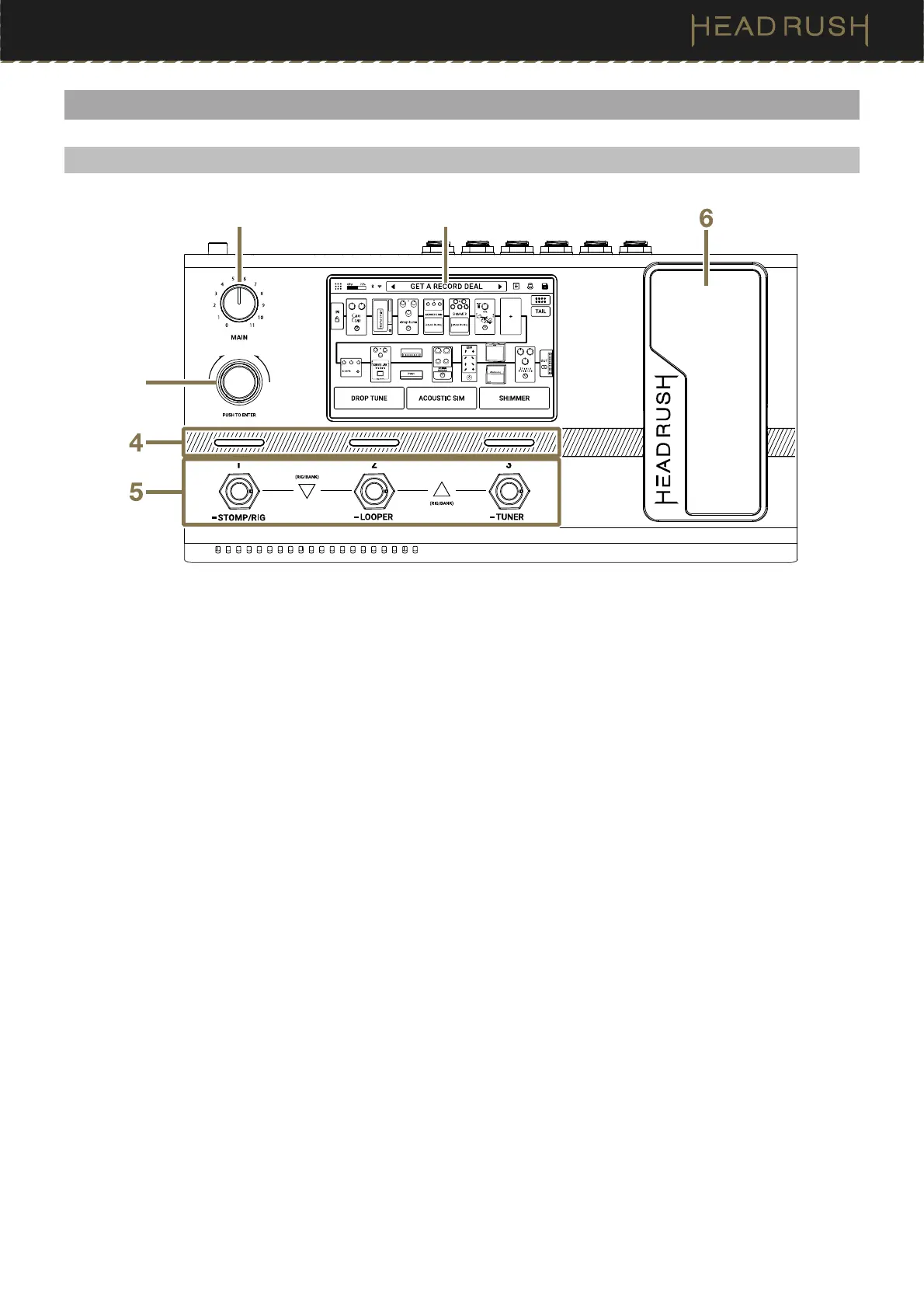
1. Display
This full-color multi-touch display shows information relevant to Flex Prime’s current operation. Touch the
display (and use the hardware controls) to control the interface. See (4.1) Main Screen to learn how it works.
2. Main
Turn this knob to adjust the level of the Main and Phones Outputs.
3. Encoder
Turn this encoder to scroll through the available menu options or adjust the parameter values of the selected
field in the display. Push the encoder to confirm your selection.
4. Footswitch Indicators
These lights indicate whether the block, rig, or scene assigned to each footswitch is on (brightly lit) or off (dimly
lit).
5. Footswitches
Press these footswitches to activate or deactivate the assigned block or scene, or to load the assigned rig.
Press and hold these footswitches to change footswitch mode (1), open the Looper (2), and open the Tuner (3).
See (4.5) Footswitch Modes for more information.
6. Expression Pedal
Use this pedal to adjust the assigned parameter/parameters.
Press the toe of the pedal down to switch between banks of assignments.
See the (4.6.3) Hardware Assign > Expression Pedal for more information.
3



 To Next Page