8
(4.0) Operation
This chapter describes Flex Prime’s functions.
(4.1) Main Screen
(4.1.1) Overview
(4.1.2) Basic Operations
Important: The sequence of blocks in your signal chain is not necessarily reflected in the footswitches. You can
freely assign blocks to available footswitches without changing your signal chain at all—and vice versa. See (4.6)
Hardware Assign to learn about this.
To assign a block (amp, cab, impulse response, effect, or clone) to an empty slot, tap it
() and then use the list that appears. See (4.3.1) Rigs > Creating a New Rig to learn
about this.
To rearrange the blocks in your signal chain, tap and drag a block to another slot or
between two other blocks (the blocks after that position will shift one slot further down
the signal chain).
To activate or deactivate a block, press the footswitch assigned to it, or tap the block
and then tap the On/Off button that appears in the top right corner.
To switch an amp and/or cab between a dual and single configuration, tap the block
and then tap the X2 button that appears in the top right corner. See (4.1.4) Amp/Cab
Doubling to learn about this.
To show a block’s settings screen, double-tap it.
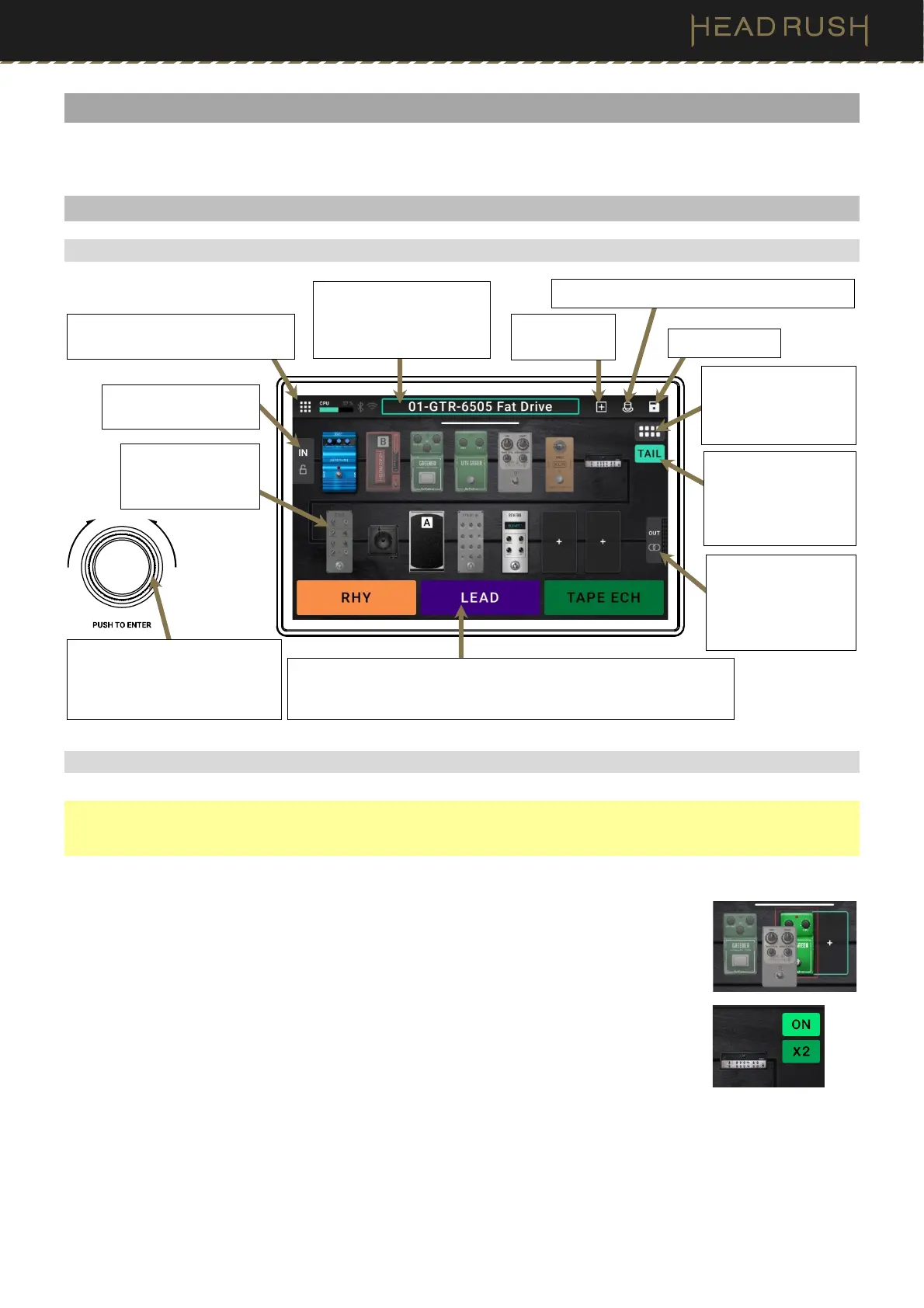
Tap and drag this bar
downward to view the Rig
List screen. Double-tap to
rename the ri
.
Turn encoder to move through
selectable items onscreen or to
adjust parameters. Press
encoder as an Enter command.
Tap to view the Menu and access
more features and settings.
Tap to save rig.
These three blocks show the current function of the three footswitches.
Tap its footswitch to activate or deactivate it.
Hold footswitch 1 (STOMP/RIG) to chan
e the footswitch mode.
This button enables or
disables reverb and
delay tails when
switching to another
rig.
This button toggles
between the different
signal routing options
for a rig.
Tap to create
a new rig.
Tap to open the (4.6) Hardware Assign page.
Double-tap to view the
Input Settings page.
Double-tap a block
to view its Detailed
Settings screen.
Double tap to view
the Output Settings
page. You can also
use the meter to view
the rig’s output level.



 To Next Page