50
(4.18) Global Settings
Use the global settings to configure Flex Prime’s overall operation.
To show the global settings, tap the Menu icon in the upper-right corner of the screen, and then
tap the Global Settings icon.
To switch through each tab of the global settings, tap the tabs along the left edge of the screen.
(4.18.1) General
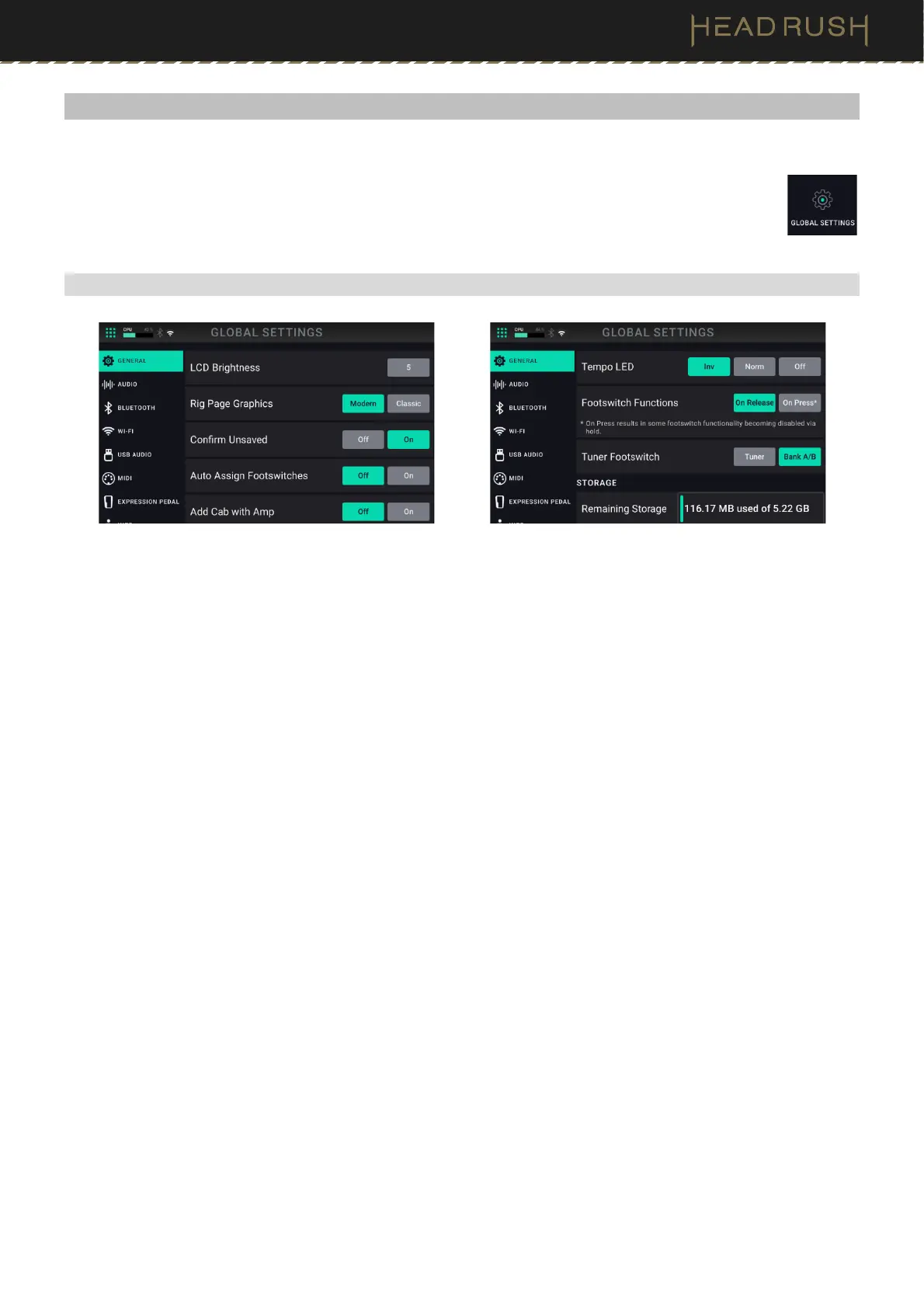
LCD Brightness: This setting determines the brightness of the main display. Tap this field, turn the main encoder
to select 1 (dim) through 5 (bright), and then press the encoder.
Rig Page Graphics: Choose Modern if you would like the main screen to feature realistic looking graphics of the
gear being emulated. Choose Classic if you would like the main screen to feature less detailed graphics.
Confirm Unsaved: This setting determines whether you will see a confirmation message if you change the rig while
there are unsaved changes on the current one. Tap On to enable these messages or Off to disable them.
Auto Assign Footswitches: This setting determines how blocks are assigned to the switches. Tap On if you want
blocks to be automatically assigned to the next available switch when you load them. Tap Off if you want blocks to
load without being assigned to a switch; you will have to assign them manually in the Hardware Assign screen.
Add Cab with Amp: This setting determines whether or not a specific cab and microphone are associated with the
amp when loaded. When this is set to Off, any cab and microphone used in the current rig will be completely
independent of the amp you select. When this is set to On, a specific cab and microphone combination will be
used if you change the amp’s Preset setting or if you load a new amp to the rig. You can change the cab and
microphone manually afterward by adjusting the parameters of the cab model.
Tempo LED: This setting determines whether the Tap Tempo footswitch’s LED blinks on the beat (Norm), on the
off beat (Inv), or whether the LED is turned off completely (Off).
Footswitch Function: This setting determines whether the footswitch action is trigger On Release or On Press of
the footswitch. When set to On Press, some footswitch functionality will be disabled via hold instead of press.
Tuner Footswitch: This setting changes the hold function of footswitch 3. When set to Tuner, holding this
footswitch will open the Tuner. When set to Bank A/B, holding this footswitch will toggle between the two banks
of three footswitches for the rig.
Remaining Storage: This meter shows how much storage space is available in Flex Prime’s internal memory. If
you want to increase the available memory, you can back up files to your computer or USB storage device and
then delete the files from Flex Prime using the File Browser or the USB Transfer feature.



 To Next Page