40
(4.13) Looper
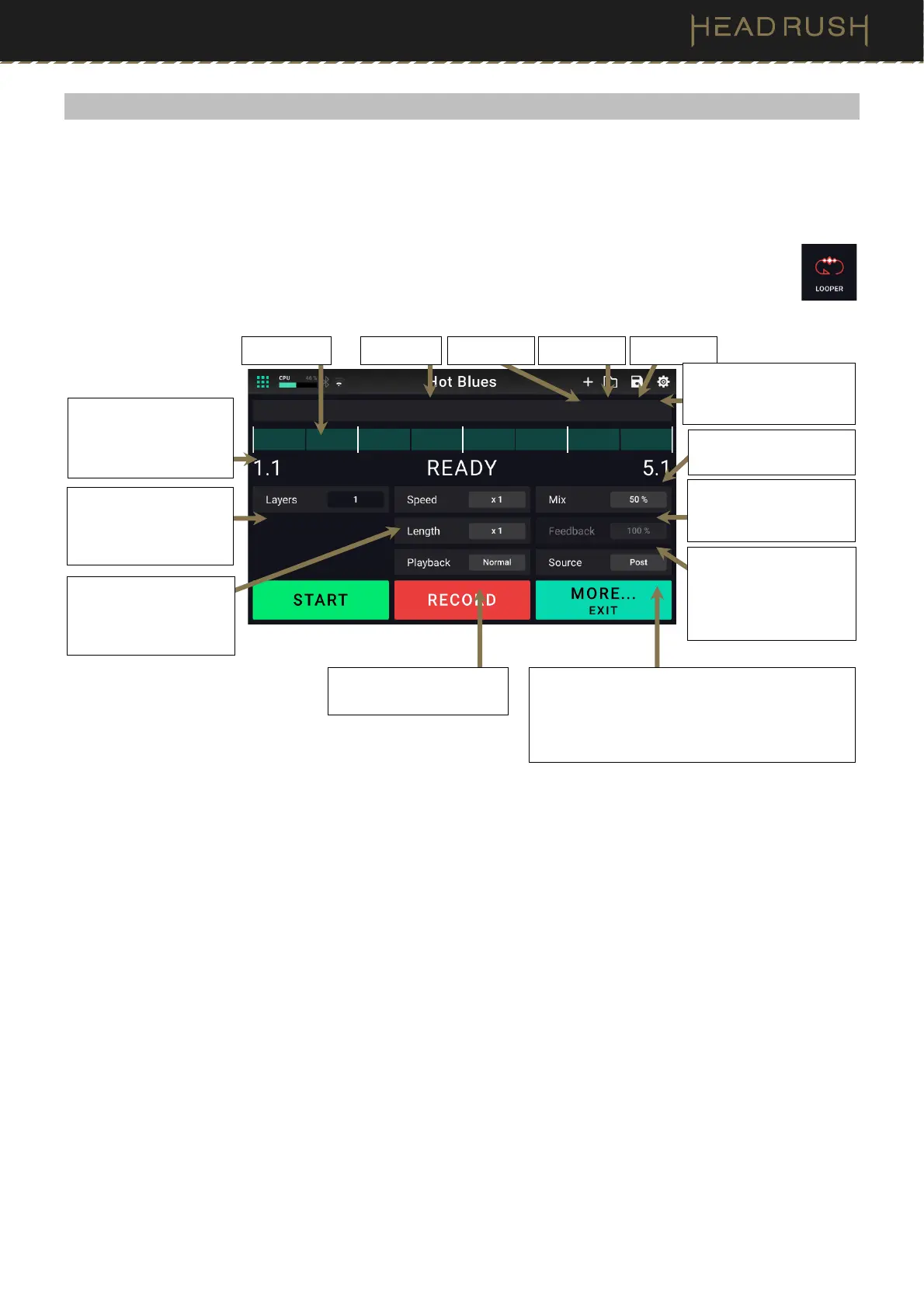
Flex Prime has a built-in looper that you can use to layer your performances. While the looper’s operation is shown
in the display, you can control most of it conveniently with the footswitches.
Each loop can be up to 5 minutes long, with a maximum of 20 minutes of overdubbed audio at a time across a
maximum of 50 layers.
To access the Looper, press and hold footswitch 2 for over one second. Alternatively, tap the Menu
icon in the top left of the Main screen, and then tap the Looper icon.
To record the first layer of a loop, press the Record footswitch. Recording will begin immediately, and the
footswitch indicator will light red. Press the Record footswitch again to stop recording and start loop playback.
The footswitch is now called Overdub and the footswitch indicator is yellow.
To record additional layers onto the loop (overdub), press the Overdub footswitch. Overdubbing will begin
immediately, and the footswitch indicator will light red. Press the Overdub footswitch again to stop overdubbing
and continue playback.
To erase the top-most (last-added) layer of the loop, press footswitch 3 (or tap More…), and then press
footswitch 2 (or tap Peel). The top-most layer of the loop will be erased immediately.
To recall the last layer removed, press footswitch 3 (or tap More…), and then hold footswitch 2 (or tap and hold
Unpeel).
To double the length of the loop, press footswitch 3 (or tap More…), and then press footswitch 1 (or tap
X2
Length).
To halve the length of the loop, press footswitch 3 (or tap More…), and then hold footswitch 1 (or tap and hold
1/2 Length). The halving process is non-destructive, so you can restore your original loop and its content by
pressing 2X Loop.
The loop’s relative length is shown in the Length field.
Rig name Loop name
Load Loop Save Loop
New Loop
This controls how much
of the looper’s signal
you hear in the outputs.
This controls how much
of the looper’s signal is
routed back through it
when recording another
layer.
This indicates the length
of the current loop.
Tap here to access
(4.13.1) Additional
Looper Settings.
This meter indicates
your current location in
the loop during
recording or playback.
This indicates the
current speed of the
loop as a multiple or
fraction of the original.
This indicates the direction
of playback.
This indicates whether the looper is located
before (Pre) or after (Post) your signal chain. For
example, moving the looper to the Pre position
enables you to edit your guitar rig without having
to play the same riff over and over again.
This indicates how many
layers are playing in the
current loop, including
the original.



 To Next Page