64
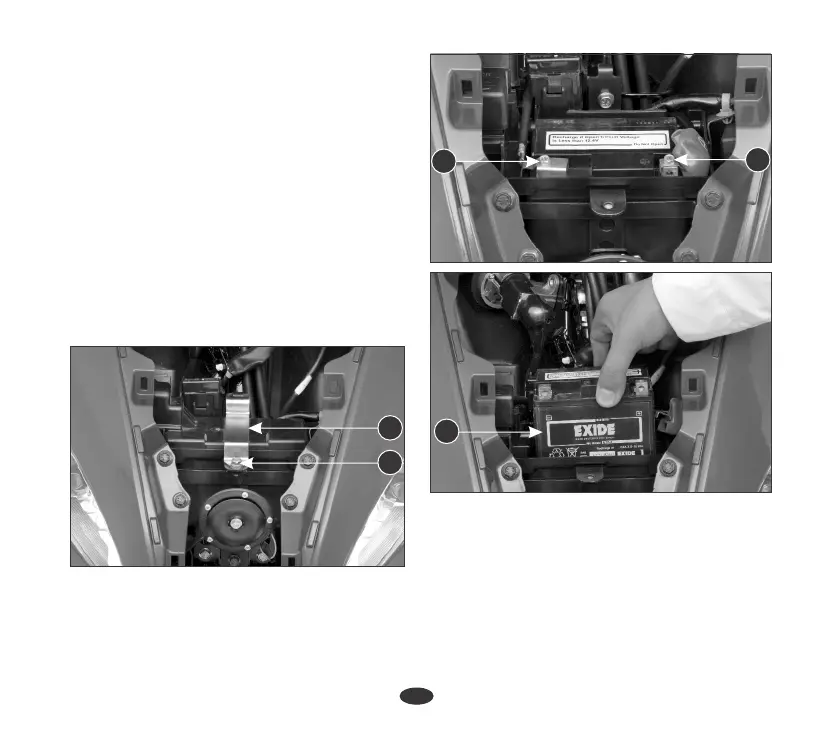
(3) Negative (-) Terminal (4) Positive (+)
Terminal (5) Battery
3. Always ensure the battery is fully
charged before installation.
1. Remove the front center cover (page 35).
2. If the battery is expected to be stored
for more then two months, ensure to
fully charge the battery once in a
month.
4. Ensure the battery leads are properly
connected to the battery terminals
during installation.
Battery Removal
2. Remove the battery band (1) by
removing the bolt (2).
3. Disconnect the negative (-) terminal lead
(3) from the battery first, then disconnect
the positive (+) terminal lead (4).
4. Remove the battery (5).
Battery installation
1. Reinstall in the reverse order of removal. Be
sure to connect the positive (+) terminal
first, then the negative (-) terminal.
2. Check the bolts and other fasteners are
secure.
(1) Battery Band (2) Bolt
2
1
3
4
5












 To Next Page