5) Select the xed area that needs to be adjusted and drag the mouse to adjust its posion.
6) Click Stop Drawing.
4. Select Area No. and ROI Level and enter Area Name.
Note
The higher the ROI level is, the clearer the image of the detected area is.
5. Click Save.
6.
Oponal: Select other area codes and repeat the steps above if you need to draw mulple xed
areas.
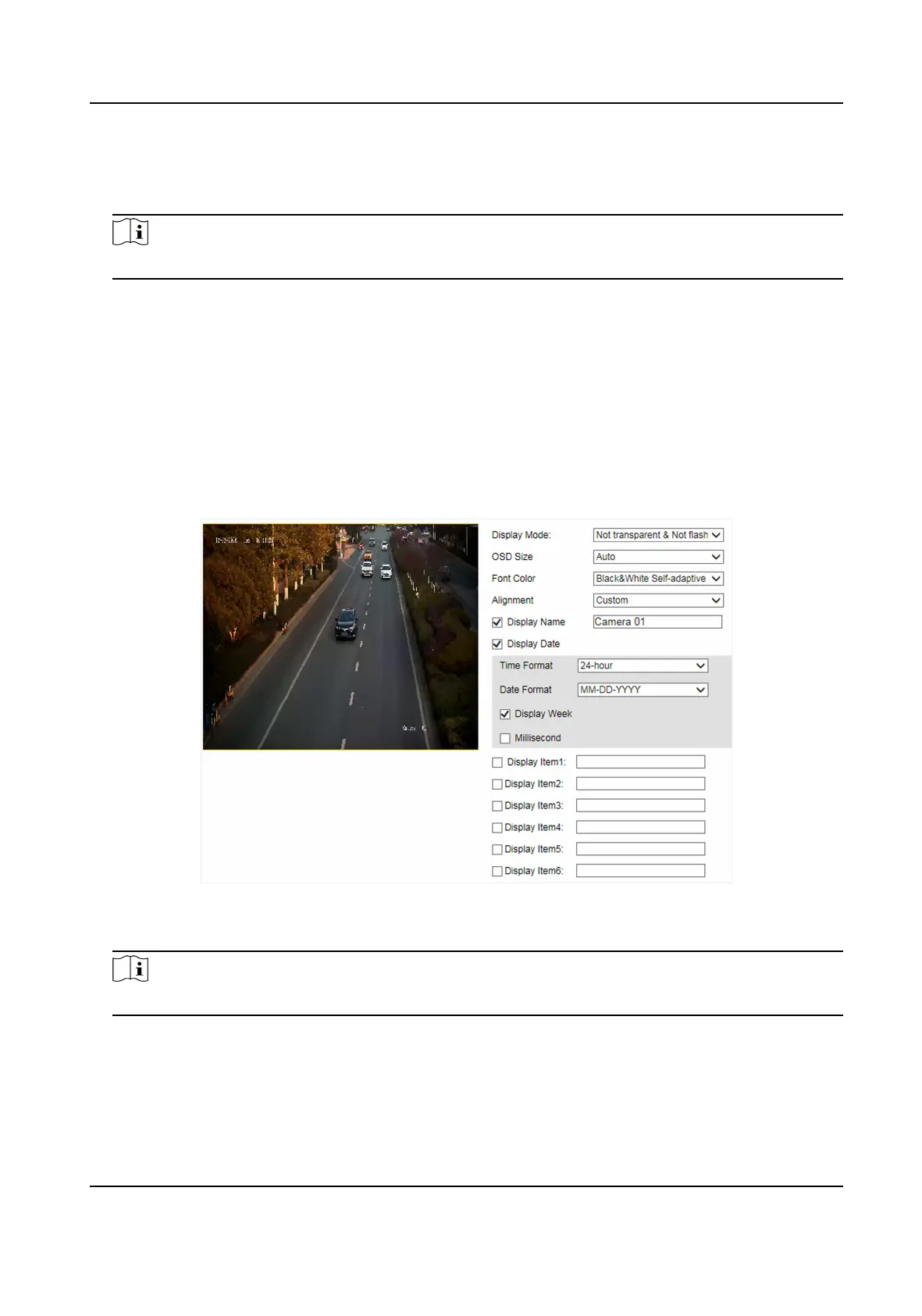
5.5 Set OSD
You can customize OSD informaon on the live view.
Steps
1. Go to
Conguraon → Device Conguraon → Text Overlay → OSD Sengs .
Figure 5-4 Set OSD
2.
Set the display mode, size, color, etc.
Note
The supported funcons vary with dierent models. The actual device prevails.
3. Set the display content.
1) Check Display Name and enter the name.
2) Check Display Date, and set the
me and date format.
3) Check Display Week or Millisecond according to your needs.
Network Trac Camera (for Trac Flow Camera) User Manual
25


 To Next Page
 Loading...










