29
Hills – ComNav User Manual V1.3 www.das.com.au
User PIN – disabling
How to: Disable a pin code from a specific user
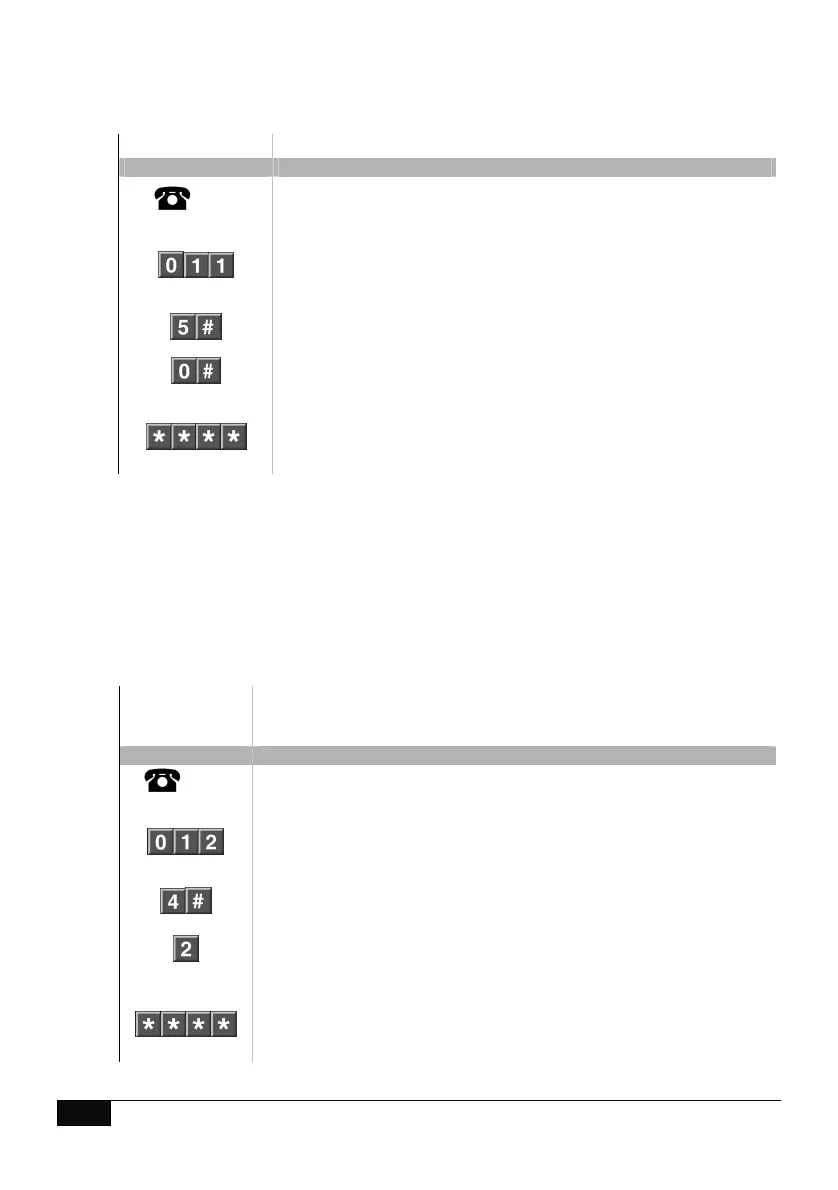
Step Example Disable the PIN code that is configured for user 5
1.
[PIN]
Call the ComNav via an offsite touch-tone phone to begin the
session.
2.
Press [0] for system configuration menu
Press [1] for user configuration menu
Press [1] for user PIN configuration
3.
Select a user number followed by # (EG: User 5)
4.
Press [0] followed by # to disable user
5.
1
st
star, moves back to user configuration menu
2
nd
star, moves back to system configuration menu
3
rd
star, moves back to main menu.
4
th
star, disconnects session
User Area – configuration
How to: Remove area control from a specific user
Step Example
Remove control of area 2 from user 4.
In this example, it is presumed a total of two areas only exist and user 4
has control of both areas..
1.
[PIN]
Call the ComNav via an offsite touch-tone phone to begin the session.
2.
Press [0] for system configuration menu
Press [1] for user configuration menu
Press [2] for user area configuration
3.
Select a user number followed by #. (EG user 4)
4.
Press the area number to change selection, (EG: deselects area 2)
(area / areas can be toggled on / off)
5.
1
st
star, moves back to user configuration menu
2
nd
star, moves back to system configuration menu
3
rd
star, moves back to main menu.
4
th
star, disconnects session



 To Next Page