EasyManua.ls Logo

Hitachi DIGITAL 8 VM-D965LE - Chroma Gain Adjustment

Hitachi DIGITAL 8 VM-D965LE
115 pages
To Next Page IconTo Next Page
To Previous Page IconTo Previous Page
Loading...
SS
GS
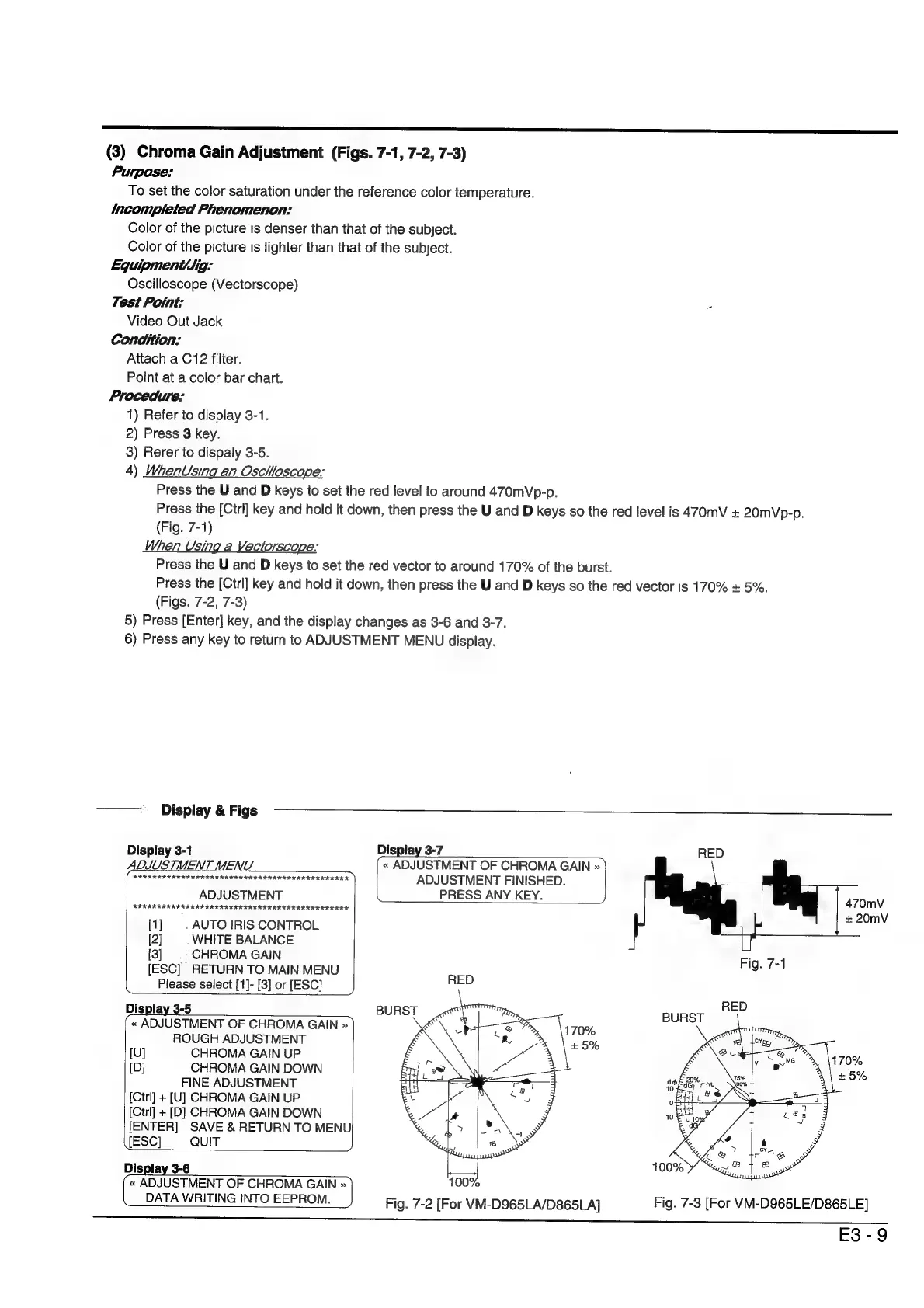
(3)
Chroma
Gain
Adjustment
(Figs.
7-1,
7-2,
7-3)
Purpose:
To
set
the
color
saturation
under
the
reference
color
temperature.
Incompleted
Phenomenon:
Color
of
the
picture
is
denser
than
that
of
the
subject.
Color
of
the
picture
Is
lighter
than
that
of
the
subject.
Equipment/Jig:
Oscilloscope
(Vectorscope)
Test
Point:
Video
Out
Jack
Condition:
Attach
a
C12
filter.
Point
at
a
color
bar
chart.
Procedure:
1)
Refer
to
display
3-1.
2)
Press
3
key.
3)
Rerer
to
dispaly
3-5.
4)
WhenUsing
an
Oscilloscope:
Press
the
U
and
D
keys
to
set
the
red
level
to
around
470mVp-p.
Press
the
[Ctrl]
key
and
hold
it
down,
then
press
the
U
and
D
keys
so
the
red
level
is
470mV
+
20mVp-p.
(Fig.
7-1)
When
Using
a
Vectorscope:
Press
the
U
and
D
keys
to
set
the
red
vector
to
around
170%
of
the
burst.
Press
the
[Ctrl]
key
and
hold
it
down,
then
press
the
U
and
D
keys
so
the
red
vector
is
170%
+
5%.
(Figs.
7-2,
7-3)
5)
Press
[Enter]
key,
and
the
display
changes
as
3-6
and
3-7.
6)
Press
any
key
to
return
to
ADJUSTMENT
MENU
display.
~——
_
Display
&
Figs
Display
3-1
Display
3-7
ADJUSTMENT
MENU
«
ADJUSTMENT
OF
CHROMA
GAIN
»
(GEODESIC
RIOD
III
ISI
IOI
IOI
Ie
ADJUSTMENT
FINISHED.
ADJUSTMENT
PRESS
ANY
KEY.
RIK
RK
RARER
ER
IRIN
IRE
III
III
IRIS
I
IRIS
IIA.
[1]
|
AUTO
IRIS
CONTROL
[2]
|
WHITE
BALANCE
[3]
|
CHROMA
GAIN
RED
+
20mV
[ESC]
RETURN
TO
MAIN
MENU
RED
pace
kK
Please
select
[1]-
[3]
or
[ESC]
Display
3-5
«
ADJUSTMENT
OF
CHROMA
GAIN
»
ROUGH
ADJUSTMENT
[U]
CHROMA
GAIN
UP
[D]
CHROMA
GAIN
DOWN
FINE
ADJUSTMENT
[Ctrl]
+
[U]
CHROMA
GAIN
UP
[Ctrl]
+
[D]
CHROMA
GAIN
DOWN
[ENTER]
SAVE
&
RETURN
TO
MENU
[ESC]
QUIT
Display
3-6
«
ADJUSTMENT
OF
CHROMA
GAIN
)
1007
DATA
WRITING
INTO
EEPROM.
Fig.
7-2
[For
VM-D965LA/D865LA]
Fig.
7-3
[For
VM-D965LE/D865LE]
E3-9

Table of Contents

Related product manuals