26
chapter 1_Before You Begin
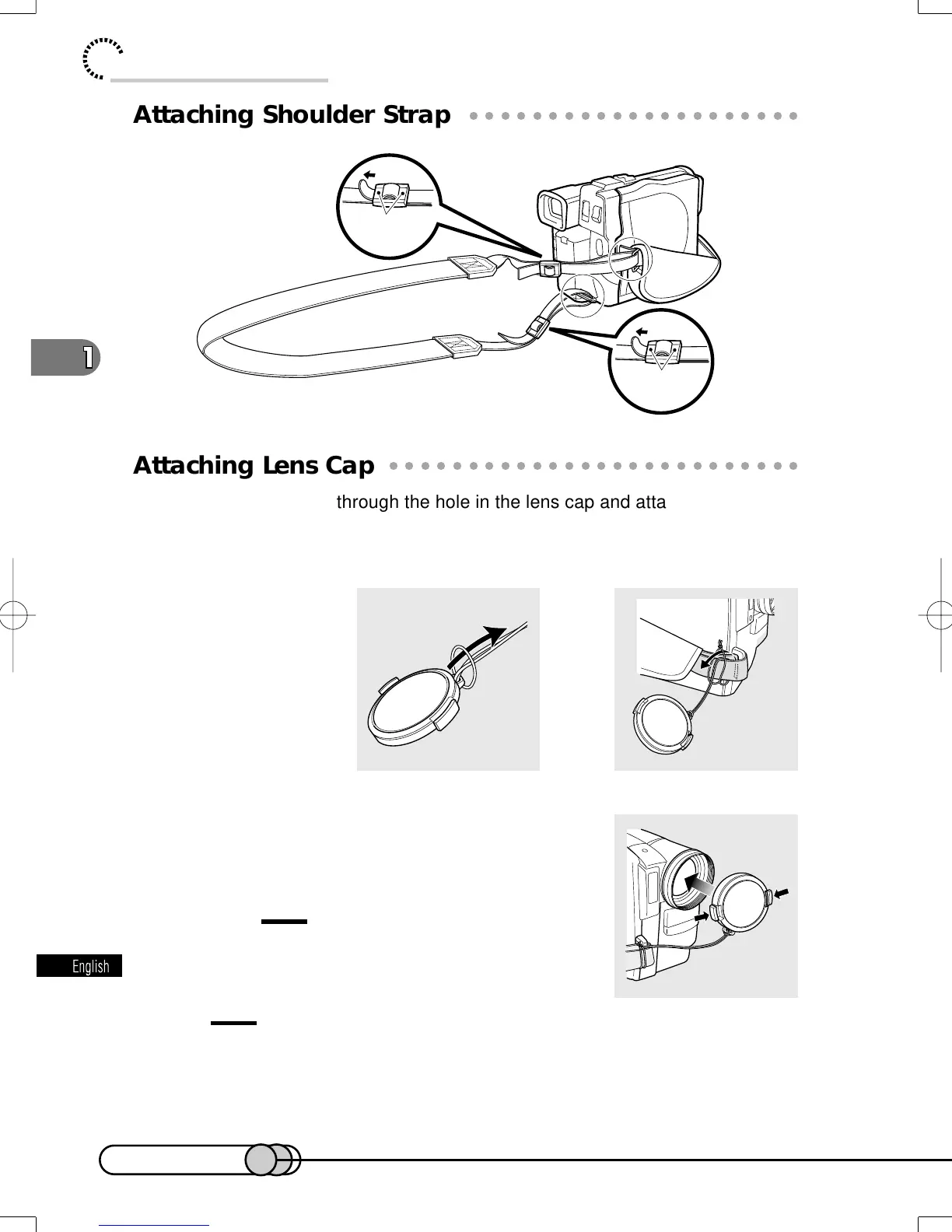
Be sure
to pass through
the 2 slots.
Be sure
to pass through
the 2 slots.
○○○○○○○○○○○○○○○○○○○○○○○○○○○○○○○○○○○○○○○○○○
Attaching Shoulder Strap
○○○○○○○○○○○○○○○○○○○○○○○○○○○○○○○○○○○○○○○○○○
Attaching Lens Cap
Pass the provided string through the hole in the lens cap and attach it to the hand
strap of DVD camera/recorder.
1. Use the string to attach the cap to the DVD camera/recorder.
2. Push the both sides of cap inward and at-
tach it over the lens.
Caution:
• Always keep the lens cap on when not using the
DVD camera/recorder, to protect the lens.
Tip:
•
When recording, attach the lens cap to the hand strap by hooking the tab
inside the cap onto strap for comfortable shooting.
E-P14-36 01.1.29, 1:45 PMPage 26 AdobePageMaker6.5J/PPC















 To Next Page