74
chapter 3_Recording
2. Bring the DVD camera/recorder close to the subject and start recording.
The subject will be focused automatically. To change the magnitude of subject
image, adjust the distance from the subject.
Tips:
•
Zoom can be used, but the subject may not be focused, depending on the
distance to the subject.
•
The amount of light tends to be insufficient during macro recording: If the
subject image is too dark, use additional lighting.
○○○○○○○○○○○○○○○○○○○○○○○○○○○○○○○○○○○○○○○○○○
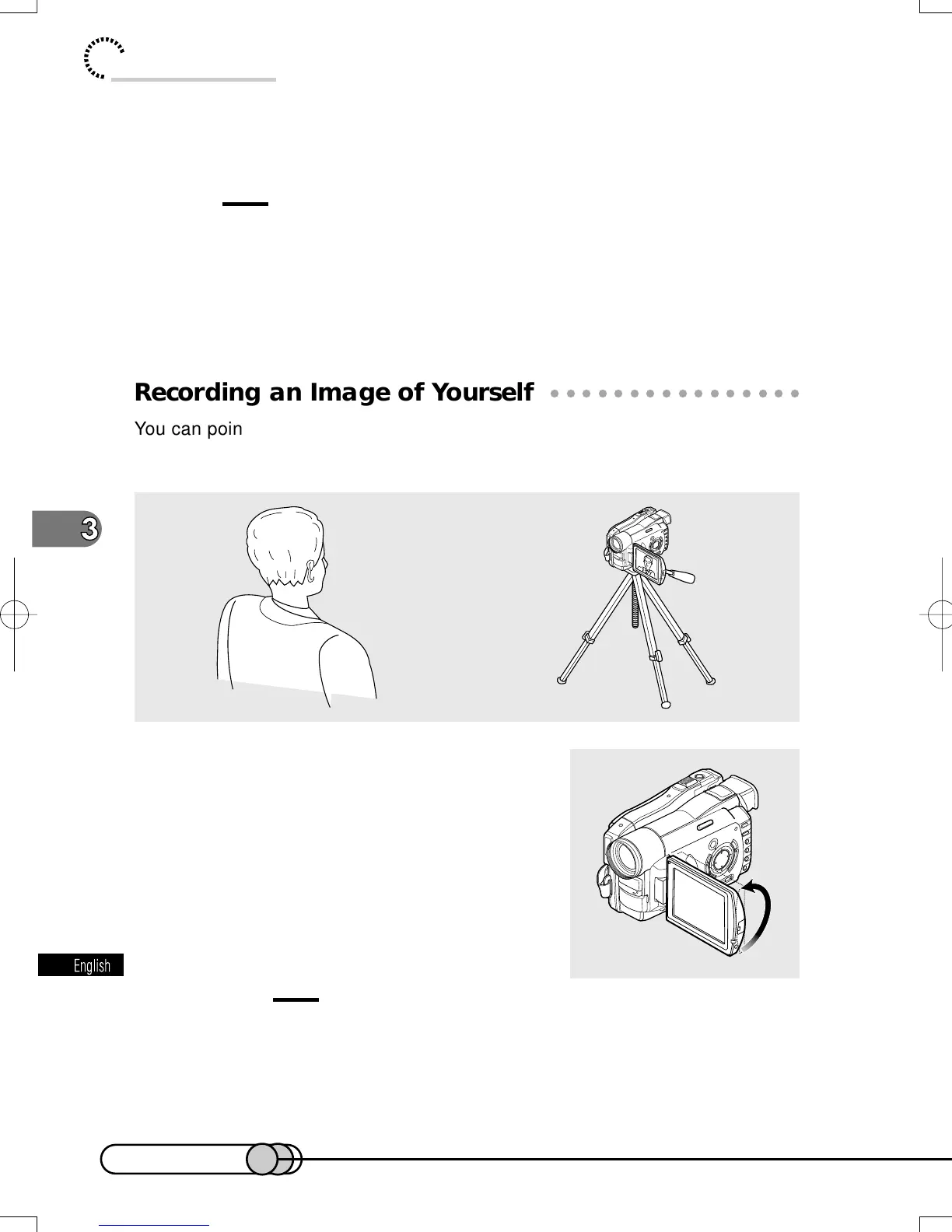
Recording an Image of Yourself
You can point the DVD camera/recorder at yourself, and record the image while
monitoring it on the LCD screen. Use the infrared remote control to operate the
DVD camera/recorder.
1. Open the LCD monitor approximately
90 ° and turn it so the monitor screen
faces in the same direction as the lens.
2. Press the REC button on the DVD cam-
era/recorder or remote control to start
recording.
(See the description on self-timer on p. 86.)
Cautions:
• Do not record for a prolonged time with the LCD monitor turned 180 ° in
close contact with the DVD camera/recorder body: Doing this could cause
the DVD camera/recorder and LCD monitor to become hot.
• When the LCD monitor is turned 180 °, no image will appear in the viewfinder.
E-P54-88 01.1.29, 3:05 PMPage 74 AdobePageMaker6.5J/PPC















 To Next Page