43
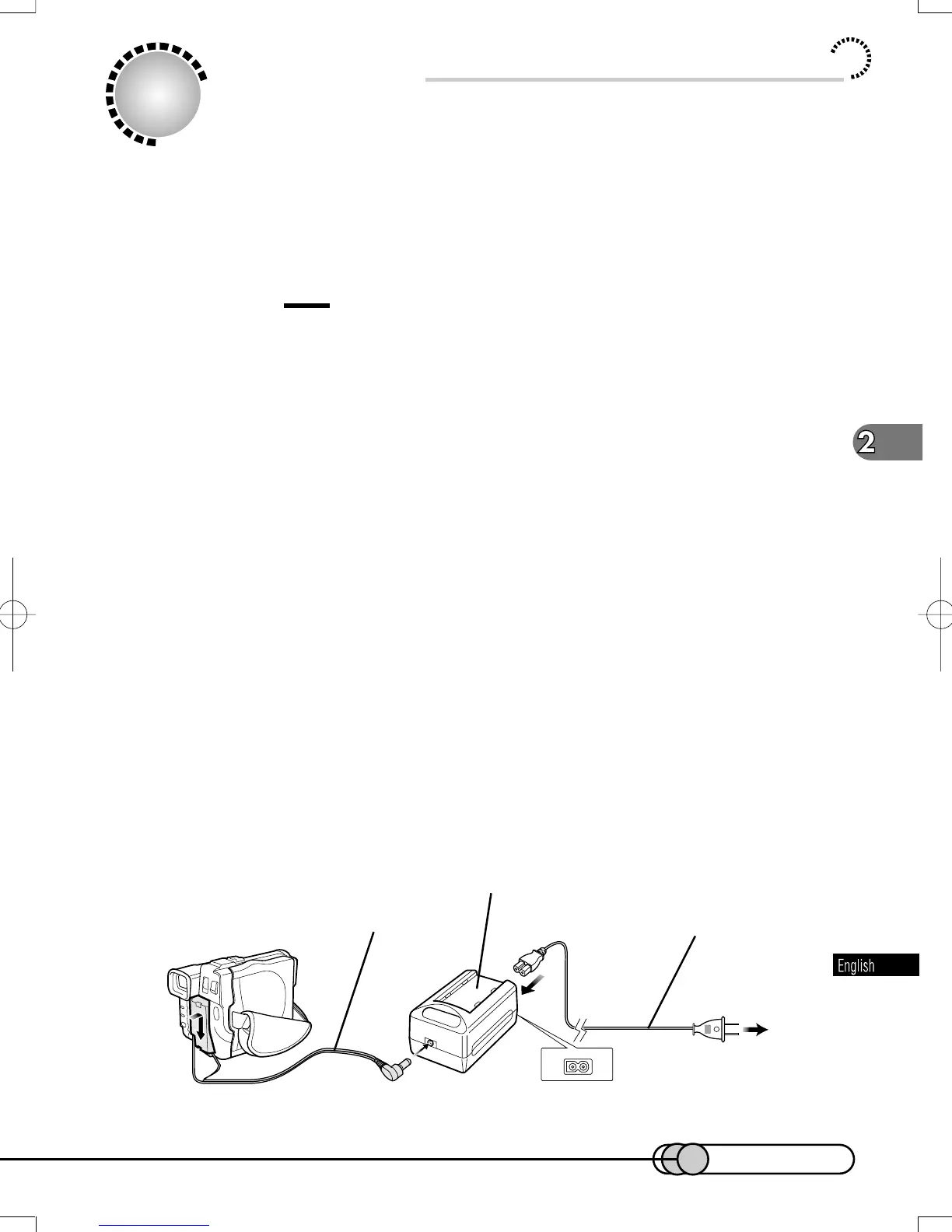
Using DVD Camera/recorder with AC
Adapter/Charger
Power the DVD camera/recorder from AC outlet when using it for a long time in-
doors, such as performing various settings on it, playing back recorded video, ed-
iting data files, transferring the data to your PC, etc.
Caution:
• Be sure to use the specified AC adapter/charger (DZ-ACP1) to power the
DVD camera/recorder. Using other AC adapters could cause electric shock
or result in fire.
1. Attach the terminal device of provided DC power cable to the bat-
tery attachment platform on DVD camera/recorder.
Align the top of terminal device with the top of battery attachment platform, and,
while fitting it onto the DVD camera/recorder, slide it downward until a click is
heard.
2. Insert the other small plug of DC power cable into DC OUT jack
of AC adapter/charger.
3. Insert the power cable plug into the AC input jack (AC IN) of AC
adapter/charger.
4. Connect the plug on the other end of power cable to AC outlet.
The POWER indicator on AC adapter/charger will light.
AC adapter/charger
Useing DVD Camera/recorder with AC Adapter/Charger
1
2
3
4
DC power cable Power cable
To AC outlet
E-P37-53 01.1.29, 1:50 PMPage 43 AdobePageMaker6.5J/PPC















 To Next Page