85
Recording Stills
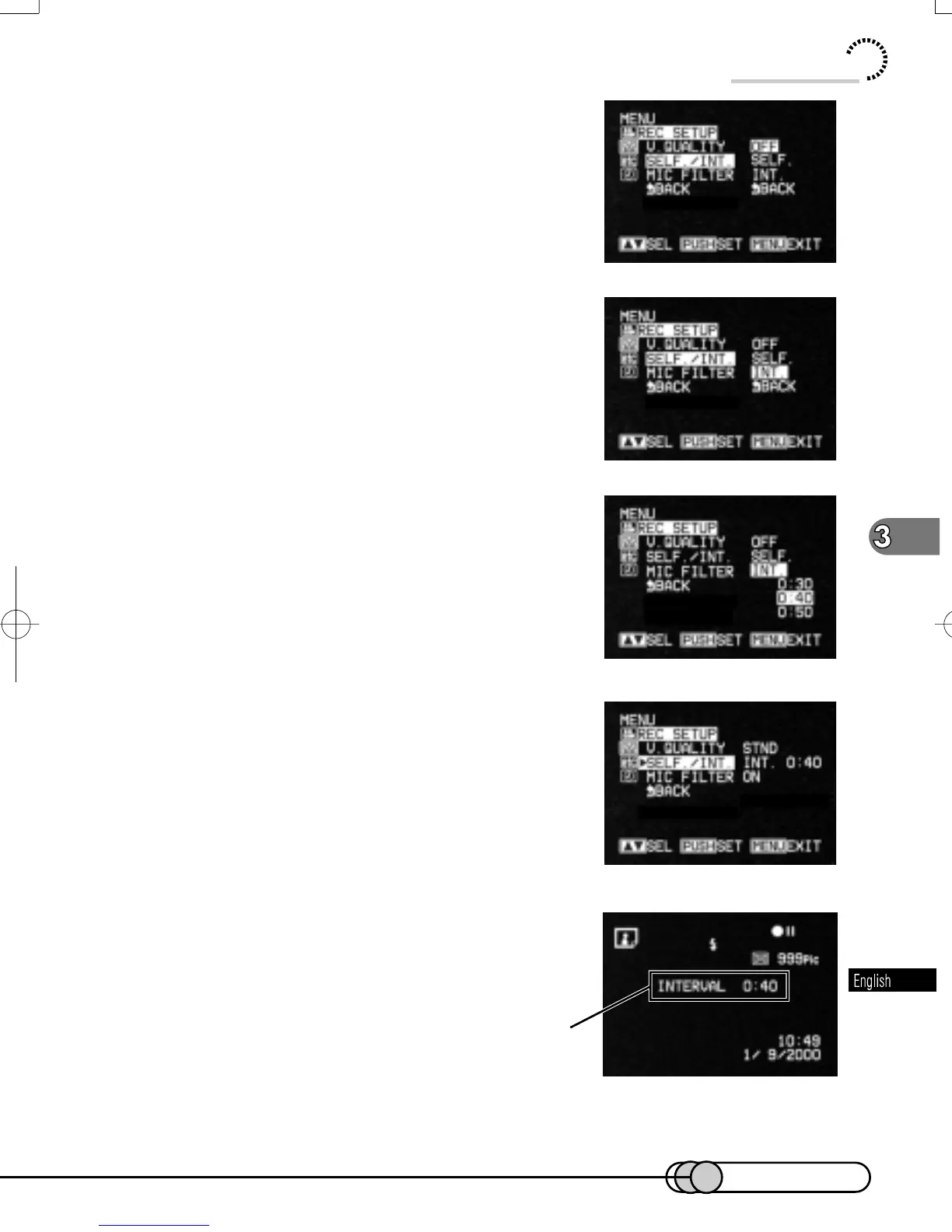
2. Use the Select dial to choose “REC
SETUP” and then “SELF. /INT.”.
Options will be next to SELF. /INT. : “OFF” is
being highlighted.
3. Use the Select dial to choose “INT.”,
and then press the Select dial.
You can now set the recording interval.
4. Turn the Select dial to select the re-
cording interval, and then press the Se-
lect dial.
The menu screen for setting record mode will be
restored, and “INT. 0:40” has been specified for
“SELF. /INT. ”.
5. Press the MENU button to switch off the
menu screen.
You can also check that interval recording has
been set by reviewing the on-screen information.
6. Press the PHOTO button: Interval recording will start.
Stills will be recorded in succession at the specified interval.
Interval recording
E-P54-88 01.1.29, 3:17 PMPage 85 AdobePageMaker6.5J/PPC















 To Next Page