2–4 Identifying Hardware Components
Hitachi Simple Modular Storage 100 User’s Guide
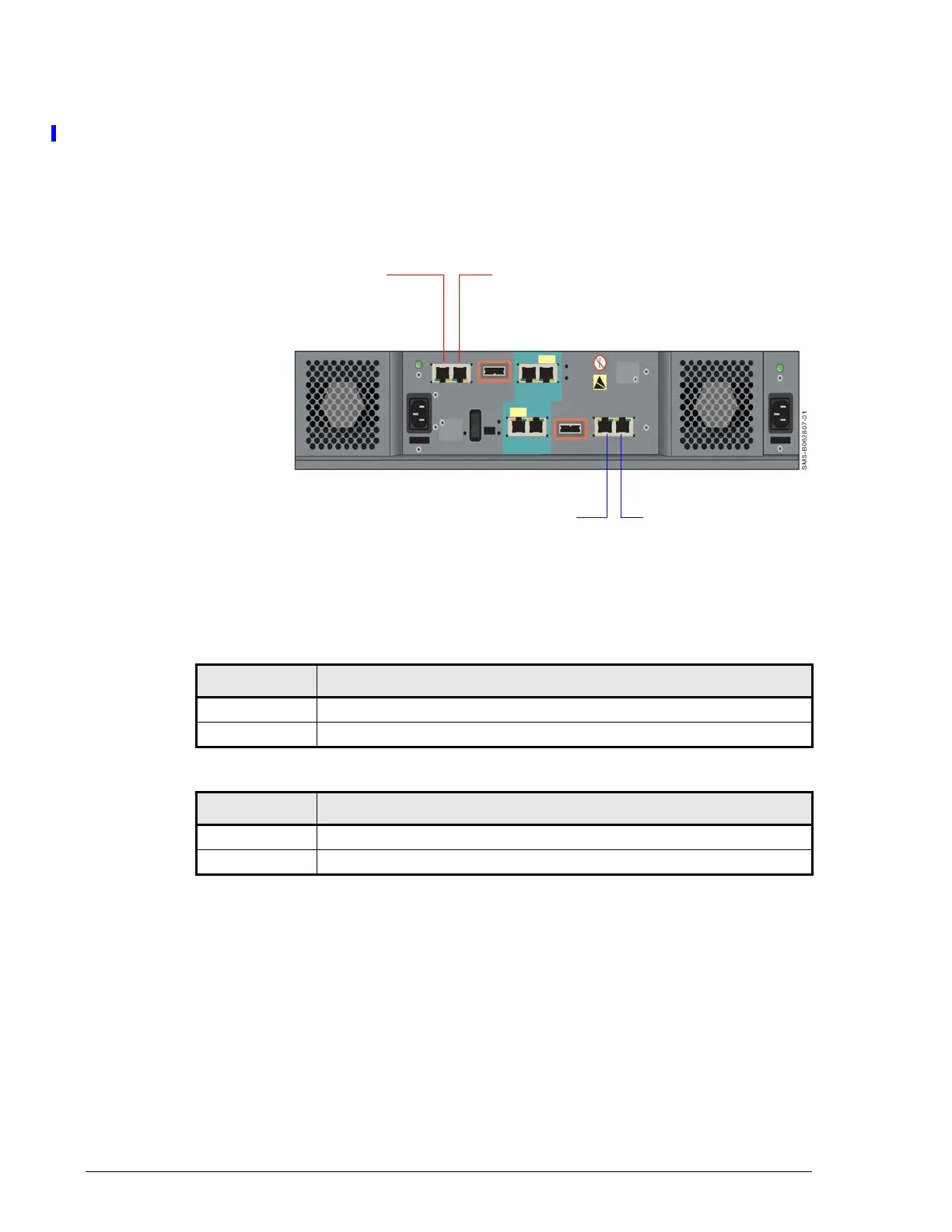
iSCSI Gigabit Ethernet Data Ports (PORT A and PORT B)
Each Hitachi Simple Modular Storage 100 controller has two standard RJ-45
Ethernet iSCSI data ports labeled PORT A and PORT B. Each iSCSI data
port provides a 1-Gigabit Ethernet interface for direct or switched
connections to IP hosts that require IP access to storage. Each iSCSI data
port accepts a straight-through or cross-over Ethernet cable, and
automatically adjusts to the type of cable used.
Figure 2-3: Location of iSCSI Data Ports on the Back Panel
Each iSCSI data port has an amber port activity LED on the left side of the
port and a green link LED on the right side.
Table 2-5: Port Activity LED
LED Status Description
OFF Data is not being sent or received on the port.
ON Data is being sent or received on the port.
Table 2-6: Link LED
LED Status Description
OFF Link status error.
ON Link status is normal.
iSCSI Data Port A
iSCSI Data Port B
CTL1
CTL0
iSCSI Data Port A iSCSI Data Port B



 To Next Page