Identifying Hardware Components 2–7
Hitachi Simple Modular Storage 100 User’s Guide
Power Supplies
Your Hitachi Simple Modular Storage 100 comes with two fully redundant
power supplies. If one power supply fails, the other one takes over to
compensate for the loss.
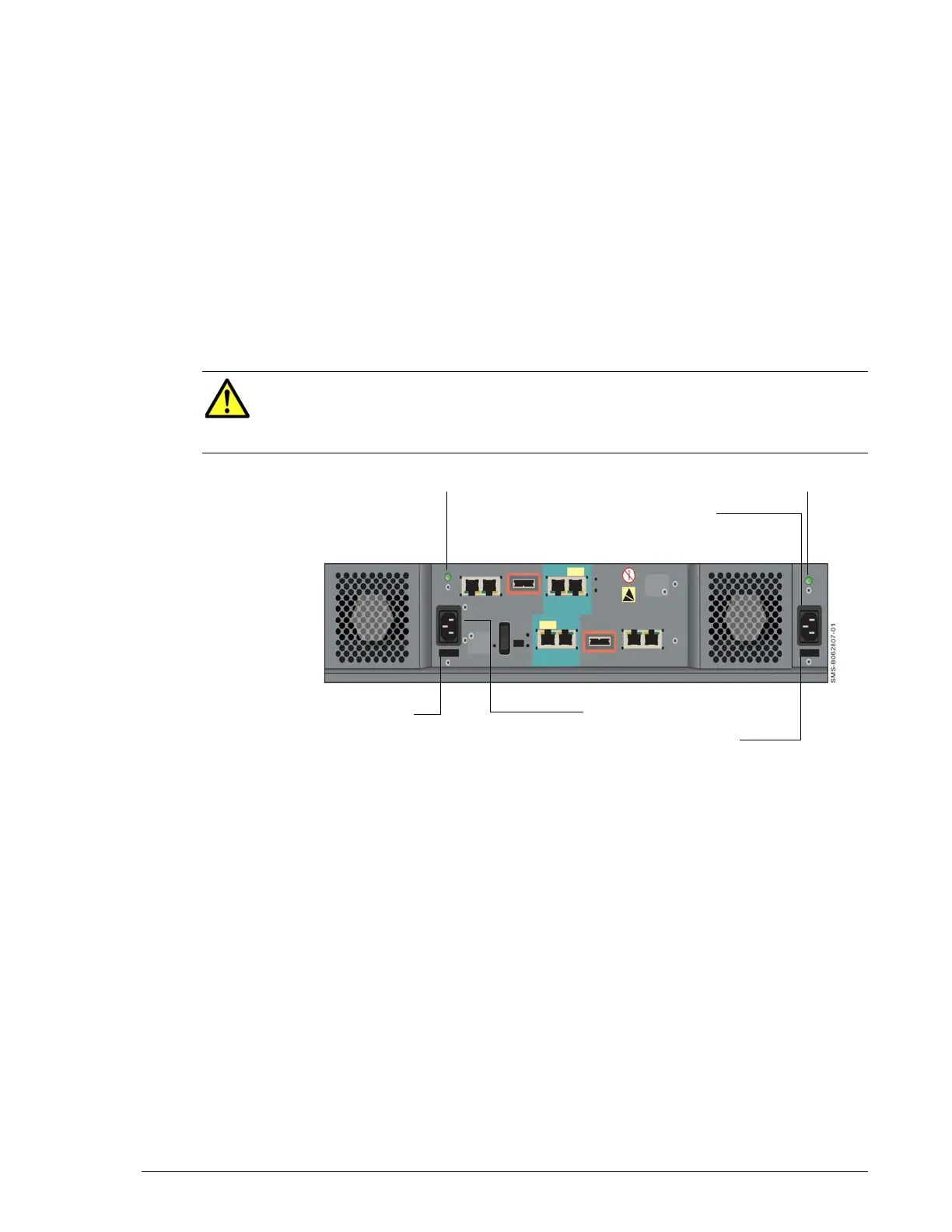
Each power supply has its own power receptacle that is accessed on the
back panel. Both receptacles must be connected to a working AC source
using the supplied power cable.
A green LED above each power receptacle blinks when the corresponding
power receptacle is connected to a working AC outlet, even if your Hitachi
Simple Modular Storage 100 is not powered on; otherwise, the LED is OFF.
Below each power receptacle is a holder you can use to secure the power
cable after connecting it to your Hitachi Simple Modular Storage 100.
•
•
Figure 2-7: Location of Power Receptacles, LEDs, and Cable Insets
When connecting
CAUTION!When connecting to an AC outlet, do not use an outlet
controlled by a wall switch. Otherwise, you will lose access to your
Hitachi Simple Modular Storage 100 if the wall switch is
inadvertently turned off.
Power LED Power LED
Power Receptacle
Power Receptacle
Power Cable Holder
Power Cable Holder



 To Next Page