2–6 Identifying Hardware Components
Hitachi Simple Modular Storage 100 User’s Guide
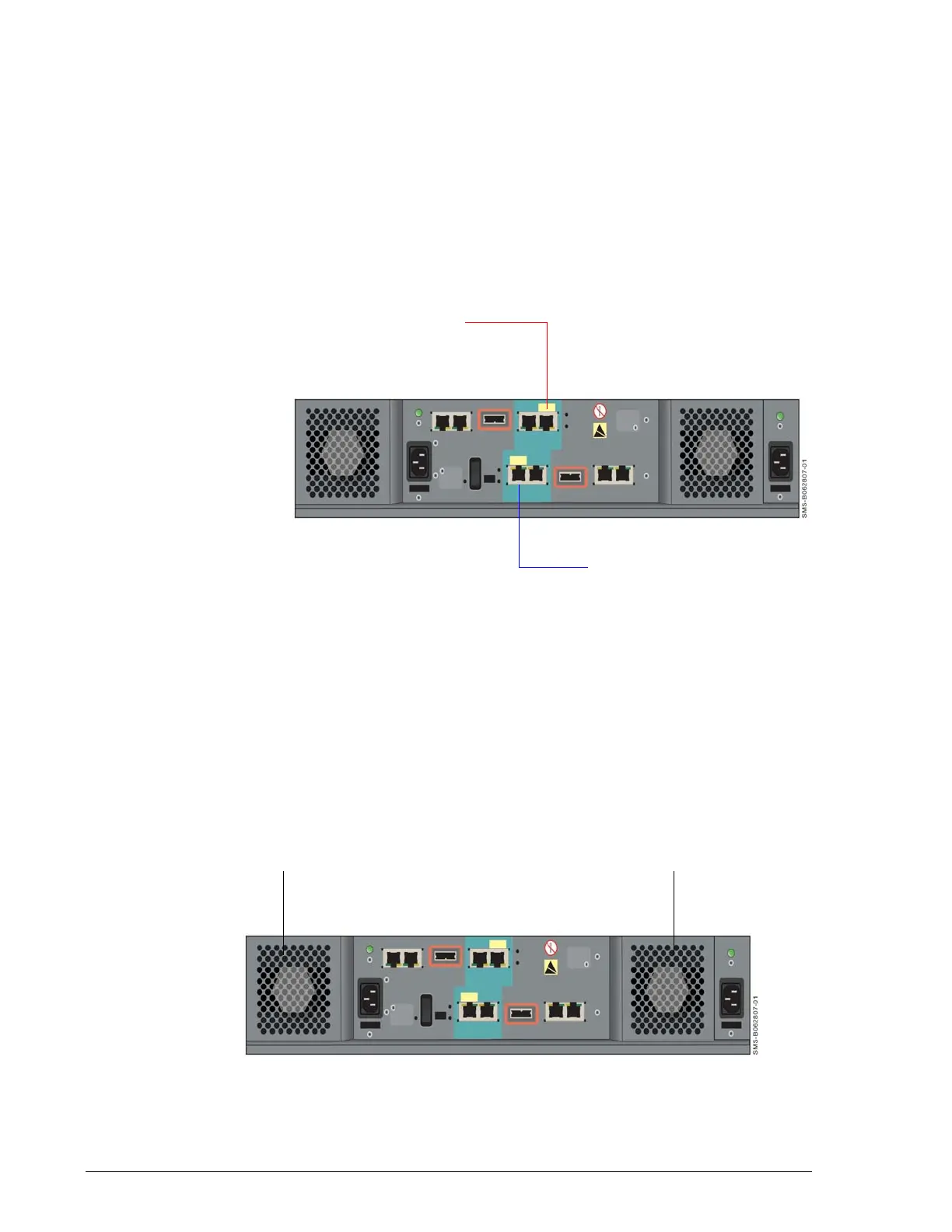
10/100 Ethernet Maintenance Ports (MAINTENANCE ONLY)
Each Hitachi Simple Modular Storage 100 controller has a 10/100 10/
100BaseT Ethernet maintenance port labeled MAINTENACE ONLY. These
ports are for performing troubleshooting procedures in the unlikely event
you encounter a problem with your Hitachi Simple Modular Storage 100. You
should not have to use these ports unless instructed to do so by an Hitachi
Customer Service Representative.
Each maintenance port has an amber port activity LED on the left side of
the port and a green link LED on the right side (see Table 2-5 on page 2-4
and Table 2-6 on page 2-4).
•
Figure 2-5: Location of Maintenance Ports on the Back Panel
•
Fans
The back panel has two fans that provide ventilation for your Hitachi Simple
Modular Storage 100. The fans pull air from the front and exhaust to the
back. When you install your Hitachi Simple Modular Storage 100, be sure
these fans are not blocked and that there is a free flow of air passing from
the front of your Hitachi Simple Modular Storage 100. The fans provide
redundant cooling. If one fan fails, the other fan runs at a higher speed to
compensate for the loss.
•
Figure 2-6: Location of Fans on the Back Panel
CTL1
CTL0
Maintenance Port
Maintenance Port
Fan Fan



 To Next Page