OPERATION OF THE SOFTWARE MENU
4.20
Imager Duo Operator’s Manual
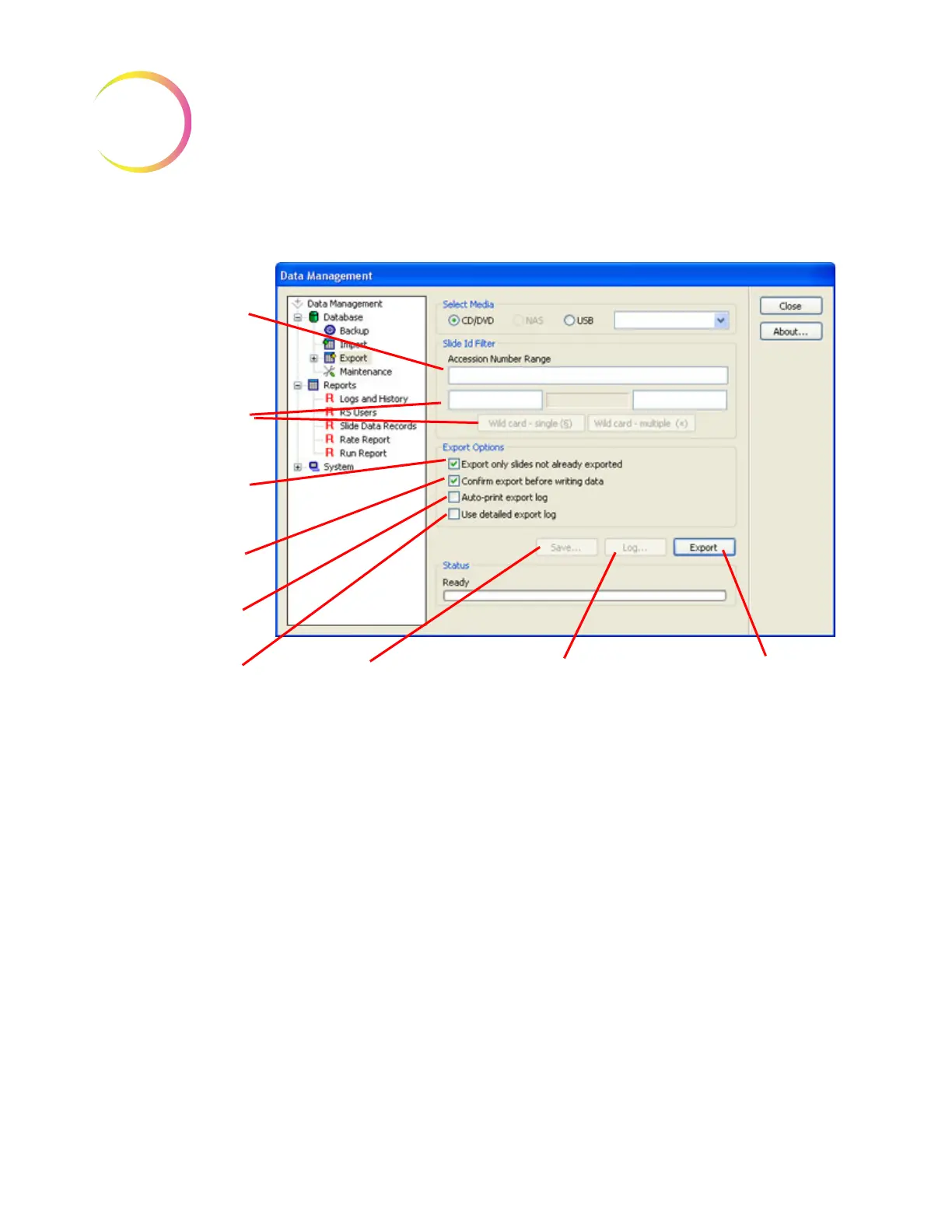
Click on the Export icon to display the window (Figure 4-29).
Figure 4-29 Export Window
Data can be filtered for export in several ways: by Accession Number Range, by
Slide ID Filter, by Exporting Only Slides Not Already Exported or any combina-
tion of these methods.
A Note on Slide IDs
Refer to slide labeling types and restrictions on page 3.7.
Depending on how your laboratory generates accession numbers (how long
they are, and the symbology format used - OCR, 1-D, 2-D), the accession num-
ber is often preceded or followed by fixed characters (for example a date, or a
Lab ID code) or by zeros.
These fixed and sequential numbers can be used for filtering the database for
exporting data.
OCR format only supports numeric characters, but the barcodes support alpha-
numeric as well as special characters.
Accession Number
Range Field
Slide ID Filter to Sort
for Specific Charac-
ters (Lab ID Codes,
Date, etc.)
Checkbox to Export
all data since the last
export
Checkbox to view
data before export
Checkbox to auto-
print export log
Checkbox to have
the Slide IDs
included on the
export log
Save... to create tem-
plates for frequently
used Slide ID Filters
Log... displays the results
of the completed export
Export begins the data
export function.












 To Next Page