OPERATION OF THE SOFTWARE MENU
4.62
Imager Duo Operator’s Manual
Enable
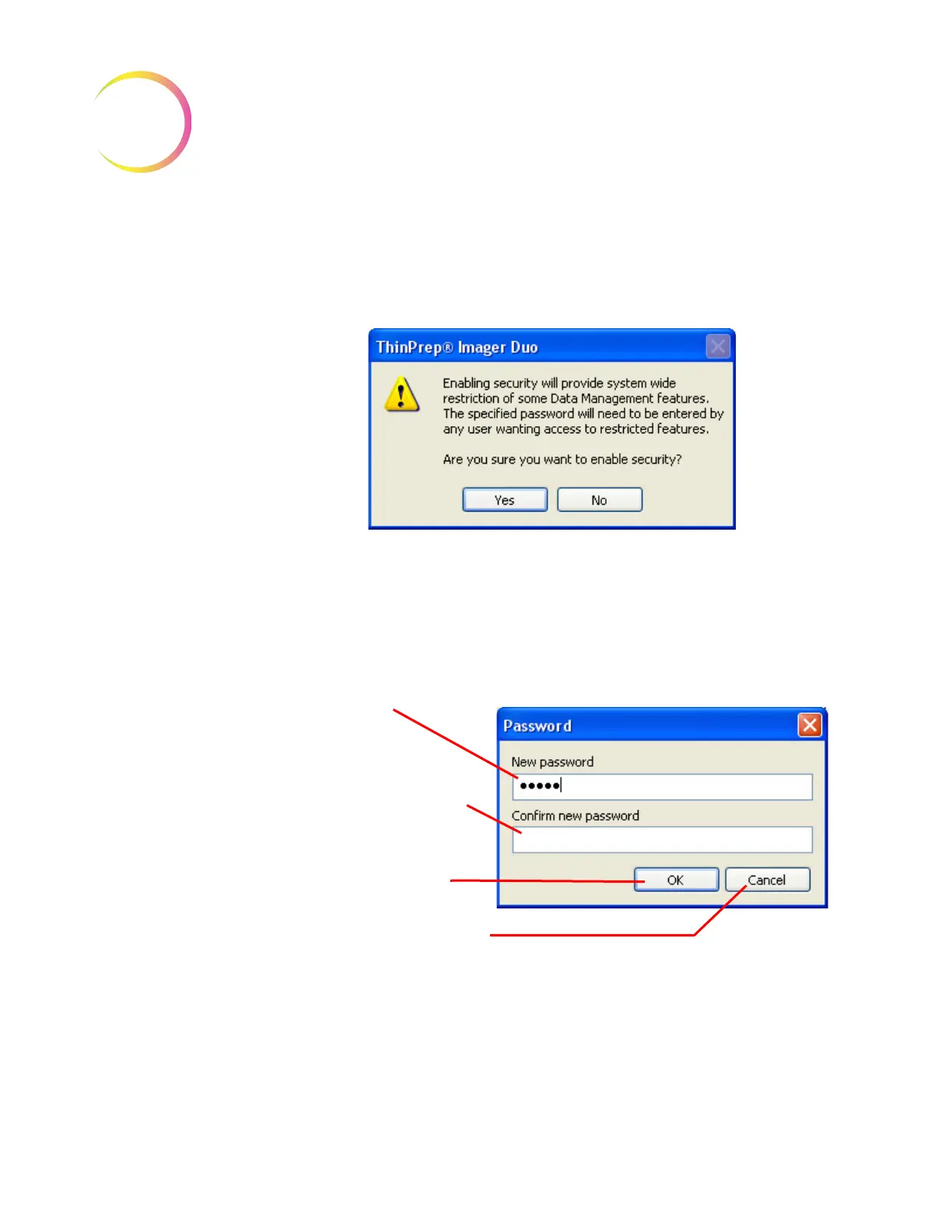
To create an administrative password for the security feature, click on the
Enable...
button. The following dialog box will appear, explaining that security
is system wide and that a password will be required to access restricted data.
Figure 4-79 Security Yes/No Dialog Box
Click
Yes
to set the password, or
No
to cancel the process.
To set a password, type the characters into the top field. (They will be substi-
tuted with dots on the display as they are typed. Figure 4-80.) Confirm the pass-
word by entering it again in the second field. Click
OK
when finished, or click
Cancel
to cancel the process and return to the Security window.
Figure 4-80 Set Security Password
The password is stored in the database on the server.
Important:
Close and re-open the Data Management window on the server and
all workstations to apply the data restriction.
Enter password:
• 1-16 characters
• alphanumeric
• case sensitive
Re-enter password to confirm
OK to accept password
Cancel to terminate the process












 To Next Page