#03592DE-EN c 23
3. Use the cursor keys to make the appropriate selection
All the measured values from the memory can be shown or only
those from a particular measurement position. The measured values
are shown as a list. Use the cursor keys to scroll up and down. Keep
the cursor key pressed down to scroll quickly through the list.
4. Use the "menu" key to change the display back to the selection
menu.
9.3. Show measured values in graphic form
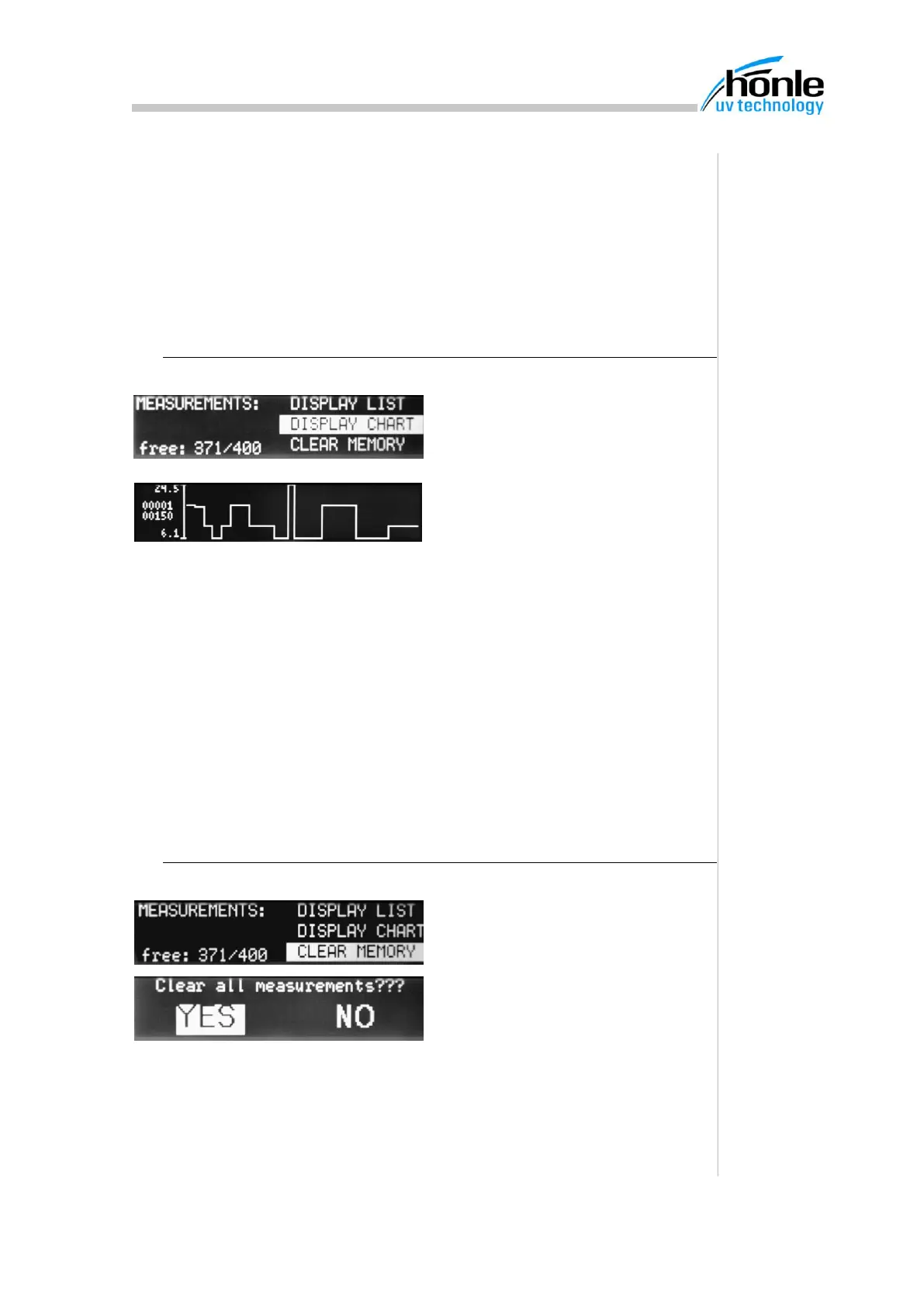
1. Press "menu" key until the
"Measured value memory" is dis-
played
2. Select the line "Display graph"
3. Use the cursor keys to make the appropriate selection
All the measured values from the memory can be shown or only
those from a particular measurement position.
The measured values are shown as a graph. Every view shows 150
measurement points. Use the cursor keys left and right to change be-
tween views if there are more than 150 measurement points. As a guide,
the first and last measurement numbers of the current view are shown on
the left. The scaling of the dose axis is carried out automatically as a
function of the measure values to be shown. The relevant designation is
given at the top and bottom of the dose axis.
4. Use the "menu" key to change the display back to the selection
menu
9.4. Delete measured value memory
1. Press "menu" key until the
"Measured value memory" is dis-
played
2. Select the line "delete all"
3. Select "YES" using the cursor
keys


 To Next Page