Phone Basics 33
1.4 Phone Controls
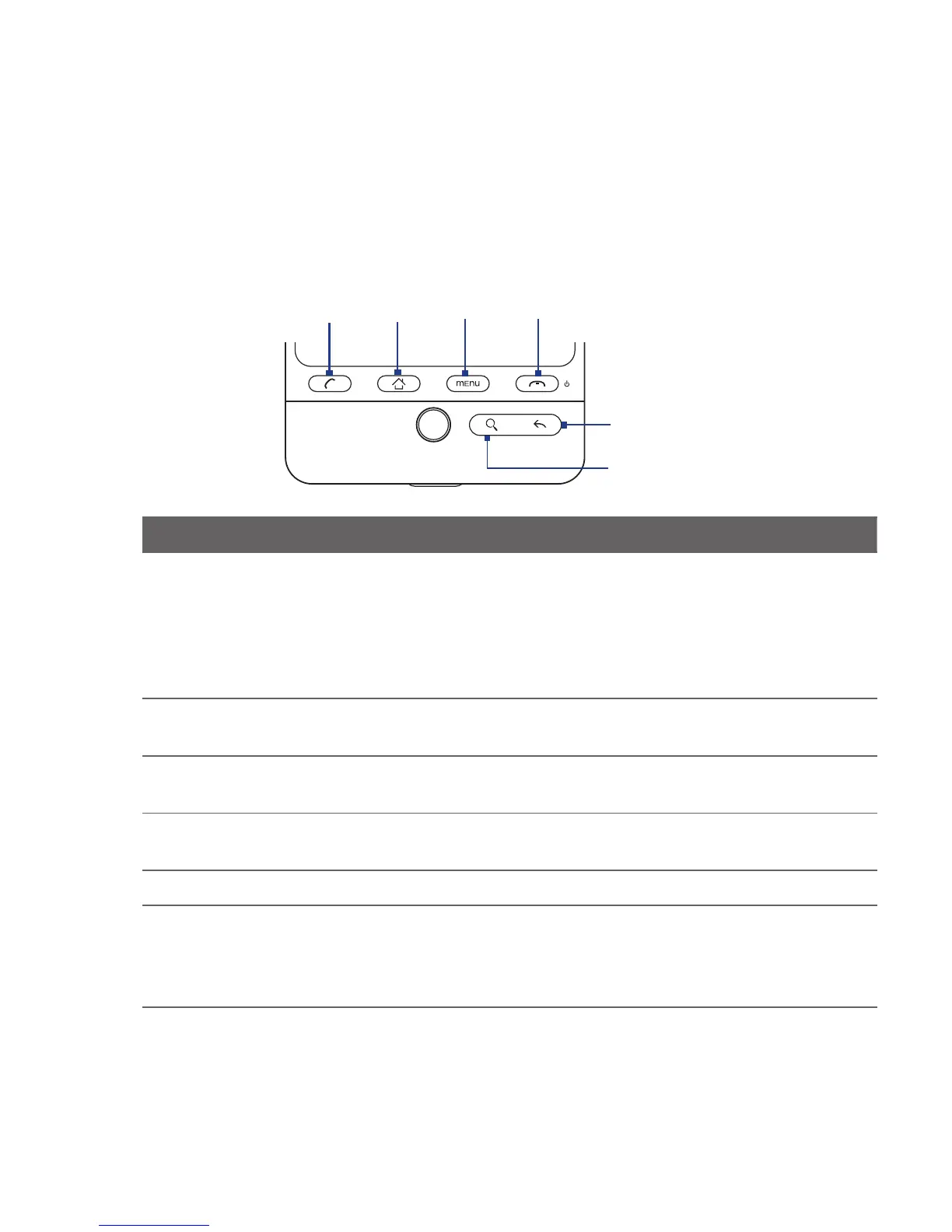
Press the control buttons on the front panel of your phone to do the following:
SEARCH
MENU
CALL
BACK
HOME
END CALL/POWER
Button Function
CALL Press to open the Phone screen.
When a contact, contact number, or phone number is highlighted on the
screen, press to call the contact or phone number.
While in a call, press to put the call on hold. Press again to resume the call.
If you navigated to another application during a call, press to display the
ongoing call on the screen.
•
•
•
•
HOME While on any application or screen, press to return to the Home screen.
Press and hold to open the recently-used applications window.
•
•
MENU Press to open a list of actions that you can do on the current screen or options
menu.
BACK Press to go back to the previous screen, or to close a dialog box, options
menu, the Notifications panel, or onscreen keyboard.
SEARCH See “Search button” later in this chapter for details.
END CALL/
POWER
While in a call, press to hang up.
While not on a call, press and hold to open the phone options menu that
lets you turn on/off Mobile network connection, turn off the phone, or
switch your phone to silent mode, vibration mode, or airplane mode.
•
•



 To Next Page