80 Entering Text
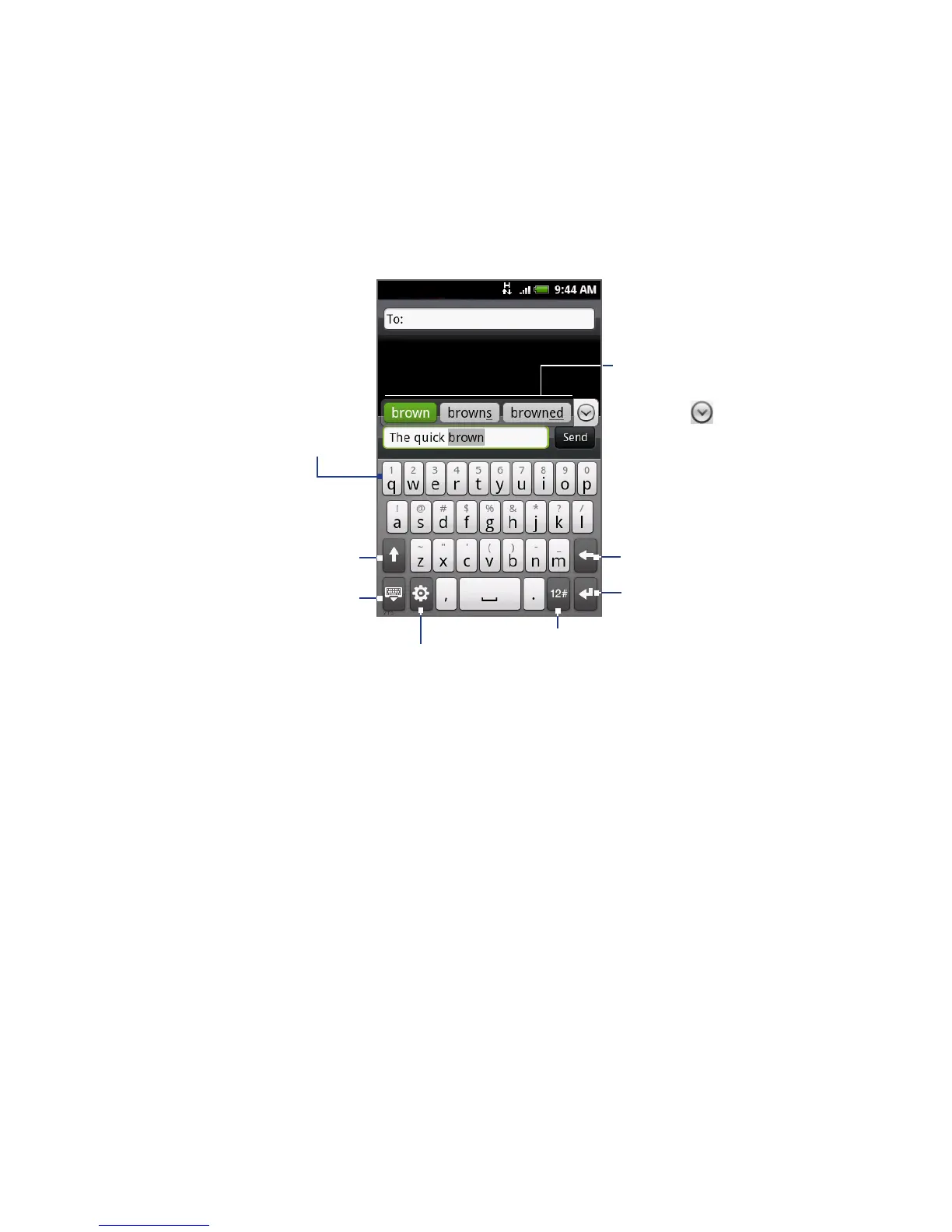
QWERTY
QWERTY is a keyboard layout similar to a desktop computer keyboard.
Displays the word
candidate list when
word prediction is
turned on. Tap a word
to insert it into your
text. Tap to see
more candidate words.
• Tap to enter letters
or symbols.
• Press and hold to
enter accented
letters, numbers, or
symbols.
• Tap to enter an
uppercase letter.
• Tap twice to turn
on Caps Lock.
Tap to switch to the numeric and
symbol keyboard. See “Entering
Numbers and Symbols” for details.
Tap to create a
new line.
Tap to delete the
previous character.
Tap to hide the
keyboard.
Tap to open a menu where you can
change the keyboard layout and
open the Touch Input Settings.
See “Adjusting Text Input and
Keyboard Settings” for details.



 To Next Page