No. Description
13 Date
14 Clock
15 Help
16 Line button
17 Line button LED
18 Deleting the Favorites
19 Adding the Favorites
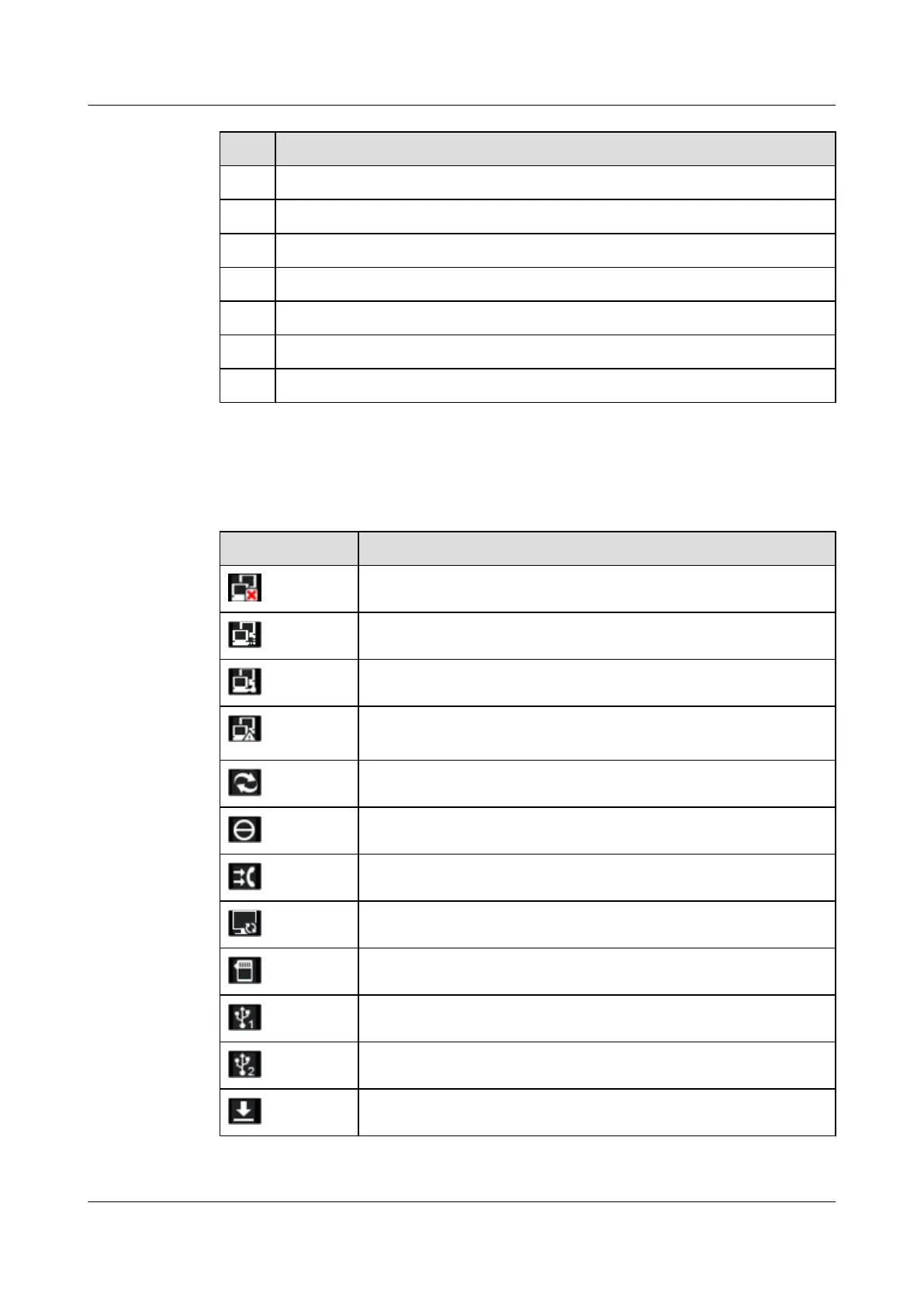
Table 2-4 describes the icons in the status bar.
Table 2-4 Icons in the status bar
Icon Description
eSpace 8850 is not connected to the network.
eSpace 8850 is connecting to a network, or the connection times out.
A network cable is connected to eSpace 8850.
The IP address of eSpace 8850 conflicts with that of another device on
the network.
eSpace 8850 is being upgraded.
The DND function is enabled.
The Call Forwarding function is enabled.
The Linkage function is enabled.
An SD card is inserted.
A USB device is connected to the USB1 port.
A USB device is connected to the USB2 port.
There are completed downloads.
eSpace 8850 Video Phone
User Guide 2 Product Description
Issue 08 (2014-08-25) Huawei Proprietary and Confidential
Copyright © Huawei Technologies Co., Ltd.
10



 To Next Page