l M4 screws (six for each switch)
l Top-mounting brackets (two for each switch)
NOTE
The M4 screws are included in the installation accessory package, whereas the M6 expansion bolts and
top-mounting brackets need to be purchased separately.
Procedure
Step 1 Wear an ESD wrist strap or ESD gloves. When wearing an ESD wrist strap, ensure that it is in
close contact with your wrist and grounded properly.
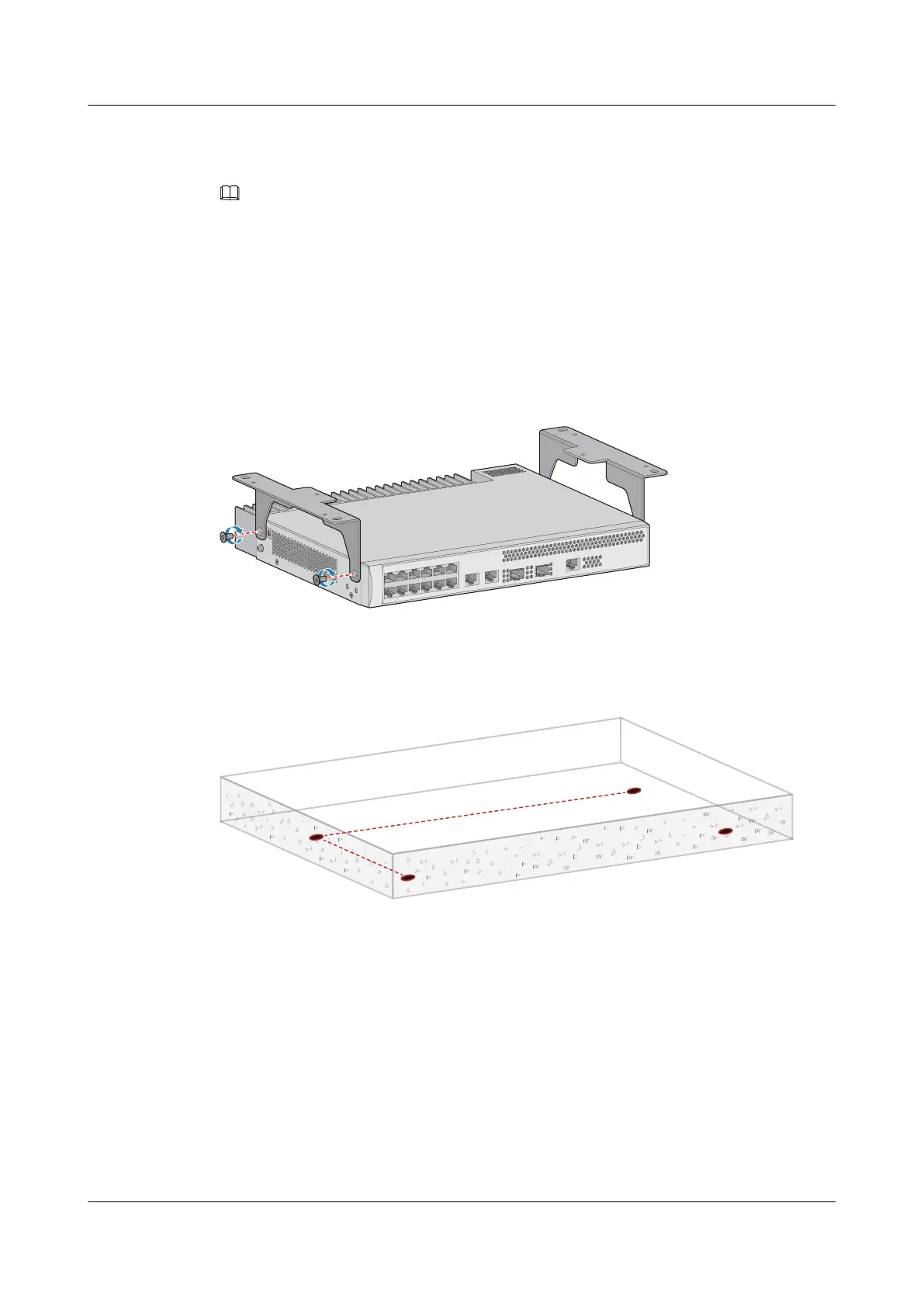
Step 2 Use M4 screws to attach a top-mounting bracket to each side of the switch.
Figure 5-18 Installing top-mounting bracket
Step 3 Use a marker to mark the positions of mounting holes according to the size of the switch and
positions of the top-mounting brackets. See Figure 5-19.
Figure 5-19 Marking mounting holes
Step 4 Install M6 expansion bolts on the top wall.
1. Use a hammer drill (with φ8 drill bit) to drill holes in the marked positions.
S2700&S3700&S5700&S6700 Switch
Hardware Installation and Maintenance Guide
5 Installing a Switch
Issue 13 (2017-11-20) Huawei Proprietary and Confidential
Copyright © Huawei Technologies Co., Ltd.
41





 To Next Page