INSTALLATION
26
Connect the Power Source
■
When power is connected to the motor, the LED inside the control button housing will
flash blue twice, then flashes green:
➤
Left stack: Once to indicate the motor has power.
➤
Right stack: Twice to indicate the motor has power.
■
Refer to the appropriate page based on your order.
➤
For battery wands, see below.
➤
For satellite-mounted rechargeable battery wand, see 27.
➤
For the 18V DC Power Supply, see 29.
Battery Wands (If Applicable)
Two battery wands come with Duette
®
Vertiglide
™
PowerView
®
Gen 3 shades 54" wide or
wider. Shades less than 54" wide will come with one battery wand only.
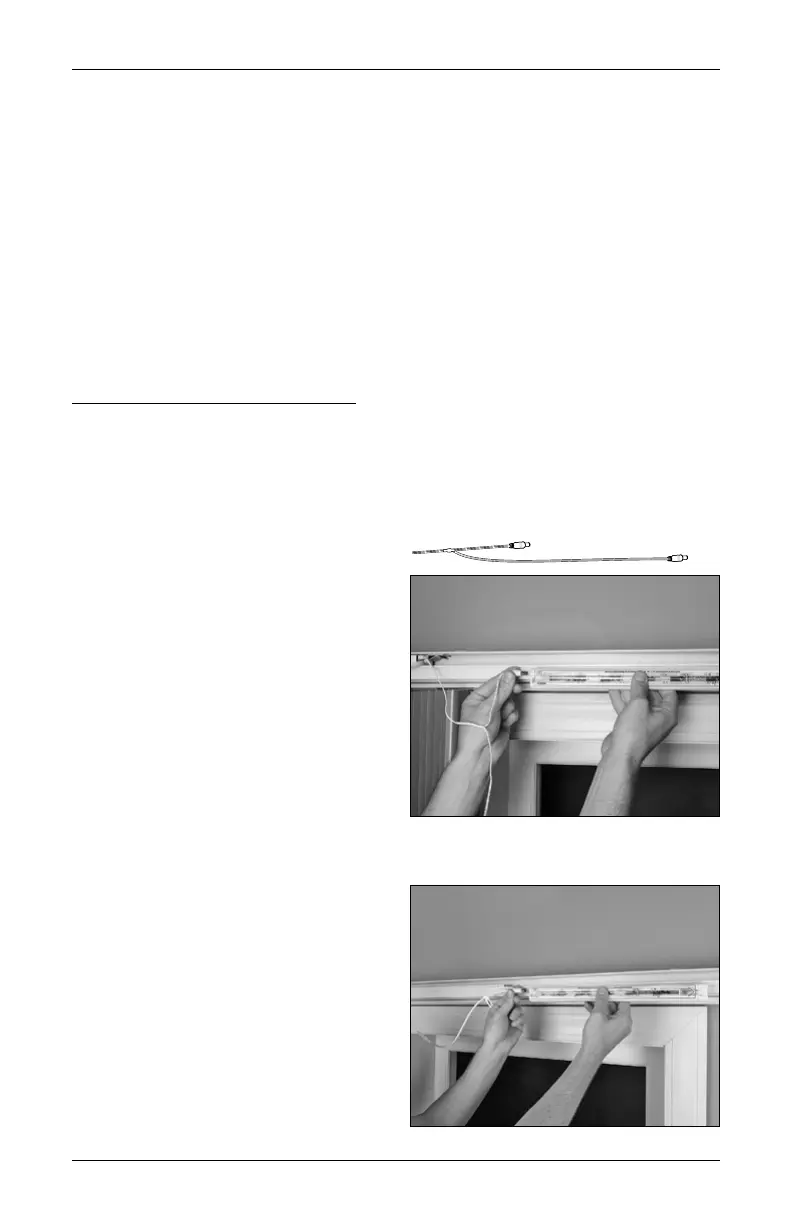
Plug the Power Cable into the Battery Wands
With two battery wands, the power cable
from the motor splits into a “Y”.
■
Plug the short end of the power cable
from the motor into the socket on the
first battery wand.
■
Place the battery wand into the front
channel of the headrail. The front lip on
the channel holds the wand in position.
■
Plug the long end of the cable into the
socket on the second battery wand.
■
Place the battery wand into the front
channel of the headrail.
First Battery Wand
Second Battery Wand











 To Next Page