INSTALLATION
29
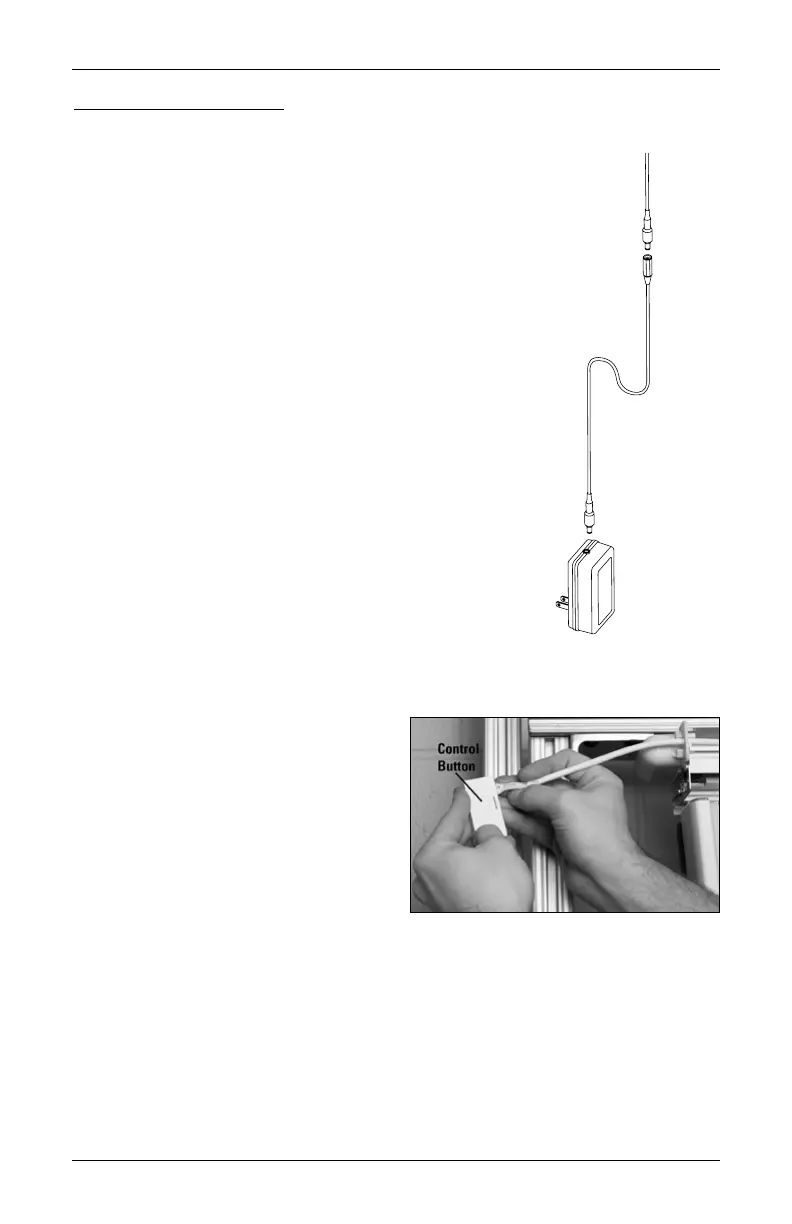
18V DC Power Supply
NOTE: When power is connected to the motor, a blue LED inside
the control button housing will flash to indicate the shade is ready
for operation.
■
Plug the power cable from the shade motor into the extension cable.
■
Plug the other end of the extension cable into the 18V DC power supply.
■
Plug the 18V DC power supply into a power source.
Testing the Shade
Testing the shade with the control button will allow you to ensure that the motor and power
source are working correctly.
■
Press the control button on the headrail
to test operation. If the shade does not
operate, see “Troubleshooting” on page
40.
➤
Press the button to alternately
traverse closed, stop, and traverse
open the shade.
■
The control button can also be used in
combination with the PowerView App for
control of advanced shade functions and home access. Open the App, then press and hold
the control button to see a list of available functions. See “Operating the PowerView®
App and Gen 3 Remote” on page 30 for more information.
Calibration Reset Requirement
Calibration reset is required for Vertiglide
™
side stack shades, as it is necessary to recalibrate
the shade's travel limits. To reset your shades, refer to “Calibration Reset” on page 32.
from shade motor
Extension
cable
18V DC
Power
Supply











 To Next Page