INSTALLATION
14
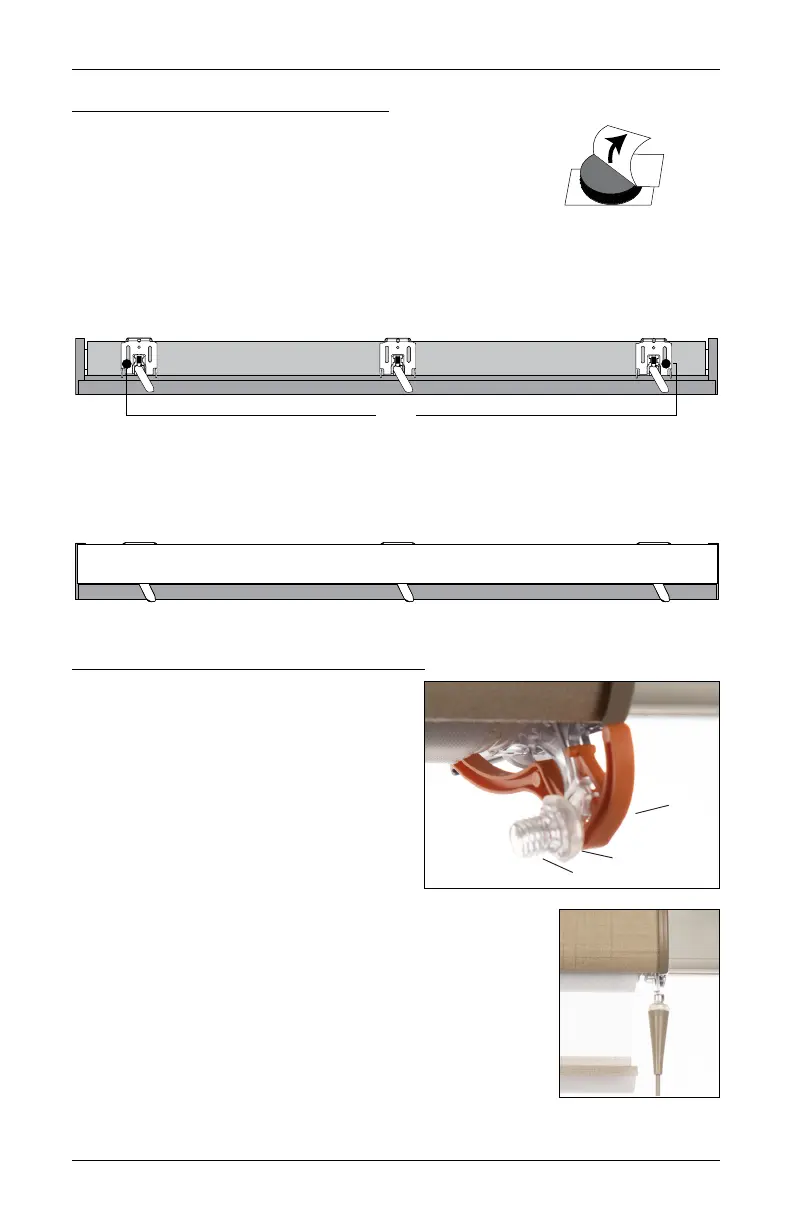
Attach the Dust Cover (Optional)
NOTE: Attaching the dust cover is optional for outside mounts.
The dust cover can be used with outside mounts to protect the top
of the headrail from exposure.
■
Cut the dust cover to desired width.
■
Remove the paper backing on one side of the hook and loop fastener dots.
■
Apply the dots to the installation brackets on each end of theshading.
■
Remove the remaining paper backing from the dots.
■
Center the dust cover over the top of the shading, above the dots, and press the dust cover
down onto the dots.
Attach the Wand — UltraGlide
®
Only
The wand must be securely attached to the
shading for proper operation.
■
Remove the orange shipping clip.
➤
Grab the edge of the shipping clip and
pull straight down.
■
Remove the wand from its packaging.
■
Gently pull out the bumper and threaded
connector until it is visible.
■
Holding the bumper to the connector, hand tighten the wand
onto the connector then slide the bumper down over the
connector.
NOTE: The underside of the bumper matches the shape on the
top of the threaded connector.
Paper
No Dust Cover
Bumper
Shipping
Clip
Connector








 To Next Page