TROUBLESHOOTING
29
Problem
PowerView® Gen 3 only: Rechargeable battery needs recharging (continued).
Solution Recharging Via the Single Charger
Remove the rechargeable battery wand from the mount, or insert the single
charger cable without removing from the shading.
■
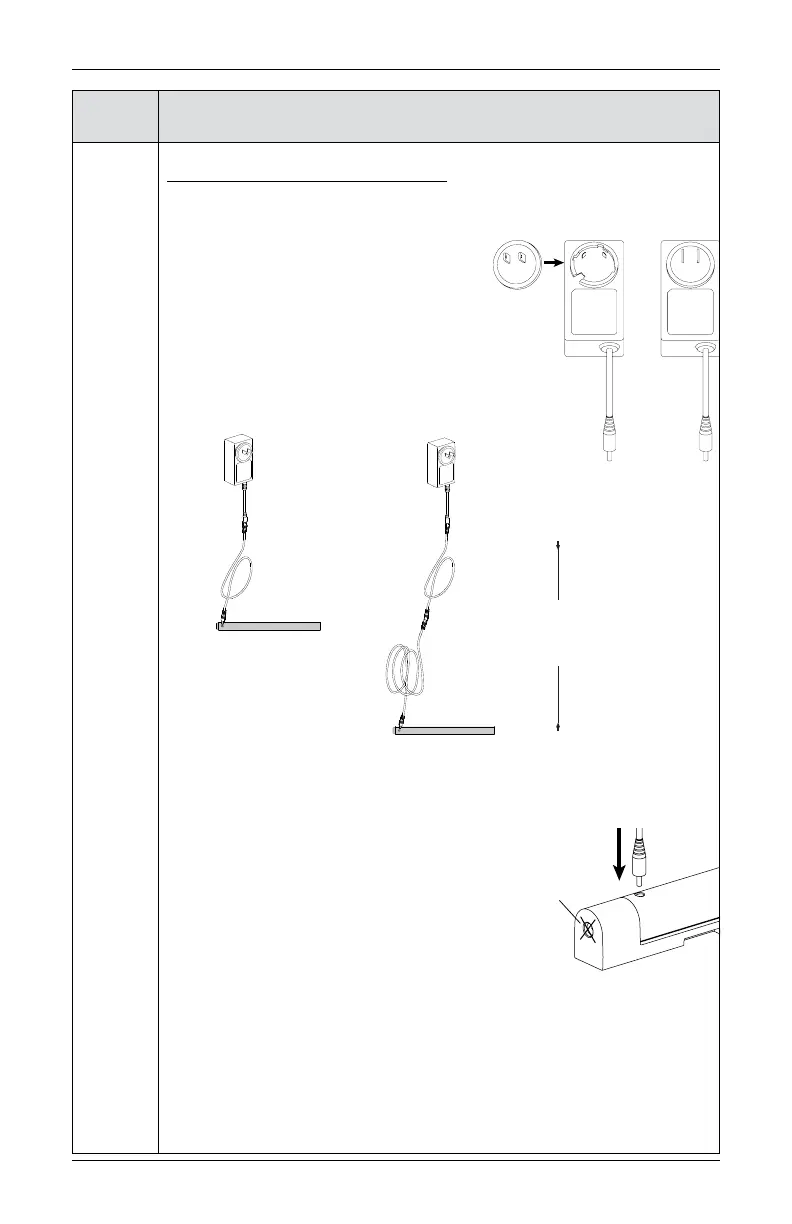
Attach the plug adapter to the charger.
■
Attach the female end of the charging
cable to the charger, and the male end to the
battery wand. If additional length is required
to reach the battery, attach additional
charging cables as needed.
■
Insert and twist cables together to ensure they do
not accidentally become unplugged during charging.
■
Plug the charger into a standard AC outlet.
■
Plug the charging cable into the charging
outlet on the rechargeable battery wand. The
charging outlet is near the nose of the wand.
■
A red light indicator confirms the battery wand
is properly inserted and is charging.
CAUTION: Do not attempt to plug the
charging cable into the battery mount’s power
socket. Doing so will not only fail to charge the battery wand but could
possibly cause damage to both the single charger and the battery mount.
■
Once the battery has been fully recharged, the red light indicator will turn
green. Charging may take up to two hours, depending on your battery level.
■
Remove the charging cable from the battery wand.
(Continued on next page.)
Single
Charger
3 ft
charging
cable
Rechargeable
Battery Wand
Rechargeable
Battery Wand
Single
Charger
3 ft
charging
cable
12 ft
charging
cable
15 ft
charging
cable
Not this
socket








 To Next Page