© 2023 HyQuest Solutions 17
Installation
Name: Rainfall
Source: 3. Pulse In 1
Process Mode: Instant
Multiplier: 0.500
Offset: 0.0000
Log Rate: 15 mins
Name: Rainfall
Source: 3. Pulse In 1
Process Mode: Event
Multiplier: 0.500
Offset: 0.0000
Log Rate: 15 mins
Name: Rainfall
Source: 3. Pulse In 1
Process Mode: Event
Multiplier: 0.500
Offset: 0.0000
Log Rate: 0 mins
Example 1: Normal Timed
This logs the total every 15 minutes,
even if it is zero. This produces the
most data as every “time slot” has an
associated sample.
Example 2: Timed Event
This logs the total every 15 minutes
only if it is non-zero. It also inserts a
zero record, one log interval earlier, if
required.
Example 3: True Event
This logs every event to a one second
resolution. If there is more than one
count in a second, the total is logged.
No zero samples are logged.
This chapter contains the following subsections:
§
Connecting a Burkert 8045 Flow Meter
§
Connecting a Seametrics EX Flow Meter
§
Connecting a Mace RotoFlo® Flow Meter
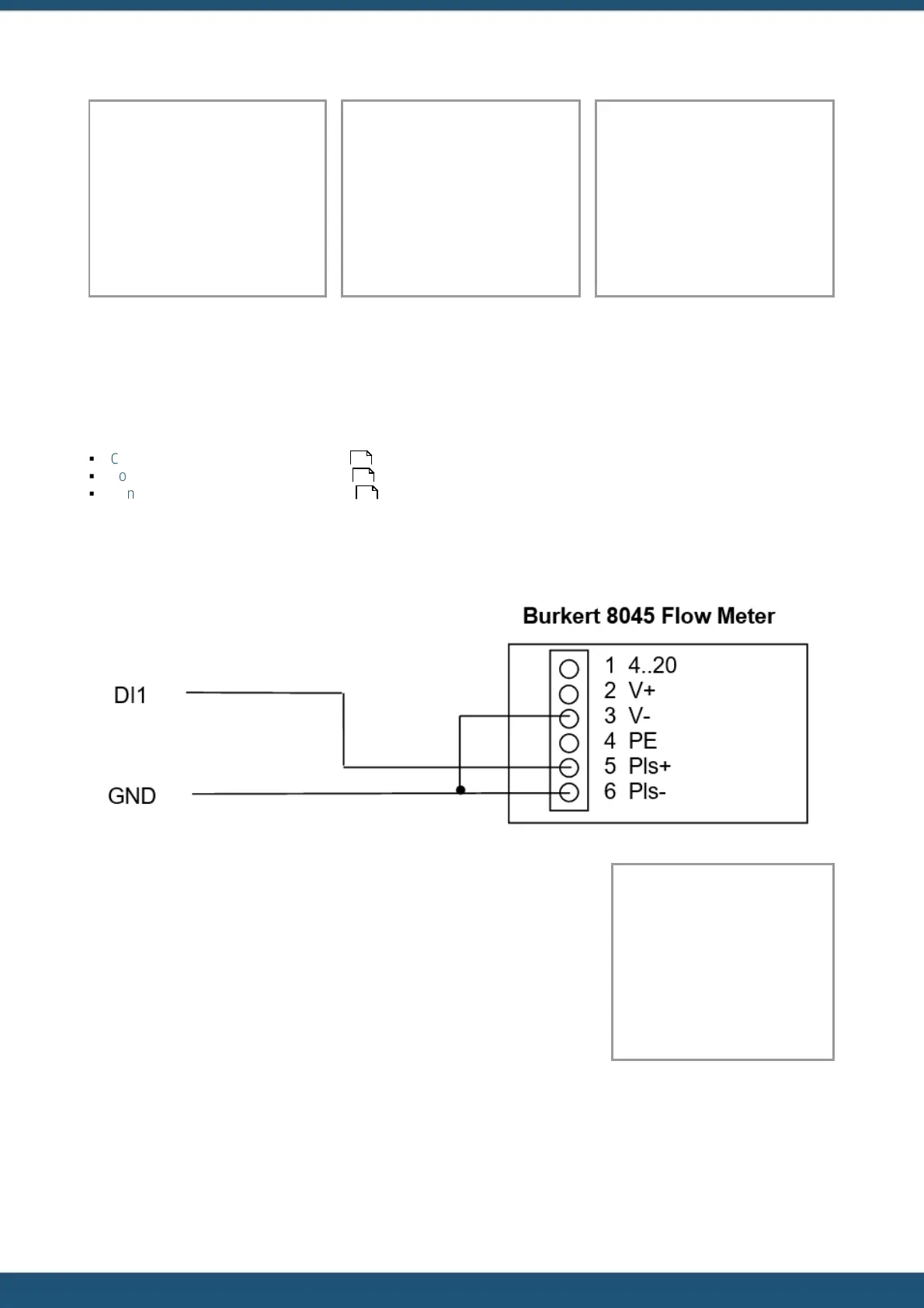
2.5.1.1 Connecting a Burkert 8045 Flow Meter
Configure the 8045 pulse value to suit. Please refer to Section 4.4.5 in the
8045 instruction manual available on the Burkert website.
http://www.burkert.com/COM/search.php?type=8045
The example configuration shown assumes the flow meter has been configured
for one pulse = 100 litres. The basic unit of measurement is a cubic metre so
each pulse is 0.1 m
3
, hence the multiplier of 0.1. The logging is configured for
timed event mode with an interval of 15 minutes.
Name: Pump Vol
Source: 3. Pulse In 1
Process Mode: Event
Multiplier: 0.1
Offset: 0.0000
Log Rate: 15mins
17
18
18



 To Next Page