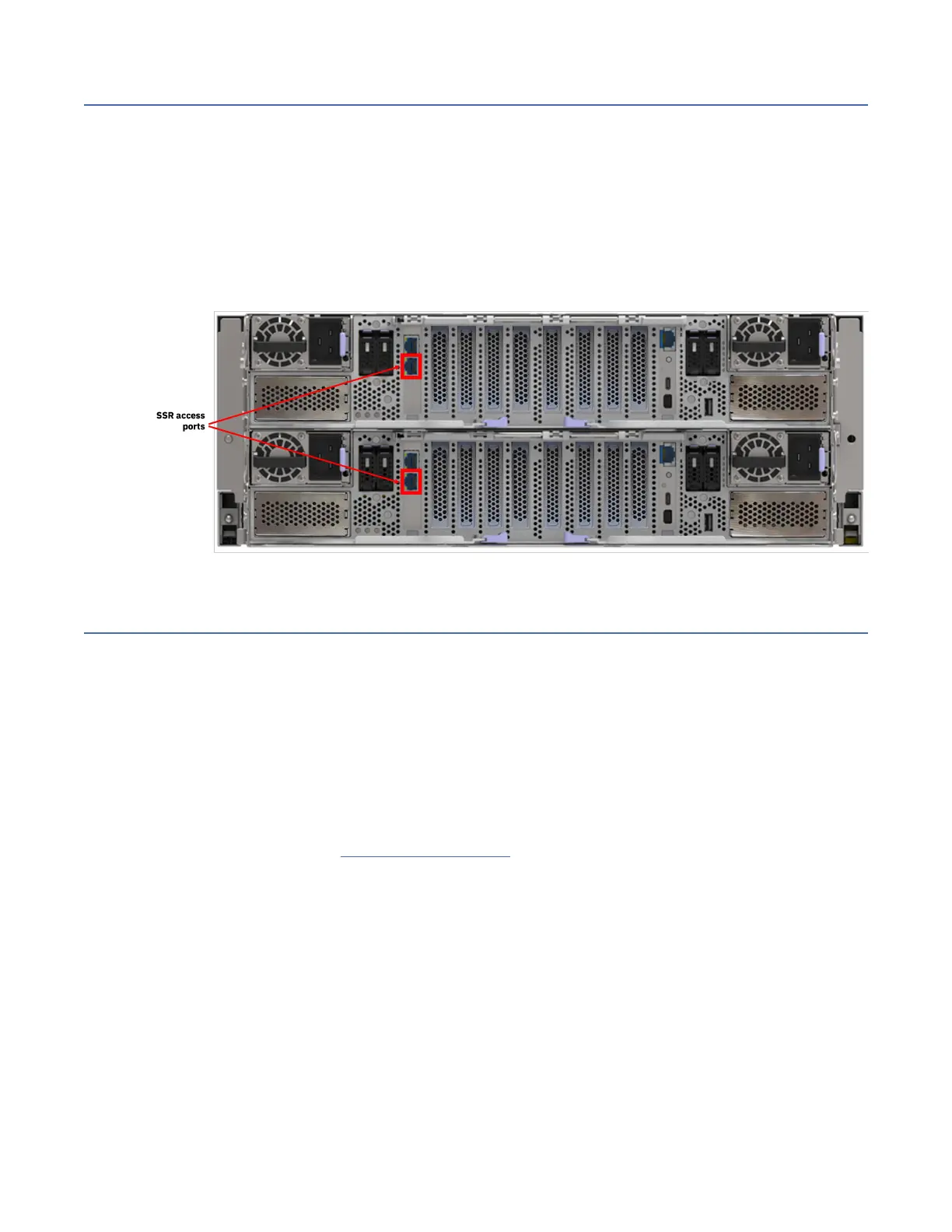
SSR access port
On the back panel of the canister, the bottom RJ45 10 GbE port is the SSR access port that a service
personnel can use to initialize a system.
You can use the SSR access port to set the IP address of the management and BMC interfaces. This port
is also used by the SSR to update the canister software or rmware and check the health of the system
before using the Install Complete app. The 101 ports (10.111.222.101/30) are assigned to this port; the
SSR is given the 10.111.222.102 IP address. For more information, see IBM ESS Install Complete Guide.
Note: An IBM intranet connection is required to access the guide.
In each of the IBM Storage Scale System 6000 server canisters, the RJ45 10 GbE port is designated as
the SSR access port, as shown in the following gure.
Figure 10. SSR access port
Hardware specication sheets
EMS node specications
IBM Storage Scale System 6000 uses one EMS node in the basic conguration. The EMS node acts as the
management server and provides infrastructure for hardware monitoring and hosts GUI.
The EMS server has the following roles:
• Quorum node
• GUI server
• Call home server
For more information, see the EMS node specications of the IBM Storage Scale System Utility Node.
Chapter 2. Technical overview
19




 To Next Page