EasyManua.ls Logo

Icom IC-M510E - Page 43

Icom IC-M510E
132 pages
Print Icon
To Next Page IconTo Next Page
To Previous Page IconTo Previous Page
Loading...
30
1
7
4
10
15
18
2
8
13
5
11
16
3
9
14
6
12
17
DIGITAL SELECTIVE CALLING (DSC)
7
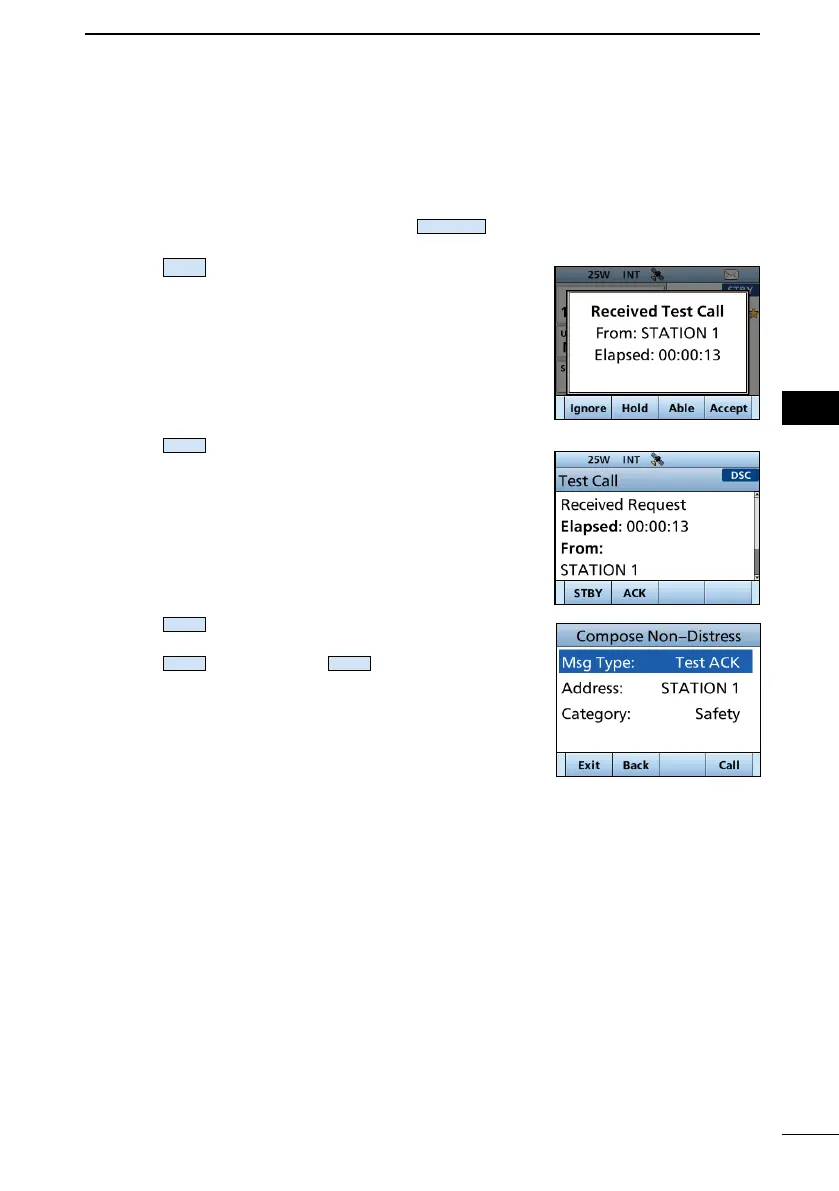
D Sending a Test Acknowledgment



1. After a Test call is being received, push
Alarm OFF
to
turn OFF the alarm.
2. Push
Accept
.
The received call’s information is displayed.
3. Push
ACK
.

4. Push
Call

“Transmitting Test ACK” is displayed.
5. Push
STBY
, and then push
OK
to return to the
operating screen.

Table of Contents

Related product manuals