Side 17
Norsk Svenska English
Montering
6/8: Innvendig kretskort blir
tilkoblet
Installation
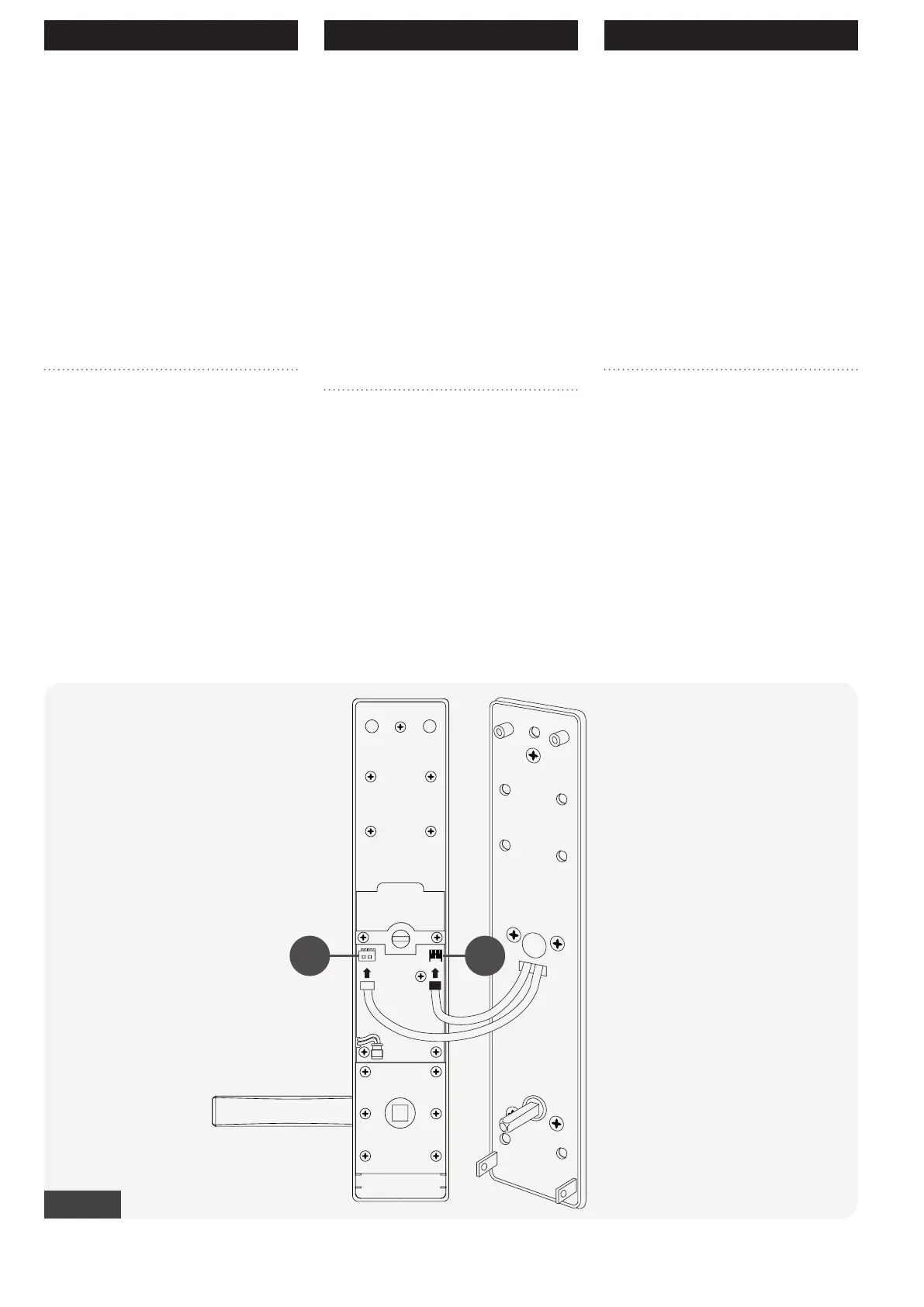
6/8: Connecting the interior
PCB
8 Tilkoblingen mot innvendig kret-
skort (PCB) blir montert som anvist
av ( A-B ) Fig-14.
1 Hvit ledning på hvitt kontaktpunkt. ( A ).
2 Svart ledning på svart kontaktpunkt ( B ).
Begge kontakter må monteres rett vei.
8 The connection of the interior PCB
is done as shown in ( A-B ) Fig-14.
1 White cable to white port ( A ).
2 Black cable to black port ( B ).
Both contacts must be installed in the right
direction.
A B
Fig-14
Montage
6/8: Anslut kretskort
8 Anslutningen till det inre kretskor-
tet (PCB) monteras enligt anvis-
ningarna ( A-B ) Fig-14.
1 Vit ledning på vit kontaktpunkt ( A ).
2 Svart ledning på svart kontaktpunkt ( B ).
Både kontakterna måste monteras i rätt
riktning.


 To Next Page