HTM-1505R/HTM-1505CS
3. lnstallatkm
CAUTION To assure safety, make connection after turning off each equipment.
3.1 Connection to external equipment
(1) Standard module (MPU, VIDEO PROCESS)
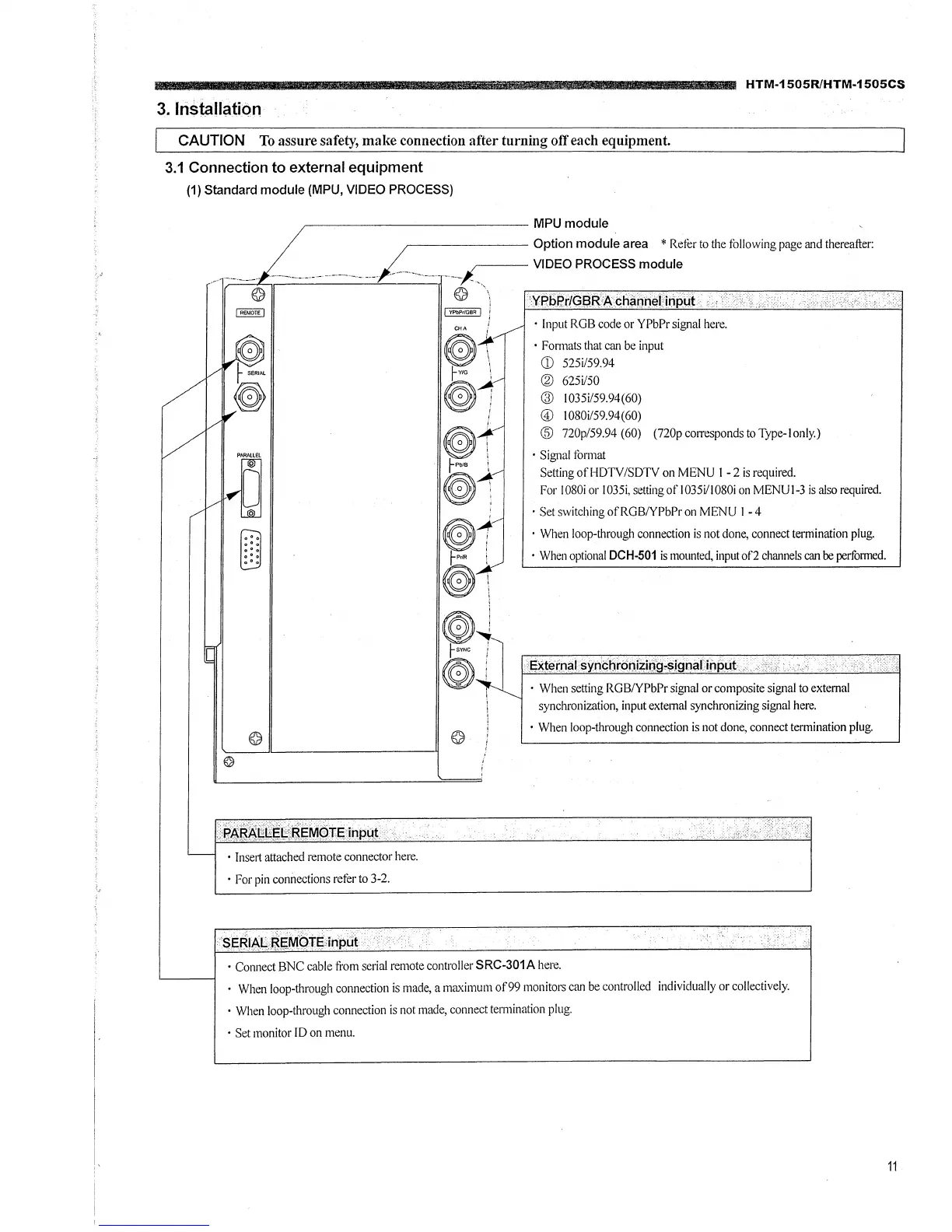
-------------- MPU module
, ~-©-,C.-,·-~··-_--_ .. __ .. _, __ .. __ , ____ .. -·_·-"_-.. __ .. _____ .. -·,_/-_-_·-_·-~_---.. _--.. _-,l,-.-.. ----._-,-.- ___ -____ -i --.;1::~:::::~=~i~ followl~-Md fu=~
) REJ.IOTE I I YPbPtlGBR I j
• Insert attached remote connector here.
• For pin connections refer to 3-2.
CHA ; • Input RGB code or YPbPr signal here.
• Formats that can be input
CD 525i/59.94
@ 625i/50
@ 1035i/59.94(60)
© I0S0i/59.94(60)
@ 720p/59.94 (60) (720pcorrespondstoType-lonly.)
• Signal fonnat
Setting ofHDTV/SDTV on MENU I -2 is required.
For 1080i or I035i, setting of 1035i/l080i on MENUI~3 is also required.
· Set switching ofRGBNPbPr on MENU I - 4
· When loop-through connection is not done, connect termination plug.
• When optional DCH-501 is mounted, input of2 channels can be perfonned.
• When setting RGBNPbPr signal or composite signal to external
synchronization, input external synchronizin~ signal here.
• When loop-through connection is not done, connect termination plug.
• Connect BNC cable from serial remote controller SRC-301A here.
• When loop-through connection is made, a maximum of99 monitors can be controlled individually or collectively.
• When loop-through connection is not made, connect termination plug.
• Set monitor ID on menu.
11




 To Next Page