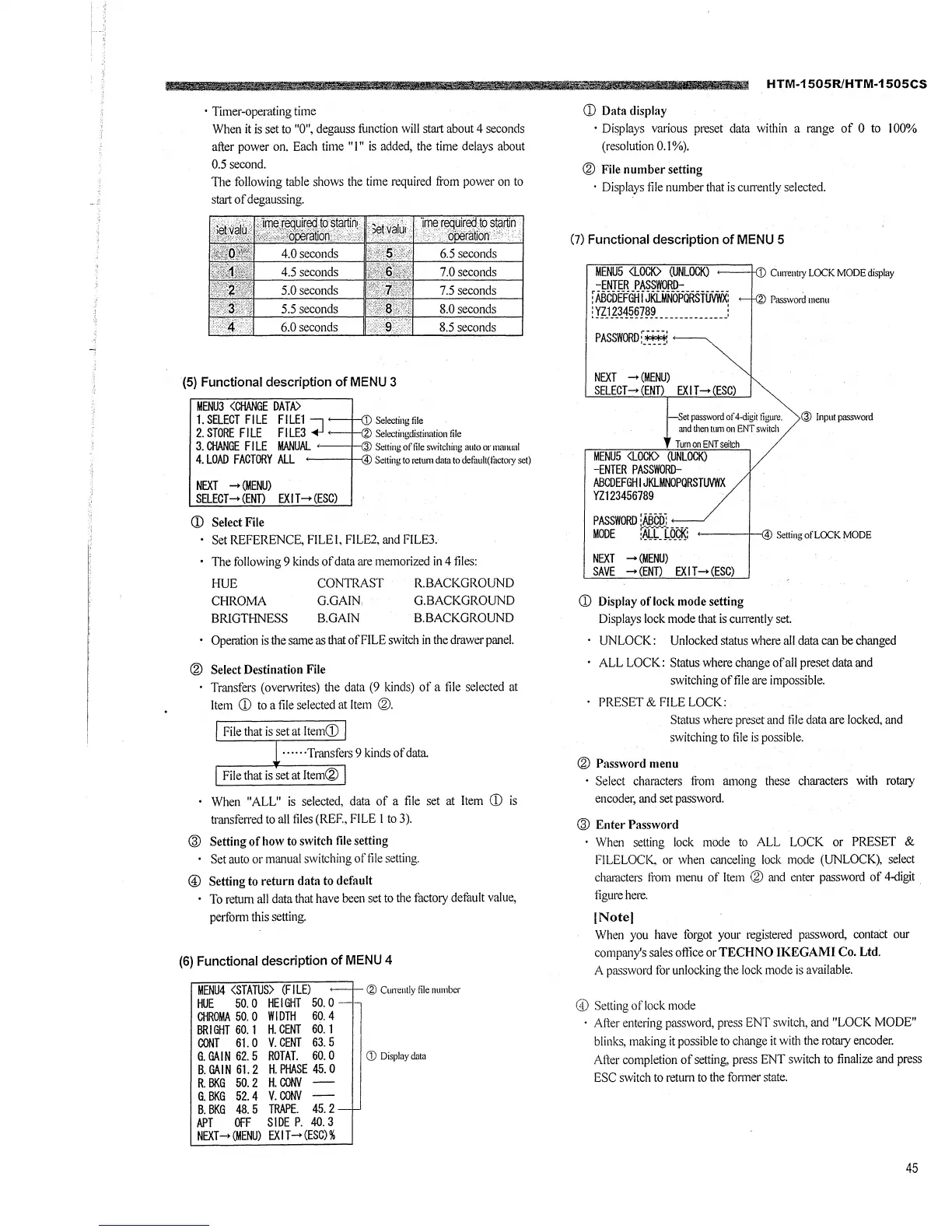
• Timer-operating time
When it is set to "O", degauss function will start about 4 seconds
after power on. Each time "I" is added, the time delays about
0.5 second.
The following table shows the time required from power on to
start of degaussing.
4.5 seconds 7.0seconds
5.0 seconds 7.5 seconds
5.5 seconds
8.0 seconds
6.0seconds 8.5 seconds
(5) Functional description of MENU 3
MENU3 <CHANGE DATA>
1. SB.ECT FILE FILEl 7
2. STORE FILE FILE3 +I
1 Selecting file
Selectingdistinalion file
3. CHANGE FI LE MANUAL ---1-{'3 Setting of file switching auto or mamud
4. LOAD FACTORY ALL 4 Settingtoretumdatatodefuult(factrnyset)
NEXT .... (MENU)
SB.ECT-+ (ENT) EXIT-+ (ESC)
(D Select File
Set REFERENCE, FILE I, Fl LE2, and FILE3.
The following 9 kinds of data are memorized in 4 files:
HUE
CHROMA
BRIGTHNESS
CONTRAST
G.GAIN,
B.GAIN
R.BACKGROUND
G.BACKGROUND
B.BACKGROUND
Operation is the same as that of FILE switch in the drawer panel.
® Select Destination File
Transfers ( overwrites) the data (9 kinds) of a file selected at
Item (D to a file selected at Item ®·
File that is set at ltem(D
······Transfers 9 kinds of data
File that is set at Item®
When "ALL" is selected, data of a file set at Item CD is
transferred to all files (REF., FILE I to 3).
@ Setting of how to switch file setting
Set auto or manual switching of file setting.
© Setting to return data to default
To return all data that have been set to the factory defimlt value,
perform this setting.
(6) Functional description of MENU 4
MENU4 <STATUS> (FI LE) ,__,_ Cg> Cum:ntly file number
HUE 50. 0 HEIGHT 50. 0 -•-
CHROMA 50. 0 WIDTH 60. 4
BRIGHT 60. 1 H. CENT 60. 1
CONT 61. 0 V. CENT 63. 5
6. GAIN 62. 5 ROTAT. 60. 0 G) Display data
B. GAi N 61. 2 H. PHASE 45. 0
R. BKG 50. 2 H. CONV
6. BKG 52. 4 V. CONV -
B. BKG 48. 5 TRAPE. 45. 2 -
APT OFF SIDE P. 40. 3
NEXT .... (MENU) EX I T-+ (ESC) %
HTM-1505R/HTM-1505CS
CD Data display
• Displays various preset data within a range of O to 100%
(resolution 0.1 %).
® File number setting
· Displays file number that is currently selected.
(7) Functional description of MENU 5
MENUS <LOCK> (UNLOCK)
-ENTER PASSWORD-
: ABCDEFGH I JKLMNOPQRSTUVWX:
:vz1234557a9 _____________ :
PASSWORD:_~
NEXT _,. (MENU)
SELECT-+ (END EXIT-+ ESC)
1 Currentry LOCK MODE display
Password menu
Set password of4-digit figure. @ Input passwrntl
and d1en tum on ENT switch
Turn on ENT seilch
MENUS <LOCK> (UNLOCK)
-ENTER PASSWORD-
ABCDEFGHIJKLMNOPQRSTUVWX
VZl 23456789
PASSWORD [ABCiJ:
MODE :ALL LOCK:
NEXT - (MENU)
SAVE .... (ENT) EXIT- (ESC)
CD Display oflock mode setting
4 Setting of LOCK MODE
Displays lock mode that is currently set
UNLOCK: Unlocked status where all data can be changed
ALL LOCK: Status where change of all preset data and
switching offile are impossible.
PRESET & FILE LOCK:
Status where preset and file data are locked, and
switching to file is possible.
® Password menu
• Select characters from among these characters with rotary
encoder, and set password.
@ Enter Password
· When setting lock mode to ALL LOCK or PRESET &
FILELOCI<, or when canceling lock mode (UNLOCK), select
characters from menu of Item ® and enter password of 4-digit .
figure here.
(Note!
When you have forgot your registered password, contact our
company's sales oflice or TECHNO IKEGAMI Co. Ltd.
A password for unlocking the lock mode is available.
© Setting of lock mode
• Alter entering password, press ENT switch, and "LOCK MODE"
blinks, making it possible to change it with the rotary encoder.
Alter completion of setting, press ENT switch to finalize and press
ESC switch to return to the fonner state.
45







 To Next Page