24
HTM-1505R/HTM-1505CS
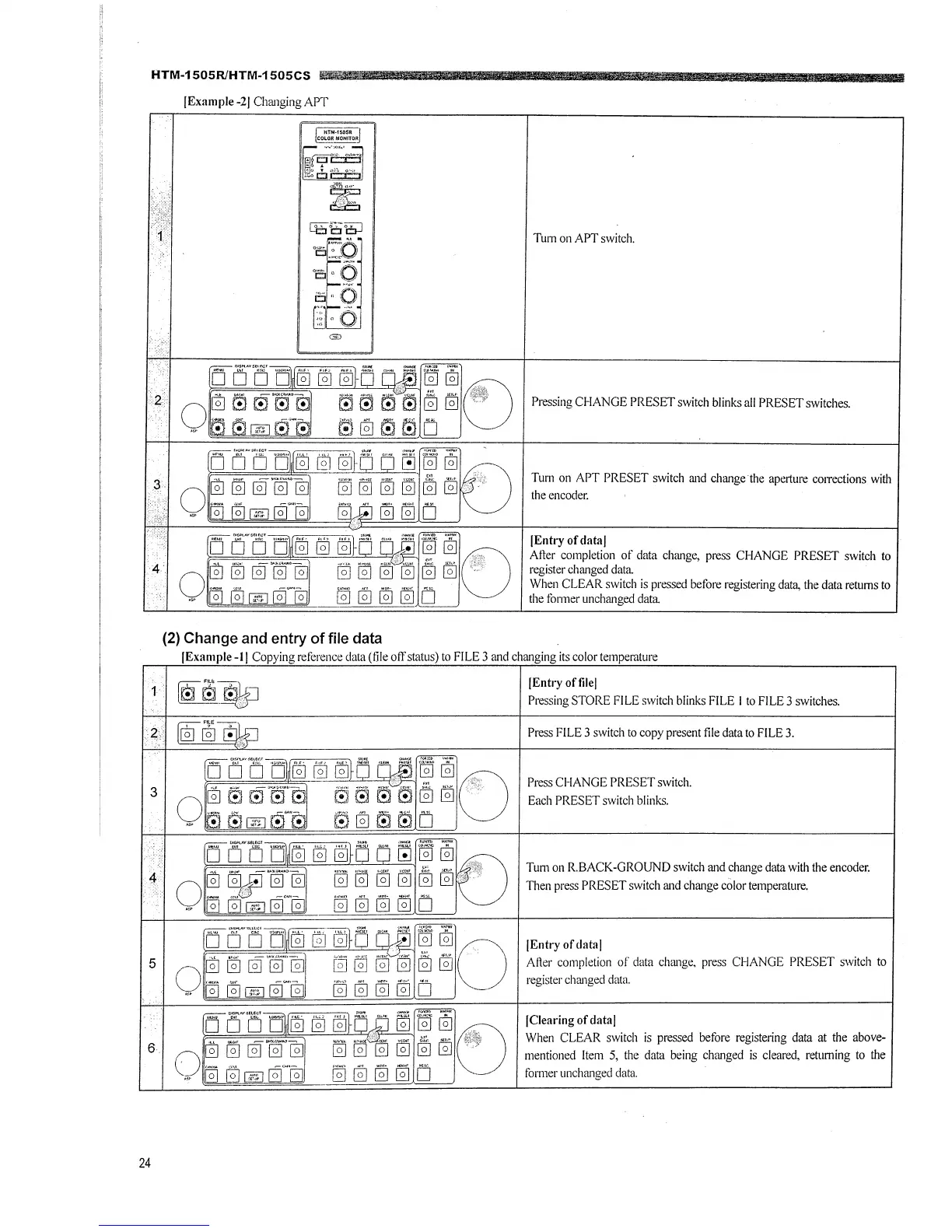
[Example -2] Changing APT
(2) Change and entry of file data
Tum on APT switch.
Pressing CHANGE PRESET switch blinks all PRESET switches.
Tum on APT PRESET switch and change the aperture corrections with
the encoder.
]Entry of data[
After completion of data change, press CHANGE PRESET switch to
register changed data.
When CLEAR switch is pressed before registering data, the data returns to
the fonner unchanged data
[Example-I [ Copying reference data (file off status) to FILE 3 and changing its color temperature
[Entry offile[
Pressing STORE FILE switch blinks FILE I to FILE 3 switches.
Press FILE 3 switch to copy present file data to FILE 3.
Press CHANGE PRESET switch.
Each PRESET switch blinks.
Tum on R.BACK-GROUND switch and change data with the encoder.
Then press PRESET switch and change color temperature.
[Entry of data]
After completion of data change, press CHANGE PRESET switch to
register changed data.
[Clearing of data]
When CLEAR switch is pressed before registering data at the above-
mentioned Item 5, the data being changed is cleared, returning to the
former unchanged data.







 To Next Page