HTM-1505R/HTM-1505CS
[ Model HTM-1505CS]
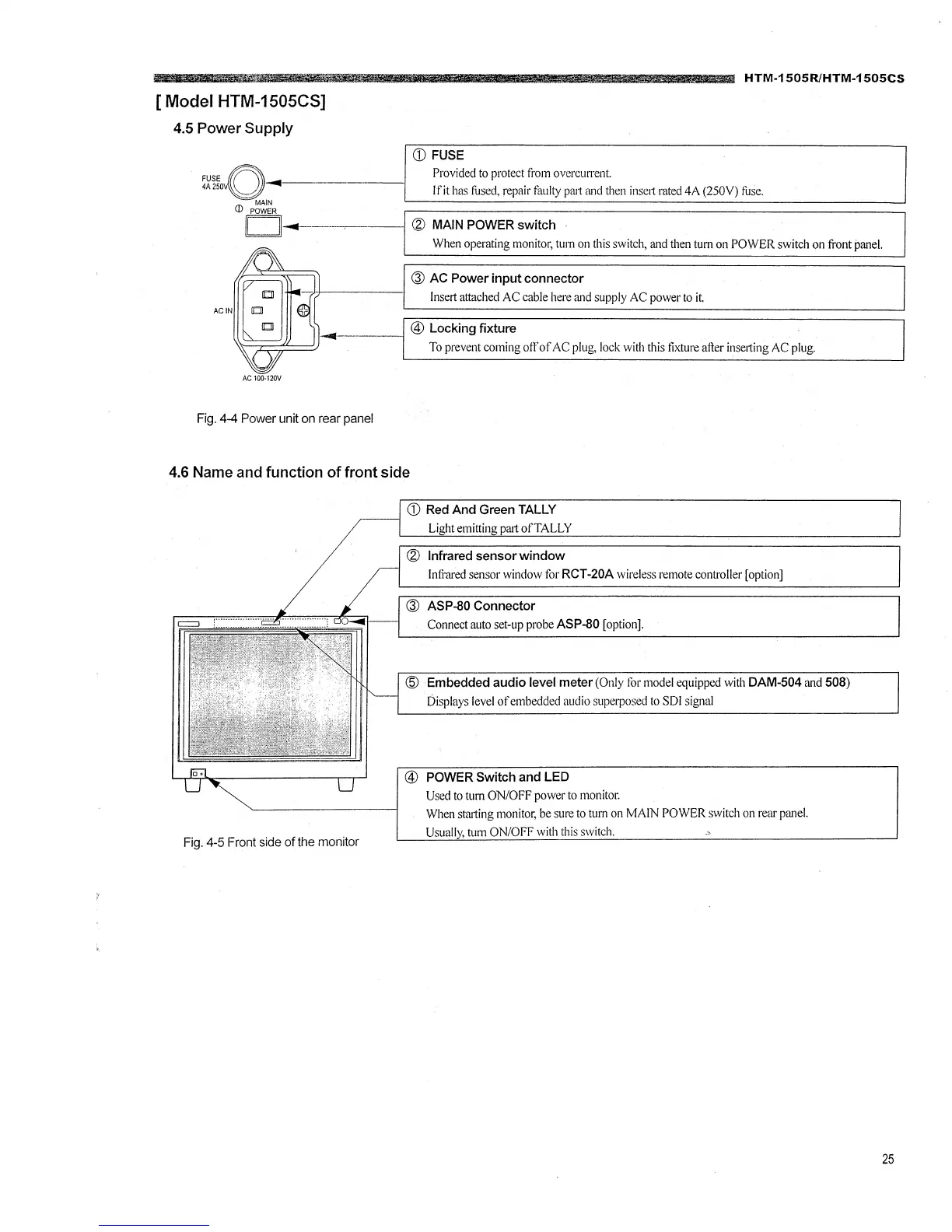
4.5 Power Supply
CD FUSE
/AQ Provided to protect from overcurrent.
:~~~o~'--1----------1 I fit has fused, repair faulty prut and then inse1t rated 4A (250V) fuse.
(I) p~~R
II II---------< ® MAIN POWER switch
When operating monitor, turn on this switch, and then turn on POWER switch on front panel.
® AC Power input connector
lnse1t attached AC cable here and supply AC power to it.
,-11--------1
@ Locking fixture
To prevent coming off of AC plug, lock with this fixture after inse1ting AC plug.
Fig. 4-4 Power unit on rear panel
4.6 Name and function of front side
Fig. 4-5 Front side of the monitor
CD Red And Green TALLY
Light emitting prut ofTALLY
® Infrared sensor window
Infrared sensor window for RCT-20A wireless remote controller [option]
® ASP-80 Connector
Connect auto set-up probe ASP-80 [option].
@ Embedded audio level meter (Only for model equipped with DAM-504 and 508)
Displays level of embedded audio superposed to SDI signal
@ POWER Switch and LED
Used to turn ON/OFF power to monitor.
When struting monitor, be sure to turn on MAIN POWER switch on rear panel.
Usually, turn ON/OFF with this switch.
25







 To Next Page