-J
! '
HTM-1505R/HTM-1505CS
44
(3) Functional description of MENU1
* Ve1tical deflection frequency "/60" in menu contains both
60Hz and 59.94 Hz.
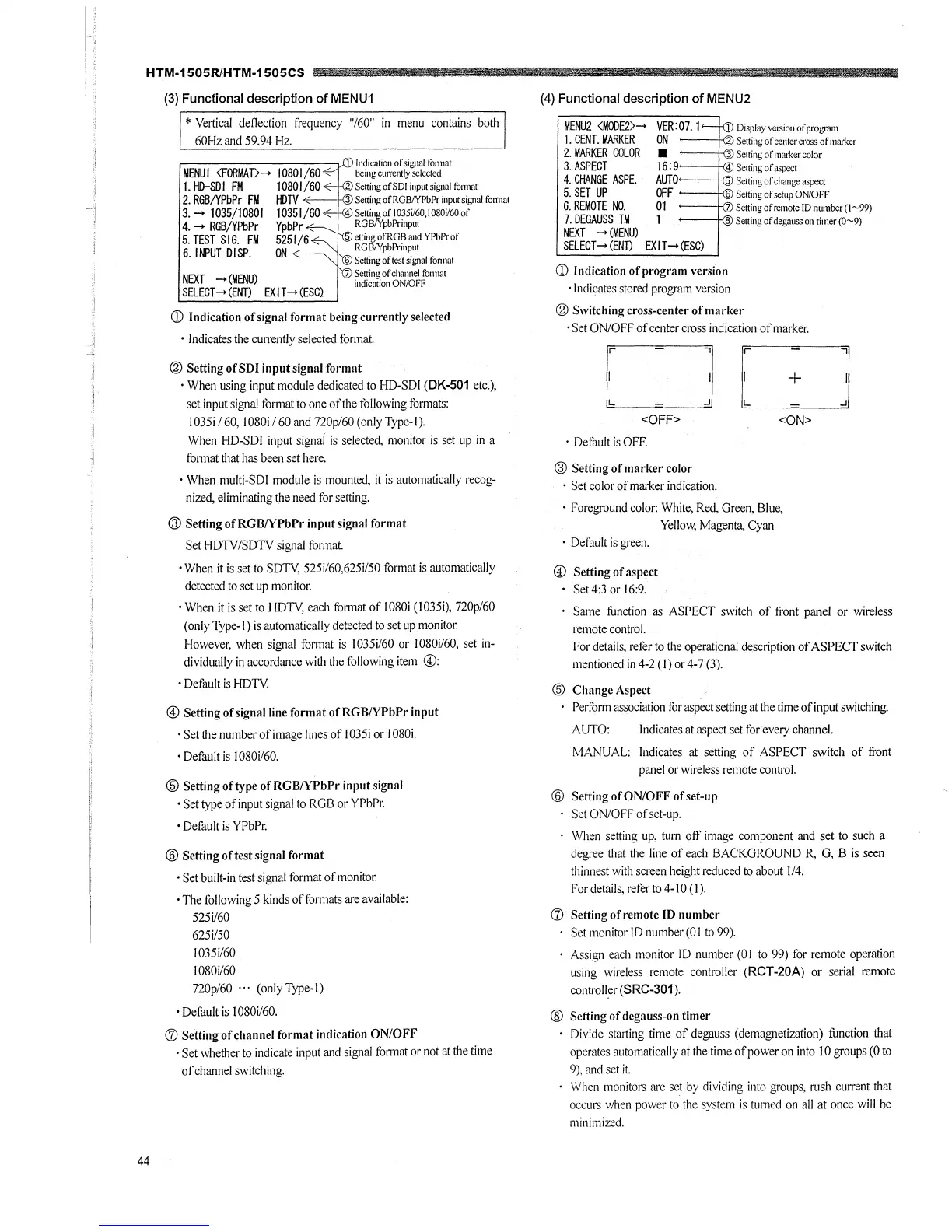
r------------, . .c11, Indication of signal fonnat
MENU1 <FORMAT> .... 10801/60 beingcurrentlyselected
1. HD-SDI FM 10801/60
~
2 SettingofSDI input signal fonnat
2. RGB/YPbPr FM HDTV 3 Setting ofRGB/YPbPr input signal fonnat
3 ..... 1035/10801 10351/60 4 Settingofl035i/60,1080i/60of
4 ..... RGB/YPbPr YpbPr RGBIYpbPrinput
5. TEST SIG. FM 5251 /6 etring ofRGB and YPbProf
6. INPUT DISP. ON RGB/YpbPrinput
6 Setting oftest signal fonnat
NEXT
.... (MENU) Setting of channel fonnat
indication ON/OFF
SELECT-+ (ENT) EX I T .... (ESC}
(D Indication of signal format being currently selected
• Indicates the cu1Tently selected format
® Setting of SDI input signal format
• When using input module dedicated to HD-SDI (DK-501 etc.),
set input signal format to one of the following furmats:
1035i/ 60, l080i I 60 and 720p/60 (only Type-I).
When HD-SDI input signai is selected, monitor is set up in a
format that has been set here.
• When multi-SDI module is mounted, it is automatically recog-
nized, eliminating the need for setting.
@ Setting ofRGB/YPbPr input signal format
Set HDTV /SDTV signal format.
• When it is set to SDTY, 525i/60,625i/50 format is automatically
detected to set up monitor.
• When it is set to HOT\!, each format of I080i (1035i), 720p/60
( only Type-I) is automatically detected to set up monitor.
However, when signal fonnat is 1035i/60 or 1080i/60, set in-
dividually in accordance with the following item ©:
• Default is HDTY.
© Setting of signal line format ofRGB/YPbPr input
• Set the number ofimage lines of I 035i or I 080i.
• Default is I 080i/60.
@ Setting of type ofRGB/YPbPr input signal
• Set type of input signal to RGB or YPbPr.
• Default is YPbPr.
@ Setting oftest signal format
• Set built-in test signal format of monitor.
• The following 5 kinds of formats are available:
525i/60
625i/50
l035i/60
l080i/60
720p/60 ... (onlyType-1)
• Default is 1080i/60.
(J) Setting of channel format indication ON/OFF
• Set whether to indicate input and signal format or not at the time
of channel switching.
(4) Functional description of MENU2
MENU2 <MODE2> ....
VER:07. 1 1 Displayversionofpro1,'ffiln
1. CENT. MARKER
ON Setting of center cross of marker
2. MARKER COLOR
3.ASPECT
■
3 Selling of mmker color
16: 9,~_ -- ' "'4 Setting of aspect
4. CHANGE ASPE.
AUTO 5 Setting of chm1ge aspect
5. SET UP
OFF 6 Setting of setup ON/OFF
6. REMOTE NO.
7.DEGAUSS TM
NEXT --+ (MENU)
01 Setting of remote ID number (I ~99)
1 8 Setting of degauss on timer (0~9)
SELECT .... (END EXIT--+ (ESC)
(D Indication of program version
· Indicates stored program version
® Switching cross-center of marker
• Set ON/OFF of center cross indication of marker.
r7
~
<OFF>
· Default is OFF.
@ Setting of marker color
• Set color of marker indication.
r-7
L:__J
<ON>
· Foreground color: White, Red, Green, Blue,
Yellow, Magenta, Cyan
• Default is green.
© Setting of aspect
Set 4:3 or 16:9.
Same function as ASPECT switch of front panel or wireless
remote control.
For details, refer to the operational description of ASPECT switch
mentioned in 4-2 (I) or 4-7 (3 ).
@ Change Aspect
Perform association for aspect setting at the time ofinput switching.
AUTO: Indicates at aspect set for every channel.
MANUAL: Indicates at setting of ASPECT switch of front
panel or wireless remote control.
@ Setting of ON/OFF of set-up
Set ON/OFF ofset-up.
When setting up, tum off image component and set to such a
degree that the line of each BACKGROUND R, G, B is seen
thinnest with screen height reduced to about 1/4.
For details, refer to 4-10 (I).
(J) Setting ofremote ID number
Set monitor ID number (0 I to 99).
Assign each monitor ID number (0 I to 99) for remote operation
using wireless remote controller (RCT-20A) or serial remote
controBer (SRC-301 ).
® Setting of degauss-on timer
Divide starting time of degauss (demagnetization) function that
operates automatically at the time of power on into IO groups (0 to
9), and set it.
When monitors are set by dividing into groups, rush current that
occurs when power to the system is turned on all at once will be
minimized.







 To Next Page