I •
. !
HTM-1505R/HTM-1505CS g'i.lw:'%:u!l-'i'H:~ "~M ,
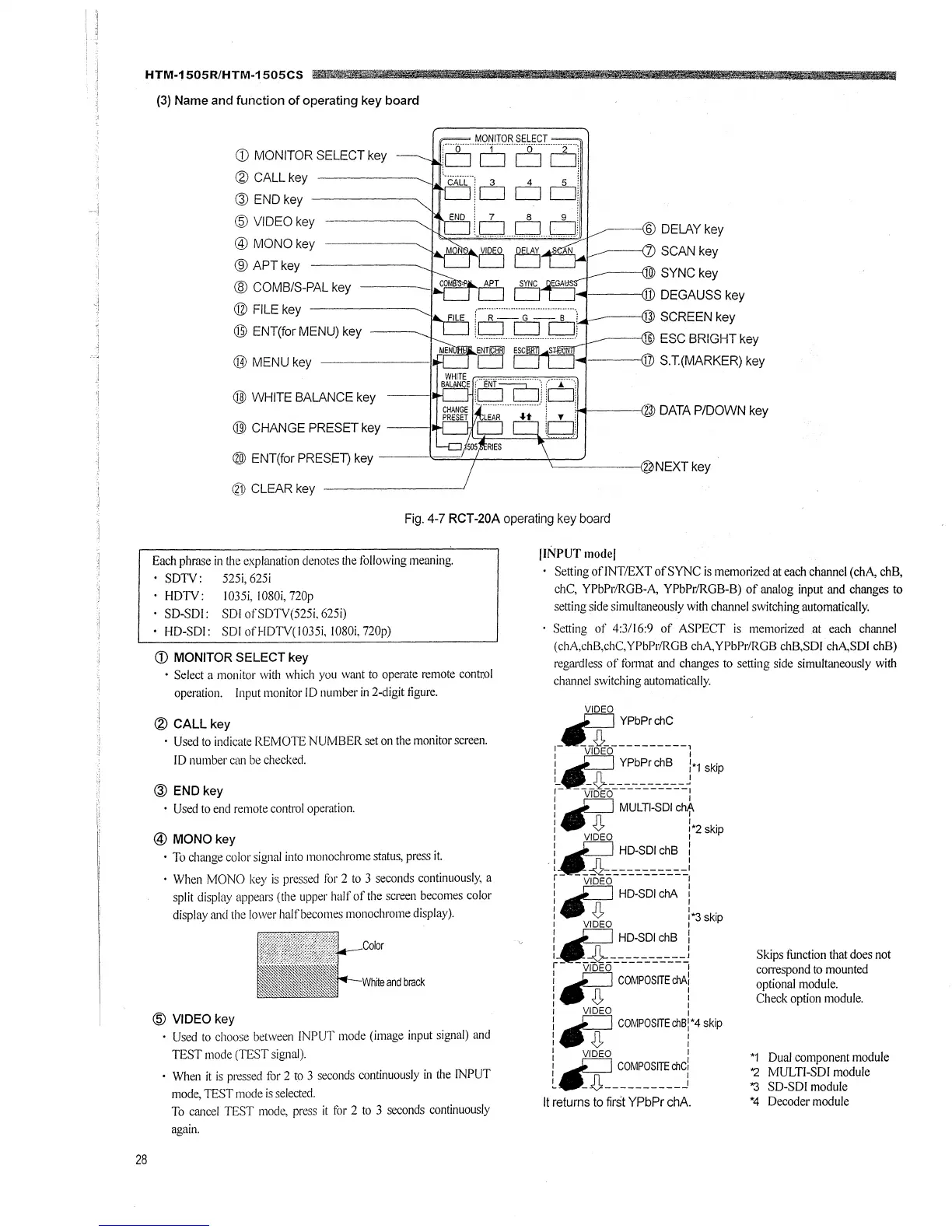
(3) Name and function of operating key board
i!iii! c_: ·u···
· iiifMl lfflh 1t _ !
28
MONITOR SELECT
CD MONITOR SELECT key [
11
i·
□
--25··0]
~
CALL key ·CALL·,
3
4
5
,
@ END key CJICJ CJ CJ:
'5"
VIDEO k
! 7 8 9 !
½V ey 10 CJ CJ
--@ DELAY key
SCAN key
: ::;::ey--------..... '""'"=1"'· ··········e5~
-------(
SYNC key
@ COMB/S-PAL key
@ FILE key
@ ENT(for MENU) key
@ MENU key
@ WHITE BALANCE key --
® CHANGE PRESET key --
11 DEGAUSS key
--------,13 SCREEN key
--------116 ESC BRIGHT key
F~=t,,1----@ S.T.(MARKER) key
------<2 DATA P/DOWN key
@) ENT(for PRESET) key ----==!..._+----l,---_)
-----<2 NEXT key
~l) CLEAR key
Fig. 4-7 RCT-20A operating key board
Each phrase in the explanation denotes the Jollowing meaning.
SDTV: 525i, 625i
HDTV: 1035i, l080i, 720p
SD-SDI: SDI ofSDTV(525i, 625i)
HD-SDI: SDI of HDTV( 1035i, IOS0i, 720p)
CD MONITOR SELECT key
· Select a monitor with which you want to operate remote control
operation. Input monitor ID number in 2-digit figure.
~
CALL key
• Used to indicate REMOTE NUMBER set on the monitor screen.
ID number can be checked.
@ END key
• Used to end remote control operation.
@ MONO key
• To change color signal into monochrome status, press it.
• When MONO key is pressed for 2 to 3 seconds continuously, a
split display appears (the upper half of the screen becomes color
display and the lower half becomes monochrome display).
Color
White and brack
@ VIDEO key
• Used to choose between INPUT mode (image input signal) and
TEST mode (TEST signal).
· When it is pressed for 2 to 3 seconds continuously in the INPUT
mode, TEST mode is selected.
To cancel TEST mode, press it for 2 to 3 seconds continuously
again.
!INPUT model
Setting of!NT/EXT of SYNC is memorized at each channel (chA, chB,
chC, YPbPr/RGB-A, YPbPr/RGB-B) of analog input and changes to
setting side simultaneously with channel switching automatically.
Setting of 4:3/16:9 of ASPECT is memorized at each channel
(chA,chB,chC,YPbPr/RGB chAYPbPr/RGB chB,SDl chA,SDl chB)
regardless of format and changes to setting side simultaneously with
channel switching automatically.
VIDEO
,_IIJ1~:~~:~~~--,
1
VIDEO
1
: .ti YPbPr chB h skip
I _ _ _________ I
r-
---◊-----------,
1
VIDEO I
:
~
MULTI-SDI cbf.
I-◊
I
: VIDEO :•z skip
:
~
HD-SDI chB :
I I
l ___________ I
r- __ _J1 __________ _
1
VIDEO :
:
~
HD-SDI chA :
I n I
1
◊
*3 k"
:~ !''P
~-·
v¾o-~~~~~~:~-~
r
~
COMPOSITE chA:
I n I
I V I
: VIDEO :
l
~
COMPOS/TEchB:*4skip
I n I
I
◊
I
: VIDEO I
i
~
COMPOSITE chC!
It returns to first YPbPr chA.
Skips function that does not
correspond to mounted
optional module.
Check option module.
*1 Dual component module
'2 MULTI-SDI module
"3 SD-SDI module
*4 Decoder module







 To Next Page