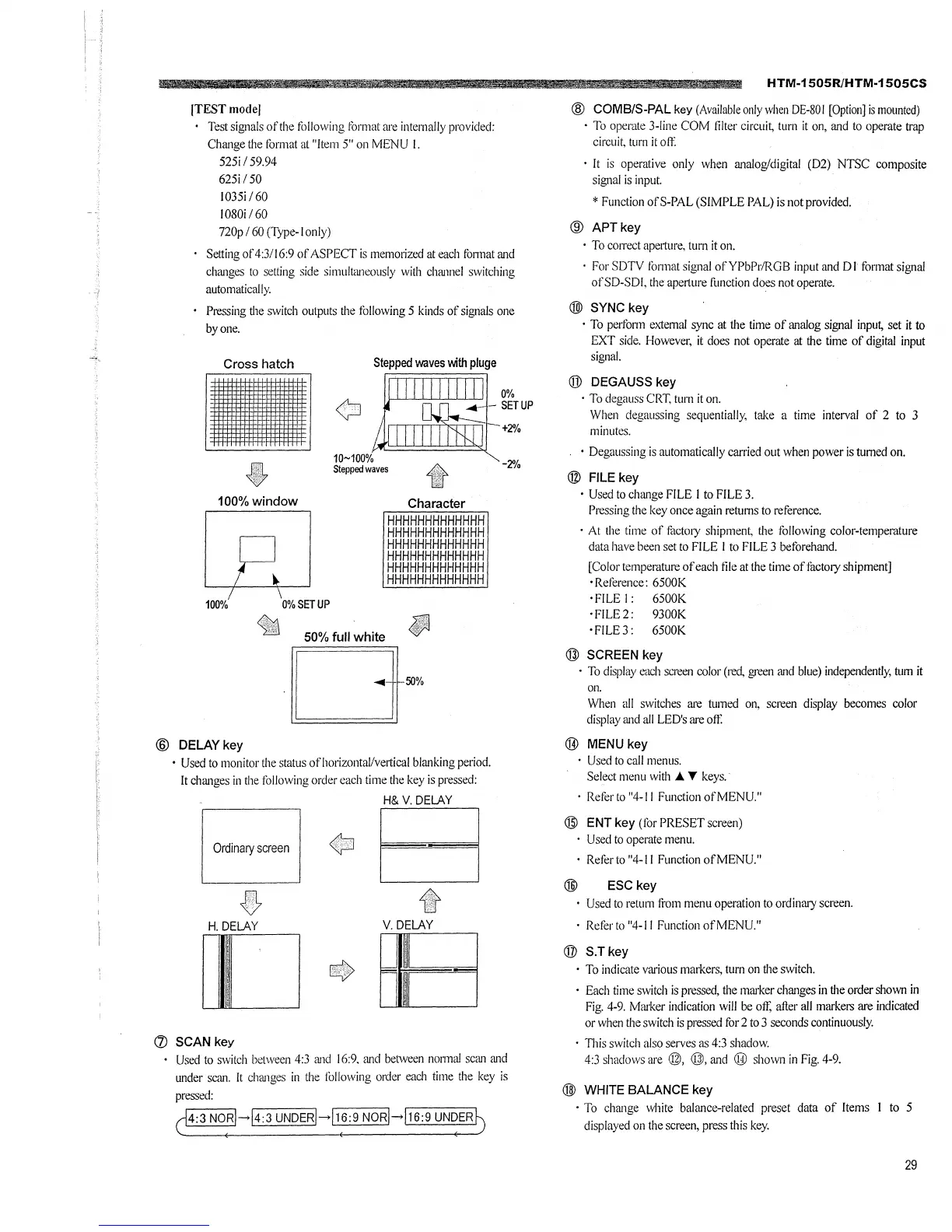
(TEST model
Test signals of the following format are internally provided:
Change the format at "Item 5" on MENU I.
525i I 59.94
625i/50
l035i 160
1080i 160
720p / 60 (Type-I only)
h.
Setting of4:3/l6:9 of ASPECT is memorized at each fom1at and
changes to setting side simultrnieously with chrnmel switching
automatically.
Pressing the switch outputs the following 5 kinds of signals one
by one.
Cross hatch
•
100%window
100% 0% SET UP
10~100%
Stepped waves
Character
HHHHHHHHHHHHH
HHHHHHHHHHHHH
HHHHHHHHHHHHH
HHHHHHHHHHHHH
HHHHHHHHHHHHH
HHHHHHHHHHHHH
50% full white
Oro¾
@ DELAYkey
0%
- SETUP
-2%
• Used to monitor the status ofhorizontal/ve1tical blrn1king period.
It chrn1ges in the following order each time the key is pressed:
H& V. DELAY
Ordinary screen
B
~
H.DELAY
V.DELAY
[]
(j) SCAN key
Used to switch between 4:3 rn1d 16:9. and between normal scan rn1d
under scan. It changes in the following order each time the key is
pressed:
0
4:3 NO·R'->'4:3 UNDER'->'1.6:9 NORl->116:9 UN~ER~
. .. li'!i!
HTM-1505R/HTM-1505CS
@ COMB/S-PAL key (Available only when DE-80 I [Option] is mounted)
· To operate 3-line COM filter circuit, turn it on, and to operate trap
circuit. turn it off
· It is operative only when analog/digital (D2) NTSC composite
signal is input.
* Function ofS-PAL (SIMPLE PAL) is not provided.
@ APTkey
· To correct ape1ture, turn it on.
· For SDTV format signal ofYPbPr/RGB input and DI format signal
of SD-SDI, the aperture fi.mction does not operate.
()]) SYNC key
· To perform e,.1emal sync at the time of analog signal input, set it to
EXT side. However, it does not operate at the time of digital input
signal.
@ DEGAUSS key
· To degauss CRT. turn it on.
When degaussing sequentially, take a time interval of 2 to 3
minutes.
• Degaussing is automatically carried out when power is turned on.
@ FILE key
• Used to change FILE I to FILE 3.
Pressing the key once again returns to reference.
· At the time of factory shipment, the following color-temperature
data have been set to FILE I to FILE 3 beforehand.
[Color temperature of each file at the time of factory shipment]
·Reference: 6500K
· FILE I : 6500K
· FILE 2: 9300K
· FILE 3: 6500K
@ SCREEN key
· To display each screen color (red, green and blue) independently, tum it
Oil.
When all switches are turned on, screen display becomes color
display rn1d all LED's are oft:
@ MENU key
• Used to call menus.
Select menu with A T keys.
· Referto"4-ll FunctionofMENU."
@ ENT key (for PRESET screen)
Used to operate menu.
Reforto "4-11 Function ofMENU."
@ ESCkey
Used to return from menu operation to ordinary screen.
· Refer to "4-11 Function of MENU."
@ S.Tkey
· To indicate various markers, turn on the switch.
• Each time switch is pressed, the mrn·ker changes in the order shown in
Fig. 4-9. Mm'ker indication will be off; after all markers are indicated
or when the switch is pressed for 2 to 3 seconds continuously.
· This switch also serves as 4:3 shadow.
4:3 shadows are @, @, and ® shown in Fig. 4-9.
@ WHITE BALANCE key
· To change white balance-related preset data of Items I to 5
displayed on the screen, press this key.
29







 To Next Page