20
Measure Differential Pressure (∆p)
1 Connect the measuring equipment according to page 15.
2 Navigate
to Quick Measure in the main menu and press enter.
3 Navigate
to Measure Dp and press enter.
4 After the calibration cycle is done the measurement begins and the
Differential Pressure (∆p) is displayed.
5 It is possible to save measured data, see item 18 (page 18) in the Measure
flow section.
6 End measurement by exiting the menu, press
and disconnect the
measuring points according to page 15.
Measure Temperature
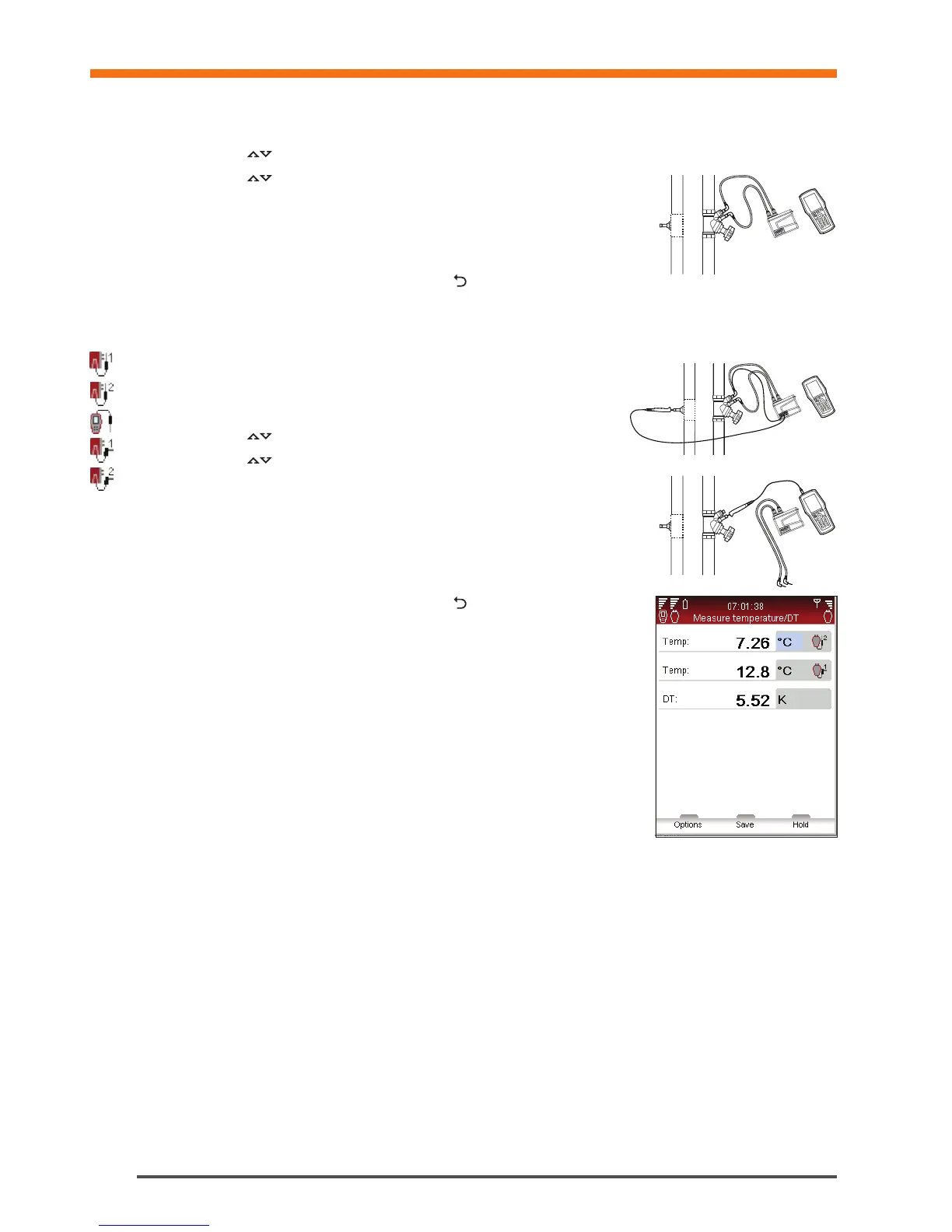
TA-SCOPE enables three ways to connect the temperature sensors. The
Dp Sensor has two connections and Handheld one. The icons to the left
indicates for each row on the display which sensor the data comes from.
1 Connect the required temperature sensors.
2 Navigate
to Quick Measure in the main menu and press enter.
3 Navigate
to Measure Temperature and press enter.
4 The temperature sensor(s) begins to measure directly.
5 If two sensors are measuring, the temperature difference – DT (∆T) is
displayed. DT (∆T) can optionally be set as hidden. Press function key
Options.
6 Possible to save measuring data, see item 18 (page 18) in the Measure
Flow section.
7 End measurement by exiting the menu, press
and disconnect the
temperature sensors from the test points.
Quick Measure


 To Next Page