69
INSTALLER
USERMAINTENANCE TECHNICIAN
TECHNICAL DATA
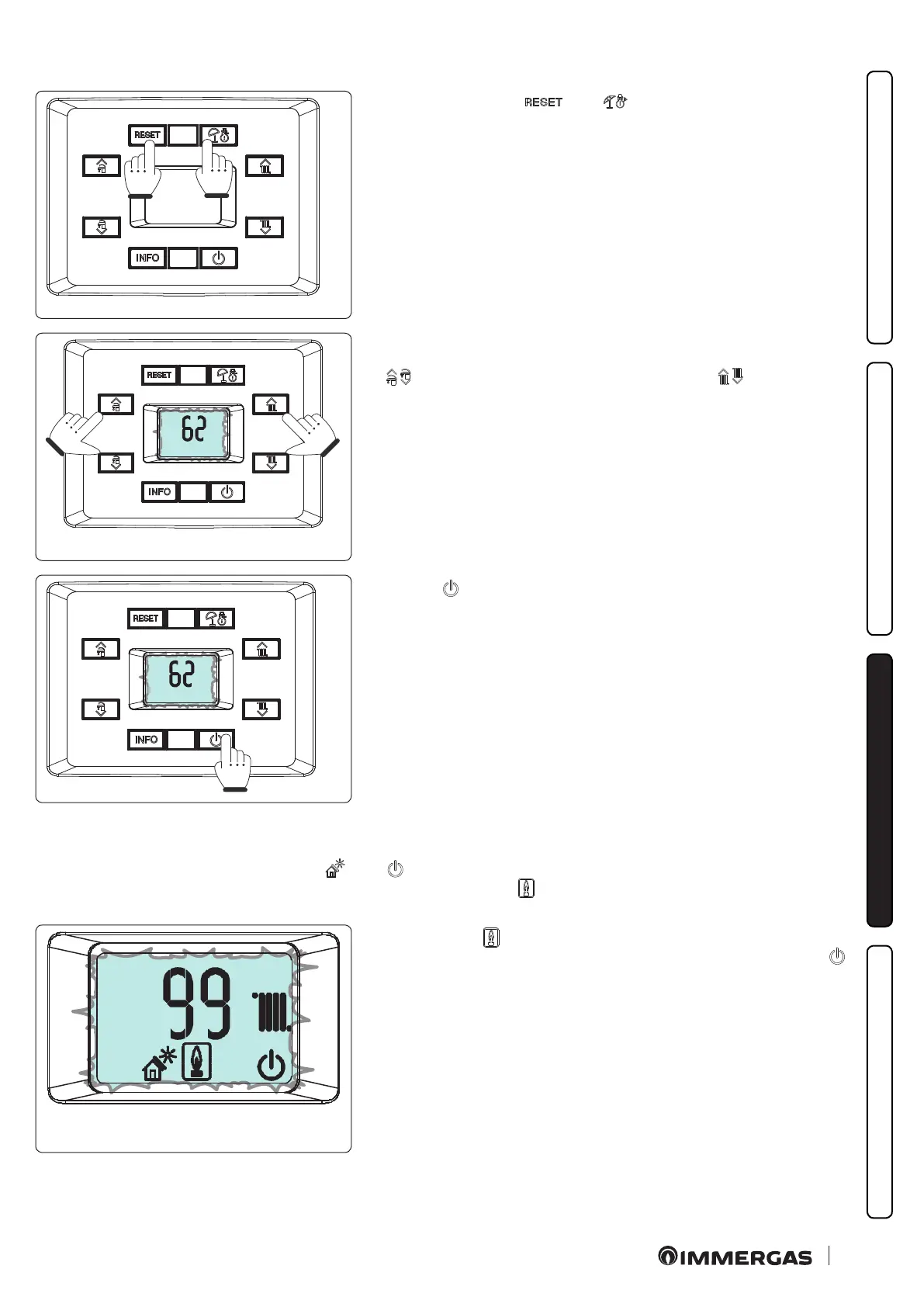
Complete calibration activation.
42
Press and hold buttons “
” and “ ” for more than 5 seconds.
43
e display will show two dashes “--” ashing. Now enter the password “62” to
activate the complete calibration (enter the rst digit by pressing the 1-2 buttons
(
) and the second digit by pressing the buttons 5-6 ( ).
44
Press the “
” key to activate calibration.
Once activated, the complete calibration function has four phases:
Nominal heat
output: with the function active, the boiler carries out the procedures required to calibrate the appliance at the nominal heat output.
At this stage the display features ashing icons: “
” and “ ” and the operating temperature alternated with the current operating heat
output (99%) is displayed; once the parameters are detected and stabilised, the “ ” symbol will start ashing (this may take a few min-
utes), meaning that the nominal heat output settings have been set.
45
Only aer the “
” symbol ashes is it possible to change the CO
2
value
(Par. 3.10) or switch to the next heat output parameter by pressing the “ ”
button.






 To Next Page