76
INSTALLER
USERMAINTENANCE TECHNICIAN
TECHNICAL DATA
58
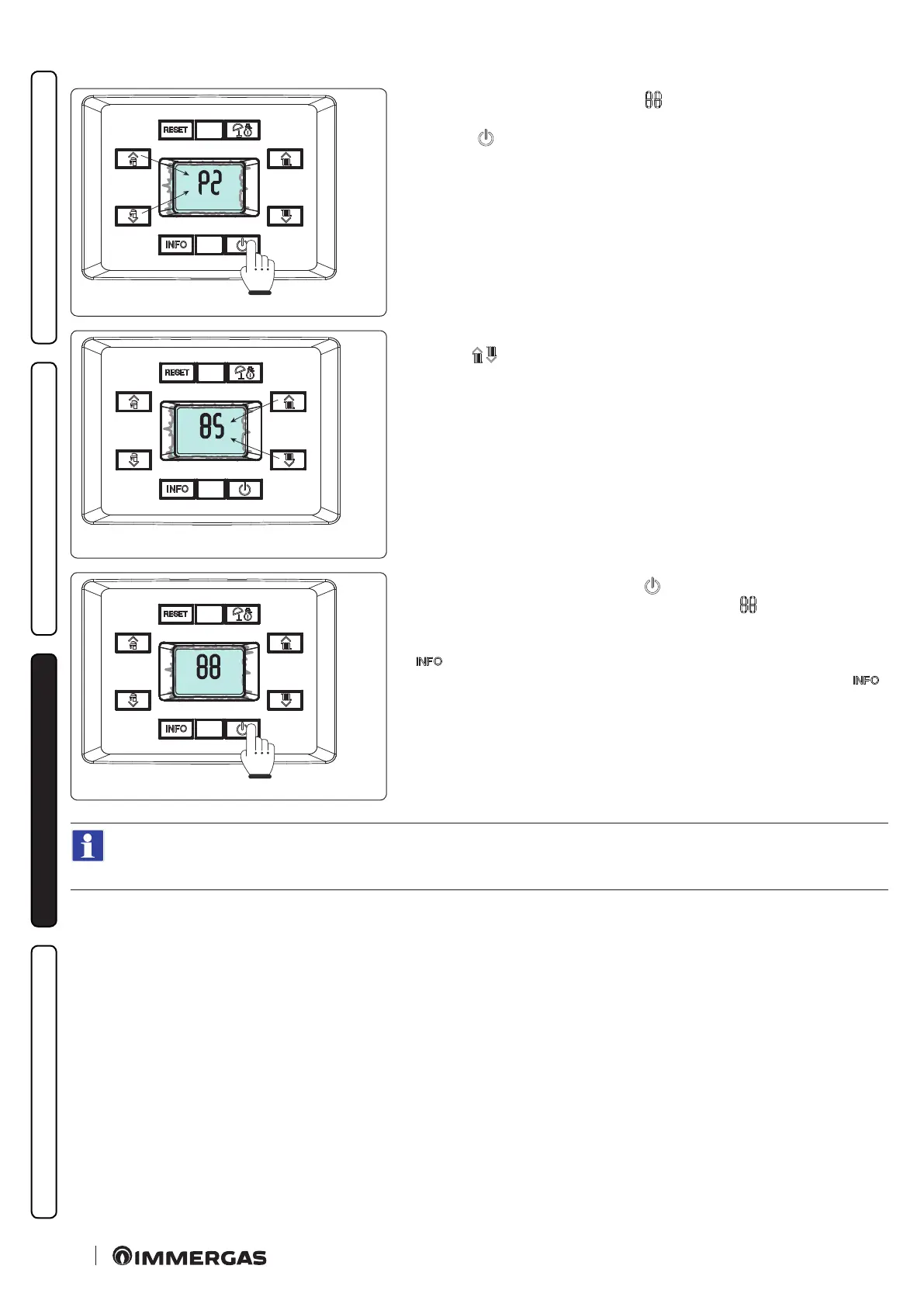
e rst digit of the central indicator (
) shows the family of the parameter.
e second digit shows the parameter number.
Press the “
” button to display the value of the selected parameter.
59
Its value can be adjusted by using the central heating temperature adjustment
buttons “
”.
60
Press the mode of operation button “
” for more than 1 second to store the
parameter value; conrmation is given by the word “ ” which appears for 2
seconds.
If you want to exit a parameter without changing its value, press the button “
”.
Exit the programming mode by waiting 15 minutes or by pressing the “ ”
button until you return to the desired display.
If necessary the default values relating to parameters “S” and “P0 ÷ P2” can be altered by temporarily modifying the type of gas
(parameter “G”) and by restoring it according to the actual operating conditions (wait for approximately 10 seconds between
the gas change and the when it is restored).
e restored values will be those relating to the type of boiler set in parameters “n” and “F”.
At the end of this operation, anomaly “E62” will appear and complete calibration will be required.
Menus “G” - “S” - “n”.
ese menus are reserved for air-gas control settings.
Every time these parameters are altered, the complete calibration function must be activated (Par. 3.9).






 To Next Page