13
English
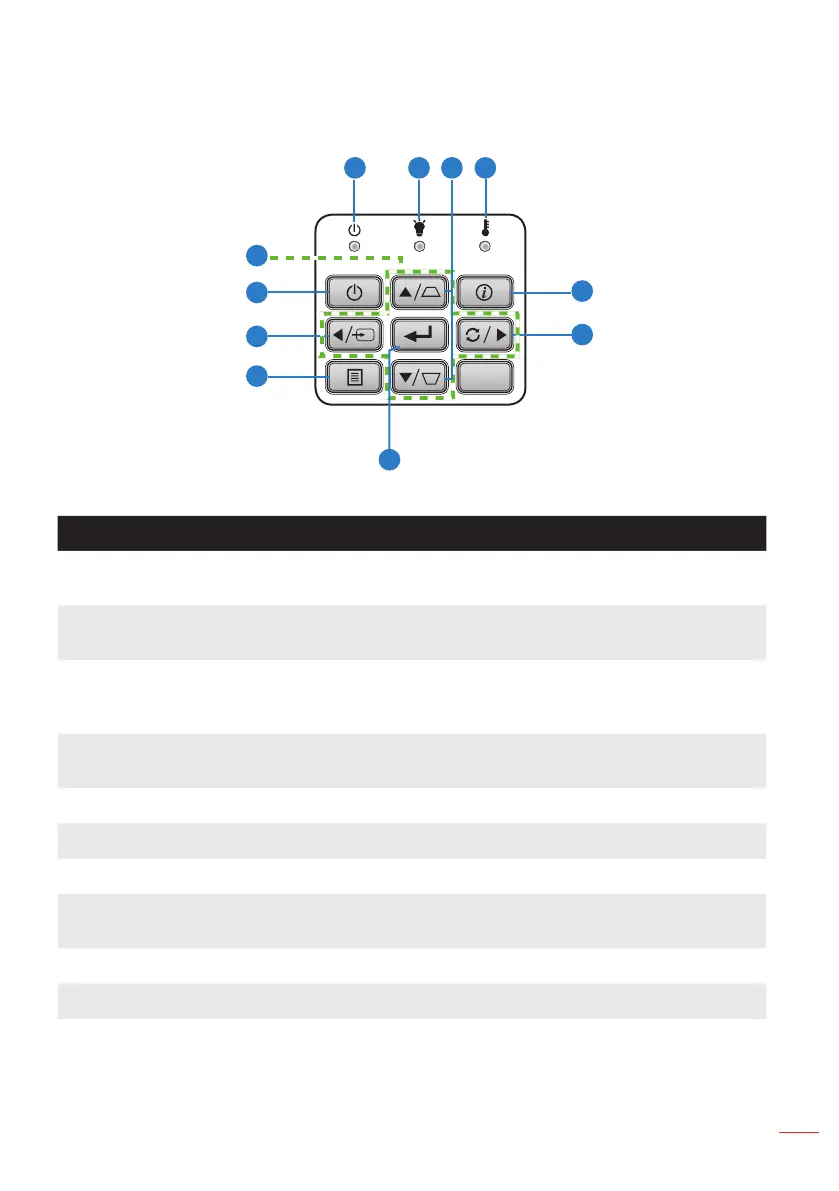
Control Panel
# Name Description
1 Power LED Indicates the projector’s power status. Please refer to “Status Indicators”
for more information on Power LED behavior.
2 Illumination LED Indicates the projector’s LED status. Please refer to “Status Indicators” for
more information on Illumination LED behavior.
3 Keystone
Correction
Adjusts the image to compensate for distortion caused by tilting the
projector (vertical/horizontal ± 40 degrees). Auto Keystone correction is
on by default.
4 Temp LED Indicates the projector’s temperature status. Please refer to “Status
Indicators” for more information on Temp LED behavior.
5 Information Displays the projector information.
6 Re-Sync Automatically synchronizes the projector to the input source.
7 Enter Press to confirm the selection item.
8 Menu Press to activate the On-Screen Display (OSD) Menu. Use the directional
keys and the Menu button to navigate through the OSD.
9 Source Press to select the desired input source.
10 Power Turns the projector on or off.
11 Four Directional
Select Keys
Press to navigate through the OSD Menu items.
5
6
1 2 4
7
8
9
10
11
3



 To Next Page