37
English
How to set-up File Type for Multi-Media with USB
Note:
1. A USB ash disk must be plugged into the projector if you want to use the multimedia USB
function.
2. Please do not connect a camera to USB port in order to avoid compatibility issues.
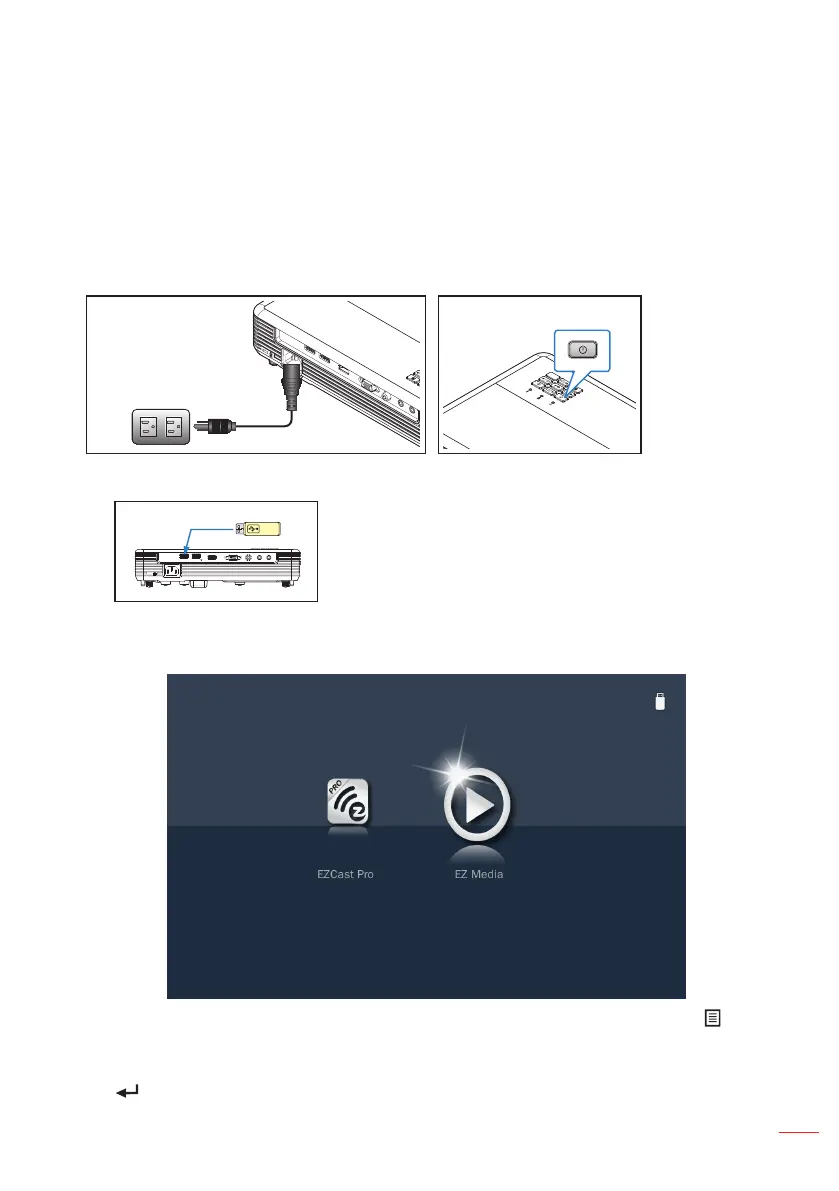
Follow these steps to playback the Photo, Video, Music, or Office files on your projector:
1. Connect the power cord to the projector and turn on the projector by pressing the
Power button.
2. Plug a USB drive into USB-1.
USB 1
READER/DISPLAY
USB 2
WIRELESS DONGLE
HDMI
VGA-IN/YPbPr
VIDEO
AUDIO IN AUDIO OUT
Select the Media source using the remote control or control panel on the projector.
The Multi-Media menu opens.
Note: To open the projector Main Menu, hold the Menu button on the remote control or the
button on the control panel for longer than 1 second.
3. Select the EZ Media icon, and then press the Enter button on the remote control or
the button on the control panel.



 To Next Page