Installation and programming manual
Installation instructions 35
6.12 Thermal Probe
Attention: In order to validate the IMQ-SECURITY SYSTEMS certification and comply with EN 54-4
requirements, installation of a thermal probe is essential.
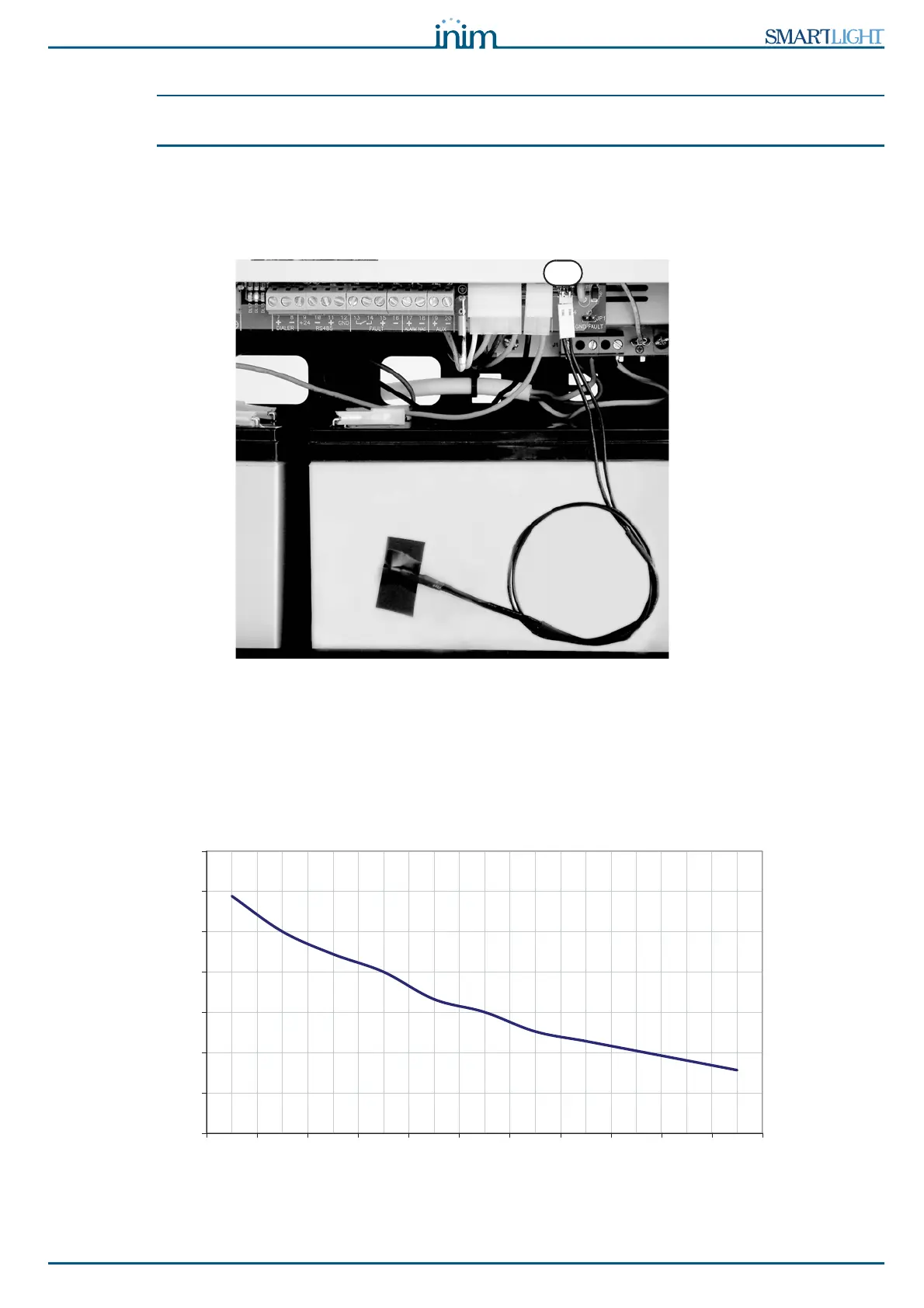
The battery has an on-board connector for a Thermal probe (accessory item). This device will regulate the
charging process in accordance with the battery temperature. The thermal probe protects against battery
overheating and consequent permanent damage.
6.12.1 Connecting a thermal probe
Figure 23 - Connecting a thermal probe
1. Disconnect the batteries (if already connected).
2. Connect the thermal probe to the connector (paragraph 4.1 - [N]).
3. Using adhesive-insulating tape, attach the thermal probe to one of the batteries, in order to provide
optimized heat-transfer measurements.
4. Hold a thermometer against the probe, and measure the probe temperature.
5. Using the following graph, find the value the measurement will be based on.
Figure 24 - Voltage charge in relation to the Battery Temperature.
6. Using a tester, measure the voltage on the AUX [A] (paragraph 4.1 - [J]) and turn the trimmer [B] to
the previously measured value.
25,5
26
26,5
27
27,5
28
28,5
29
0 5 10 15 20 25 30 35 40 45 50
°C
Volt



 To Next Page