User’s Manual Innomar SES Parametric Sub-bottom Profilers 143
Innomar Technologie GmbH (2020-09) 143
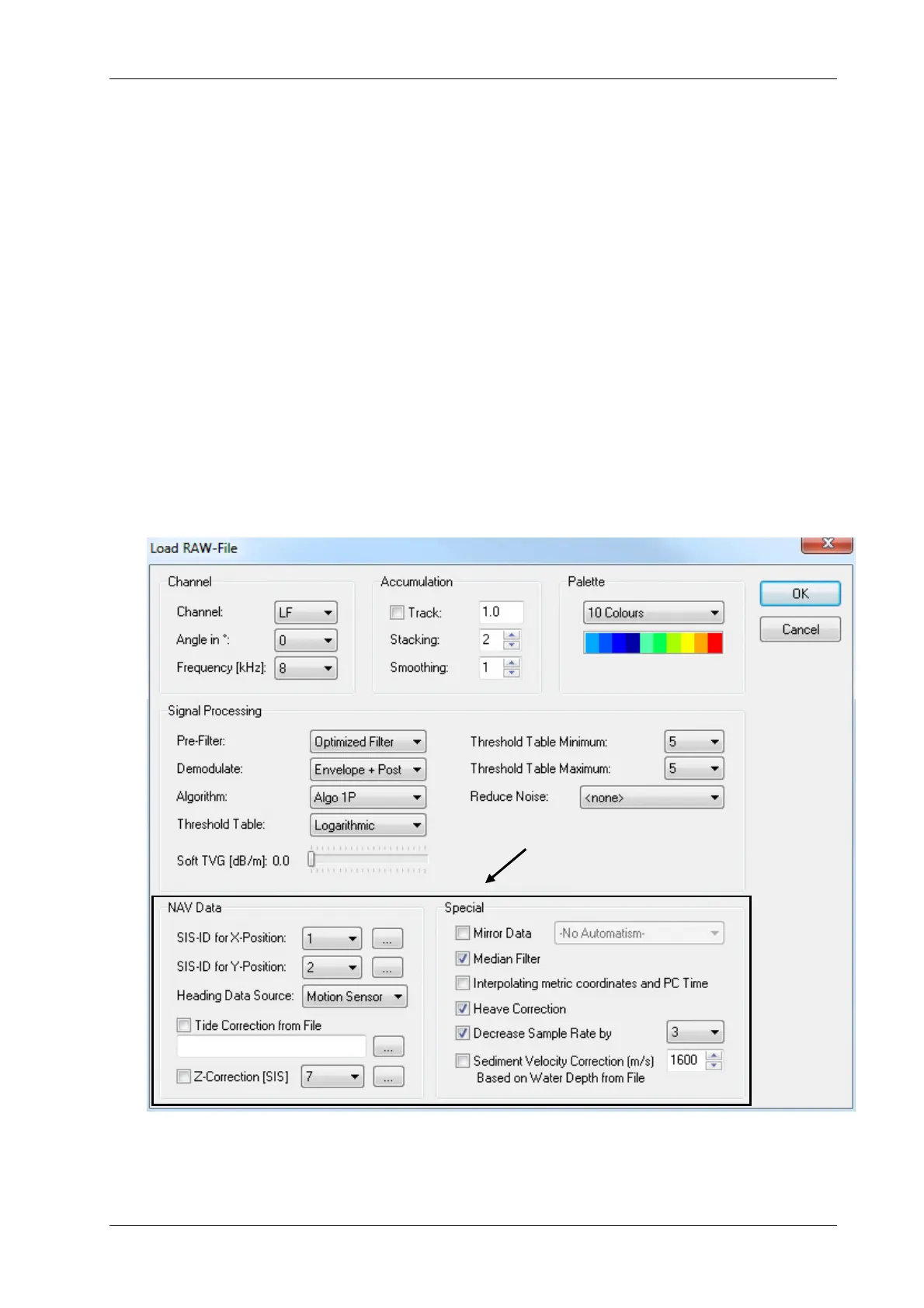
Stacking: 2. The higher the stacking the better the signal to noise ratio due to averaging of
pings, the stacking value determines the lateral shrinking of the echo plot, i.e. 2 means half
of the original traces are shown on the echo plot.
PreFilter: Optimized Filter, Demodulate: Envelope plus PostFilter, Algorithm: 1P. These
three functions will process the full wave form signal and create an envelope picture with
reduced noise, the filter settings are automatically optimized to the system transmit pulse
settings (frequency, pulse length) applied during data acquisition.
Threshold Table Minimum: 5. The higher the threshold value the less noise is shown in the
echo plot, the threshold table is logarithmic, choose a setting where some noise is still visi-
ble in the echo plot in order to keep weak reflectors visible.
Threshold Table Maximum: 5. Choose high values for data with high dynamic and low val-
ues for data with low dynamic, however, typical values are between 2 and 5.
SIS-ID for X-Position and Y-Position: Here you choose the SIS-IDs where the SESWIN
software has recorded the coordinates, several ISE functions, such as distance markers,
require metric coordinates, the small buttons with the three dots will give a preview of the
SIS-IDs stored within the data file. This is not needed for QA, so we can keep the defaults.
This and the next two settings are not available in “file view mode”.
Median Filter: on. This filter provides a noise reduction, particularly for noise spikes.
Decrease Sample Rate: 3. The higher the sample rate reduction, the higher the vertical
shrinkage of the echo plot.
ISE Load RAW File dialogue with recommended settings for QA. The lower part of this dialogue (black rectan-
gle) is not available if ISE is operated without dongle (in “file view mode”). “Heave Correction” is switched on by
default.
Not visible if ISE is running in
“file view mode” (without dongle)



 To Next Page