User’s Manual Innomar SES Parametric Sub-bottom Profilers 71
Innomar Technologie GmbH (2020-09) 71
Draw Marker on Cross Lines: If set, vertical markers will be plotted on the crossings with the
specified lines. Load a list with position information of specified lines that may cross the actual
survey profiles. At any position, where these lines are crossed, a marker will be drawn into the
echo plot together with the Cross-Line Name from the table.
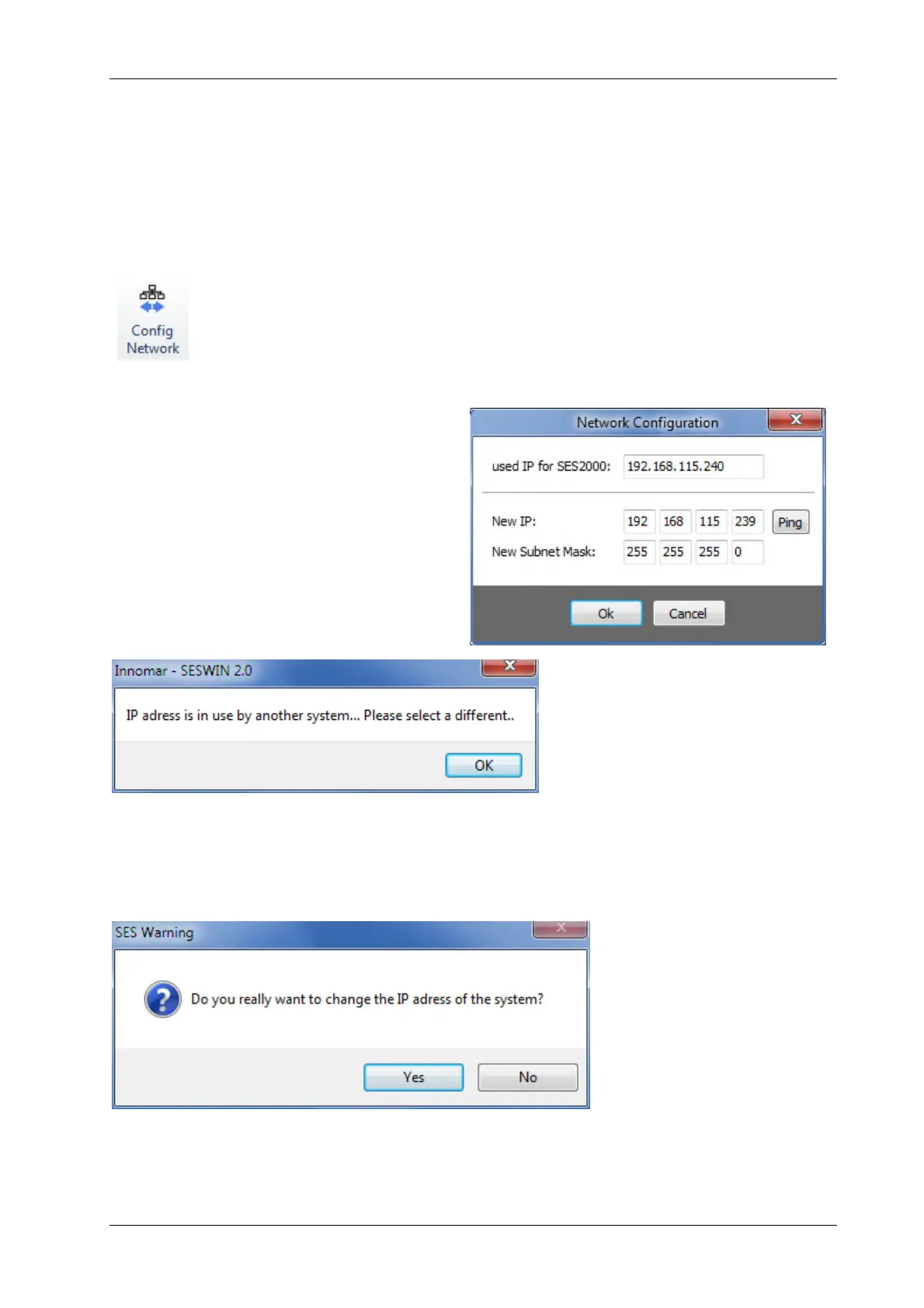
4.11.17 System Setup – Settings – Config Network
The computer running SESWIN is connected to the INNOMAR “smart” or “com-
pact” topside unit via Ethernet. For these models the “Config Network” section
is used to change the IP address of the topside unit if necessary.
For the other models this section is used to change the IP address of the inter-
nal micro-controller for UDP motion data, if required (see section 4.11.13 on
page 64).
The actual IP address used by the topside
unit is displayed for reference.
You can check if the new address is already
in use by the “Ping” button. (On Windows
7/8/10 this “ping” needs to run the SESWIN
application with administrator privileges!)
In case the system gets an answer on the net-
work ping, a message is shown that the cho-
sen address is already used (see below).
Before the address is changed on the topside unit, there is a warning message displayed. Please
note the new address on the topside unit, you need to know it for future connections to
the kit.



 To Next Page