User’s Manual Innomar SES Parametric Sub-bottom Profilers 47
Innomar Technologie GmbH (2020-09) 47
4.10 SESWIN View Menu Bar
This menu bar collects all parameters and settings that control the online data display.
All settings made in this menu will not affect the recorded data.
4.10.1 View – Sub-Bottom Processing
This is used to set the online SBP data pro-
cessing. These settings are used for the
online echo plot only and will not affect the
recorded data.
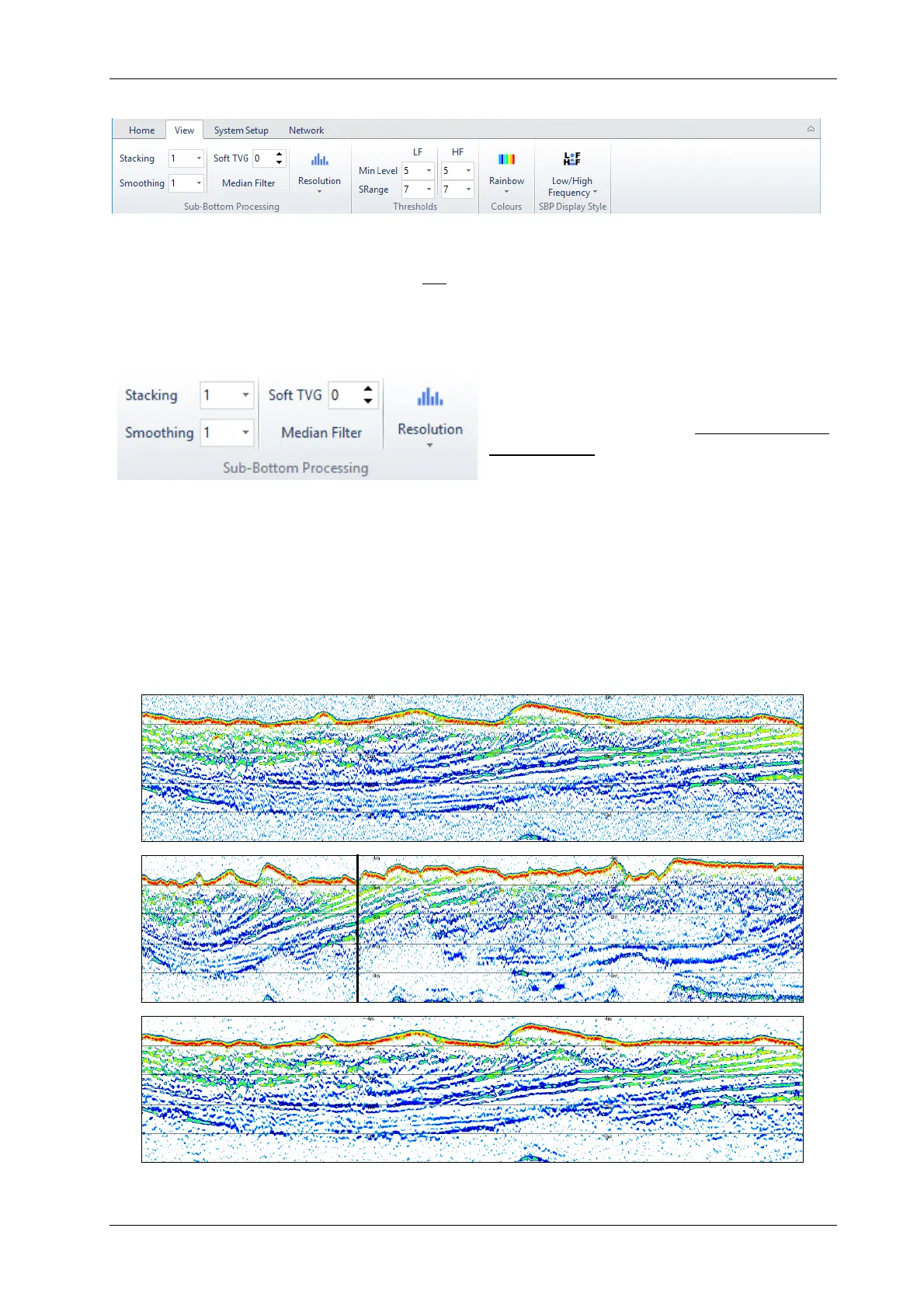
Stacking / Smoothing are used to improve the signal to noise ratio (range 1-16, increment 1).
A good starting point would be a rate of 2 to 3.
With “Stacking” set to > 1 an average of pings is ploted and then a new average block
starts. This will reduce the ping update rate on screen. This effect is shown in the picture below
(b), the black vertical line indicates the data part seen in (a).
With “Smoothing” set to > 1 also an average of pings is ploted, but this is a moving aver-
age. Thus, the ping update rate on screen is not changing, but high “Smoothing” values may
have a blurring effect on the data seen on screen.
(a)
(b)
(c)
Echo print (a) without stacking/smoothing, (b) stacking by factor three and (c) smoothing by factor three
(all other processing parameters are kept the same)



 To Next Page