46 User’s Manual Innomar SES Parametric Sub-bottom Profilers
46 Innomar Technologie GmbH (2020-09)
4.9.7 Home – Depth
The online calculated water depth (bottom track) from both SBP
data channels (HF and LF) is displayed in right-hand part of the
Home menu.
The bottom is tracked on all data channels automatically. Water
depth calculation is based on the transducer draught and sound ve-
locity (see “System Setup – General – System”).
Depth
Ruler
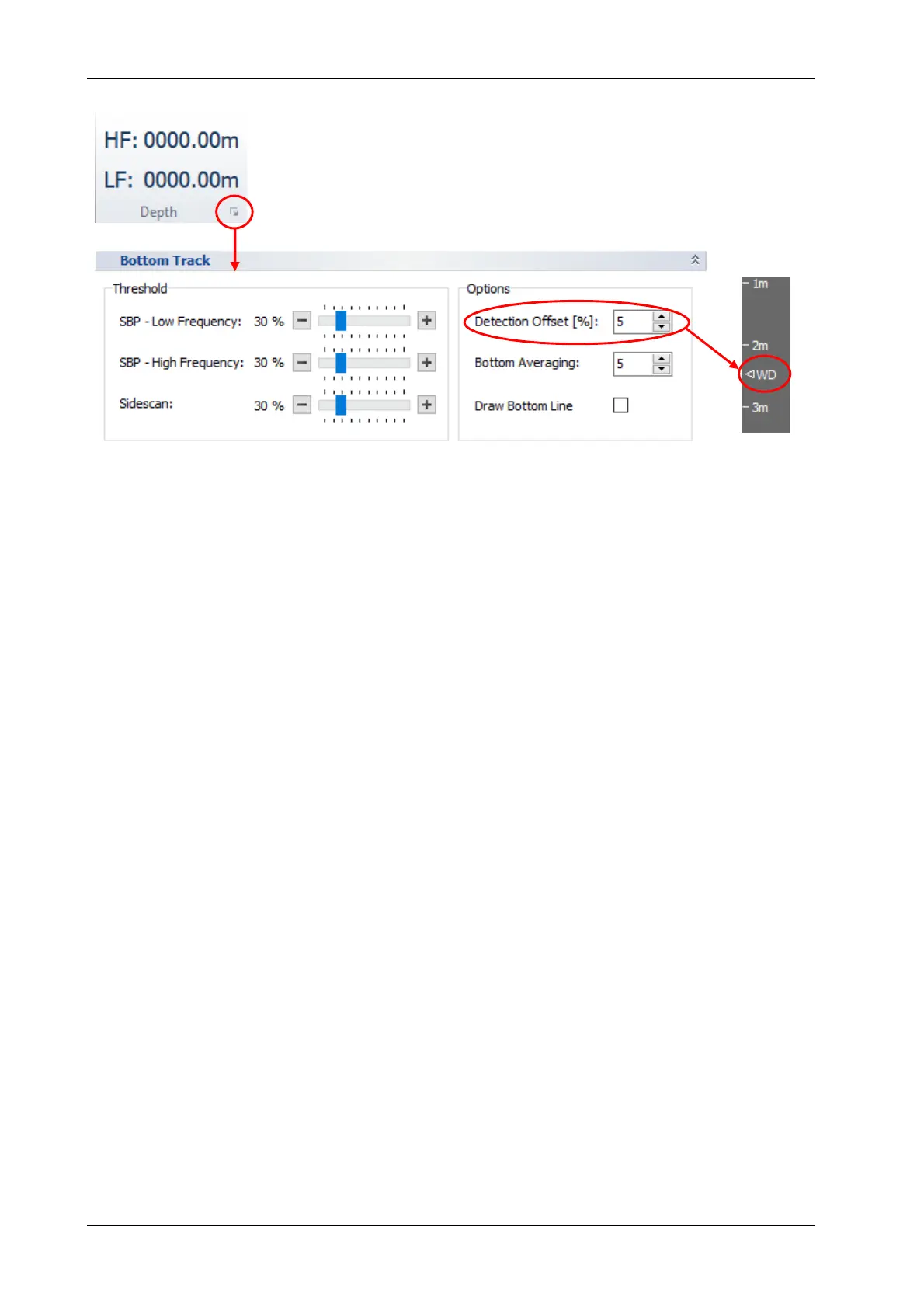
The bottom track can be adjusted using the “Bottom Track” dialog shown above:
Threshold: Use the sliders to set a threshold for the bottom track on the different data
channels. In most cases the default value (40%) gives good results, but at difficult condi-
tions like extensive marine growth this might be increased to detect the true seabed.
Detection Offset: If there is much noise or reverberation above the seabed’s return (e.g.
in very shallow water), one can blank this area for bottom track by setting a start offset. If
an offset is applied this is indicated in the depth ruler as shown above. It is the operator's
responsibility to ensure that the offset is always above the true bottom line!
Bottom Averaging: Bottom track values of the given number of consecutive pings are
averaged (default 5).
Draw Bottom Line: If this check box is activated, the tracked bottom line is shown in the
echo plots.



 To Next Page