5G INDOOR ROUTER FG2000e USER GUIDE 22
Managing Cellular Data Usage
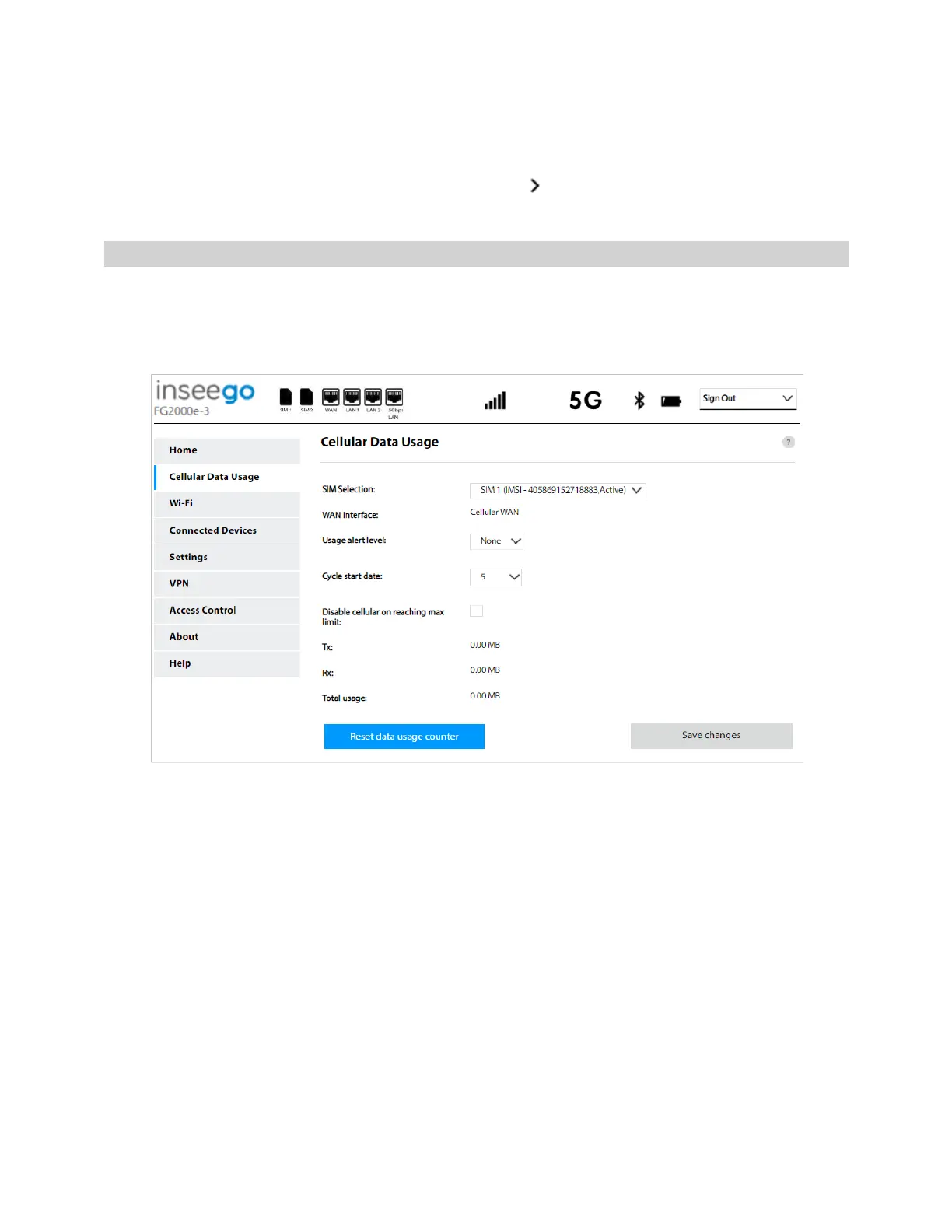
You can monitor and manage cellular data usage on your 5G Indoor Router using the Cellular Data
Usage page. To manage or view cellular data usage, select from any Home page panel and then
select Cellular Data Usage from the side menu. The Cellular Data Usage page appears.
Cellular Data Usage Page
Use the Cellular Data Usage page to view details and manage your FG2000e data usage.
NOTE: Your FG2000e provides only a rough estimate of data usage. Always check with your service
provider for exact usage.
SIM Selection: Use the drop-down to change the SIM on which cellular data usage is displayed.
WAN interface: The name of the WAN interface.
Usage alert level: Specify an alerting threshold for data usage (from 20 MB to 20 GB, or None).
Cycle start date: Specify the start day of the month for your data counter cycle. NOTE: You can set
this to correspond to the start day of your billing cycle.
Disable cellular on reaching max limit: Enter a data limit.
Tx: The amount of data transmitted during the current cycle.
Rx: The amount of data received during the current cycle.
Total usage: An estimation of the amount of data used during the current cycle.
Use the Reset data usage counter button to restart the data usage shown on this page to zero.
Select Save changes.



 To Next Page