5G INDOOR ROUTER FG2000e USER GUIDE 13
Connecting Devices with Ethernet
You can connect wired devices such as laptops, printers, and gaming consoles via Ethernet.
To connect Ethernet devices:
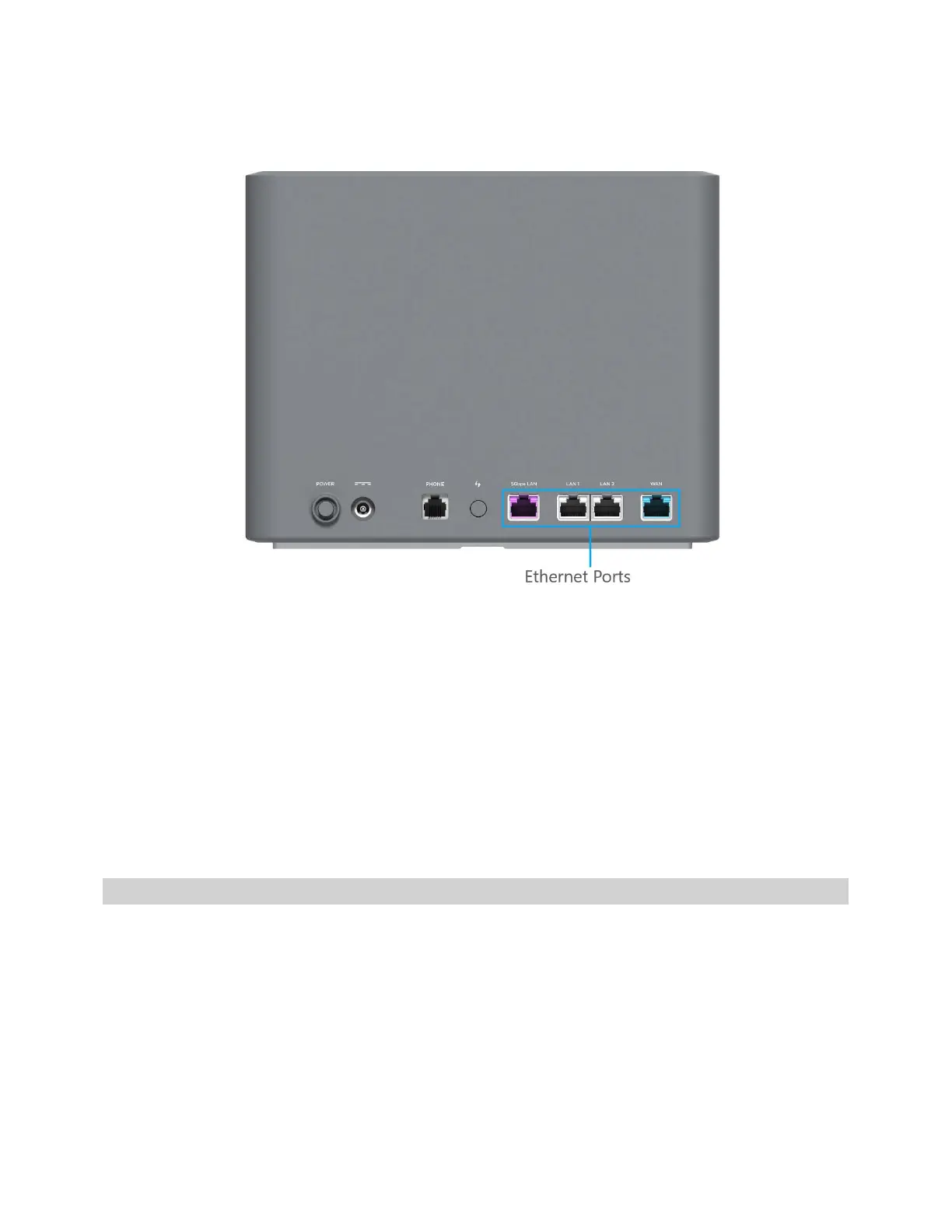
1. Plug one end of an Ethernet cable into one of the Ethernet ports on the router.
NOTE: To connect wired devices for Internet connection, use the LAN1, LAN2, or 5Gbps LAN
ports (5Gbps LAN provides Internet throughput to up to 5Gbps, depending on the maximum
throughput of the device you are connecting to). To connect to a fiber router or modem, use the
WAN port and connect to the LAN port of the router/modem.
2. Plug the other end of the cable into the Ethernet port of the device you wish to connect.
Devices plugged into the FG2000e via Ethernet have instant access to the Internet.
Monitoring and Managing your 5G Indoor Router
You can use multiple options to monitor and manage your 5G Indoor Router.
Inseego Mobile App
You can use the same mobile app you used to find a location for your FG2000e to perform basic device
monitoring and management.



 To Next Page