5G INDOOR ROUTER FG2000e USER GUIDE 81
Port Configuration Tab
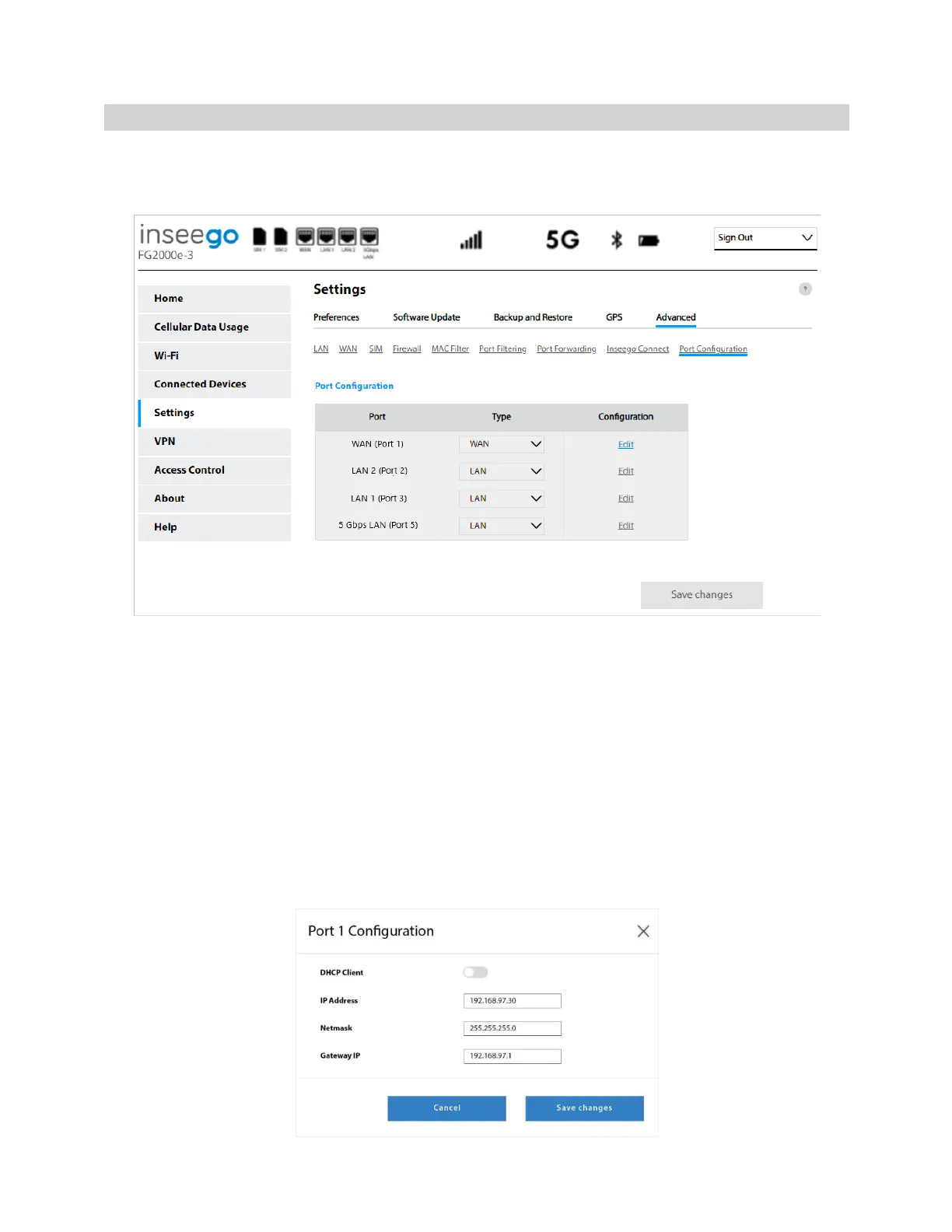
Use this page to configure the ports on your FG2000e. You can set a port to WAN or LAN and
configure WAN ports.
NOTE: When IP Passthrough is turned on, all interfaces are disabled except for the specified LAN port.
Settings on this page are not available. Go to Advanced > LAN > IPPT to turn IP Passthrough off.
Port Configuration
Port: Lists each Ethernet port on your FG2000e.
Type: Use the drop-down to select WAN or LAN. NOTE: Although Ethernet ports are labeled as WAN
or LAN on the device, you can configure any of them to be either WAN or LAN using this setting.
Configuration: Click Edit to configure ports that have been set as WAN. The Port Configuration dialog
box appears.



 To Next Page